

Project Overview
Arduino Nano + HC-SR501 PIR animated skull: An Arduino Nano reads an HC-SR501 PIR motion sensor to trigger a servo-driven jaw, red LED eyes, and a KY-006 buzzer for an automatic Halloween scare.
The PIR senses someone approaching the front door. A servo cranks the jaw open and shut. Red LEDs light up the eye sockets, and a buzzer plays an eerie tone.
- Time: ~2 hours
- Skill level: Beginner / Intermediate
- What you will build: A motion-triggered animated skull with moving jaw, glowing eyes, and audio.

Parts List
From ShillehTek
- HC-SR501 PIR Motion Sensor - detects motion to trigger the scare sequence
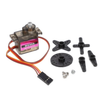
- MG90S Servo (jaw movement) - opens and closes the skull jaw
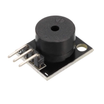
- KY-006 Buzzer (audio) - generates the spooky tone
- Arduino Nano V3.0 - runs the sketch and controls the IO pins
- Dupont Jumper Wires - makes quick connections for prototyping
External
- Plastic skull (Halloween store, or 3D-printed)
- 2 red LEDs (eye sockets)
- 2× 220Ω resistors
- 9V battery or USB power bank
Note: The Arduino Nano, HC-SR501 PIR, and MG90S servo are typically used on 5V logic and power. Make sure all grounds are common between the sensor, servo, LEDs, buzzer, and Arduino.
Step-by-Step Guide
Step 1 - Modify the Skull
Goal: Create a jaw that can be moved by the servo.
What to do: Cut the lower jaw free, hinge it back on, and attach a string (or linkage) from the jaw to the servo arm so the servo can pull the jaw open and let it return.

Expected result: The jaw can open and close smoothly when pulled by the linkage.
Step 2 - Add the LED Eyes
Goal: Install red LED eyes that the Arduino can control.
What to do: Glue two red LEDs behind the eye sockets. Wire each LED in series with a 220Ω resistor so the Arduino pins can drive them safely.

Expected result: The LEDs sit securely behind the eyes and are ready to connect to the Arduino.
Step 3 - Wire the Whole Thing
Goal: Connect the PIR sensor, servo, LEDs, and buzzer to the Arduino Nano.
What to do: Wire the modules and parts to these pins: PIR to D2 (trigger), servo to D9, LEDs to D5 and D6 (PWM for flicker), and buzzer to D8. Make sure all components share a common ground.

Expected result: All modules are connected to the correct pins and powered, with a shared ground.
Step 4 - Upload the Arduino Sketch
Goal: Program the Arduino Nano to trigger the jaw, lights, and sound when motion is detected.
What to do: Paste the sketch below into the Arduino IDE and upload it to your Arduino Nano.
Code:
#include <Servo.h>
const int PIR = 2, BUZZ = 8;
const int LED_L = 5, LED_R = 6;
Servo jaw;
void setup() {
  pinMode(PIR, INPUT);
  pinMode(BUZZ, OUTPUT);
  pinMode(LED_L, OUTPUT); pinMode(LED_R, OUTPUT);
  jaw.attach(9); jaw.write(0);
}
void scare() {
  for (int i = 0; i < 8; i++) {
    jaw.write(40); analogWrite(LED_L, 255); analogWrite(LED_R, 255);
    tone(BUZZ, 300 + random(200));
    delay(100);
    jaw.write(0);  analogWrite(LED_L, 60); analogWrite(LED_R, 60);
    delay(80);
  }
  noTone(BUZZ);
}
void loop() {
  if (digitalRead(PIR) == HIGH) {
    scare();
    delay(5000);   // 5s cooldown
  }
}
Expected result: When the PIR output goes HIGH, the jaw moves, the LEDs brighten and dim, and the buzzer plays tones, then the system waits 5 seconds before triggering again.
Step 5 - Place It
Goal: Position the skull so it detects approaching visitors reliably.
What to do: Mount the skull near the front door at face height, with the PIR sensor pointing toward the walkway.

Expected result: The skull triggers when someone approaches and resets after each activation.
Step 6 - Where to Take It Next
Goal: Plan optional enhancements after the base build works.
What to do: If you want to expand the project, consider these ideas:
- Audio sample playback (DFPlayer + amplified speaker) for real cackling laughter
- Multiple skulls in a row - different scares at different distances
- Wi-Fi alerts to your phone every time something triggers it
- Eye tracking - servo-mounted eyes that follow the approaching visitor
Expected result: You have a clear list of next upgrades once your motion-triggered skull is working.
Conclusion
You built an Arduino Nano Halloween skull that uses an HC-SR501 PIR motion sensor to trigger a servo jaw, LED eyes, and a KY-006 buzzer. Once placed by your entryway, it reacts automatically when someone walks up.
Want the exact parts used in this build? Grab them from ShillehTek.com. If you want help customizing this project or building something for your product, check out our IoT consulting services.
Credit: Project reference adapted from Instructables.





.png?v=25000753014097803521791168436)

.png?v=68677308723310773341791168436)


