

Project Overview
Arduino + 4x4 Membrane Matrix Keypad: In this build, you will wire a 4x4 membrane matrix keypad to an Arduino (UNO or Nano) and use the Keypad library to read clean key-press events, print them to the Serial Monitor, and finish with a simple 4-digit passcode check.
A 4x4 keypad gives you 16 momentary keys in a thin membrane package, perfect for passcode locks, calculators, kiosk menus, and access-control panels. Internally it is a row/column matrix wired to 8 pins, and the Arduino Keypad library handles the row-scanning loop so your sketch just receives key-press events.
- Time: About 15 minutes
- Skill level: Beginner
- What you will build: An Arduino streaming every key press to the Serial Monitor, then a small passcode-check example.

Parts List
From ShillehTek
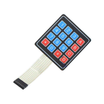
- 4x4 Membrane Matrix Keypad (16-Key) - the input device you will scan as a row/column matrix.
- Arduino Nano V3.0 Pre-Soldered CH340G ATmega328P - runs the sketch and reads the keypad presses.
- 120 PCS 20 cm Dupont Jumper Wires - connects the keypad ribbon pins to Arduino GPIO.
External
- USB cable + computer running the Arduino IDE
Note: The keypad has 8 ribbon pins. Pins 1-4 are typically the rows; pins 5-8 are the columns. If your output looks scrambled (numbers mapped to letters or vice versa), swap the row/column pin arrays in the sketch and you will be fine.
Step-by-Step Guide
Step 1 - How a Matrix Keypad Works
Goal: Understand the row/column scan pattern.
What to do: Sixteen buttons would normally need 16 GPIOs. A matrix keypad reduces that to 8 by making each button bridge a single row to a single column. To find a press, the Arduino drives one column LOW at a time and reads which row goes LOW; that pair identifies the pressed key. The library scans about 50 times per second, fast enough that the latency is invisible to a human.
- 4 row pins + 4 column pins = 8 GPIOs for 16 keys
- No external resistors needed (the AVR’s internal pull-ups handle column lines)
- Library handles debounce and key-up / key-down distinction
Expected result: You know why 16 keys only need 8 wires.
Step 2 - Wire the Keypad
Goal: Connect the eight ribbon pins to the Arduino.
What to do: Looking at the back of the keypad with the ribbon at the bottom, the pins go left to right as 1, 2, 3, 4 (rows) then 5, 6, 7, 8 (columns).
- Pin 1 (Row 1) -> Arduino D9
- Pin 2 (Row 2) -> Arduino D8
- Pin 3 (Row 3) -> Arduino D7
- Pin 4 (Row 4) -> Arduino D6
- Pin 5 (Col 1) -> Arduino D5
- Pin 6 (Col 2) -> Arduino D4
- Pin 7 (Col 3) -> Arduino D3
- Pin 8 (Col 4) -> Arduino D2

No power, no ground, no resistors. The keypad is purely passive.
Expected result: Eight clean jumpers from keypad to Arduino, none of them to 5 V or GND.
Step 3 - Install the Keypad Library
Goal: Get the matrix scanner.
What to do: Open Tools → Manage Libraries and search for Keypad by Mark Stanley and Alexander Brevig. Click Install.


Expected result: Examples appear under File → Examples → Keypad.
Step 4 - Print Each Press
Goal: Confirm wiring by streaming key presses to the Serial Monitor.
What to do: Upload the sketch below, then open the Serial Monitor at 9600 baud and press keys.
Code:
#include <Keypad.h>

const byte ROWS = 4;
const byte COLS = 4;

char keys[ROWS][COLS] = {
  {'1','2','3','A'},
  {'4','5','6','B'},
  {'7','8','9','C'},
  {'*','0','#','D'}
};

byte rowPins[ROWS] = {9, 8, 7, 6};
byte colPins[COLS] = {5, 4, 3, 2};

Keypad pad = Keypad(makeKeymap(keys), rowPins, colPins, ROWS, COLS);

void setup() {
  Serial.begin(9600);
}

void loop() {
  char k = pad.getKey();
  if (k) {
    Serial.print(F("Pressed: "));
    Serial.println(k);
  }
}
If keys come back swapped (the digit keys produce letters or vice versa), the row/column arrays are reversed. Flip rowPins and colPins in the sketch.
Expected result: Every press prints the matching character.
Step 5 - Build a Passcode Check
Goal: Capture a 4-digit code, then act on it.
What to do: Add the code below to your sketch (and make sure you set LOCK_PIN as an output in setup() if you are using it).
Code:
const String EXPECTED = "1234";
String entered;
const int LOCK_PIN = 13;

void loop() {
  char k = pad.getKey();
  if (!k) return;

  if (k == '#') {
    if (entered == EXPECTED) {
      Serial.println(F("ACCESS GRANTED"));
      digitalWrite(LOCK_PIN, HIGH);
      delay(2000);
      digitalWrite(LOCK_PIN, LOW);
    } else {
      Serial.println(F("denied"));
    }
    entered = "";
  } else if (k == '*') {
    entered = "";
    Serial.println(F("cleared"));
  } else {
    entered += k;
    Serial.println(entered);
  }
}
Type four digits then #. If they match the expected code, D13’s LED lights for two seconds. * wipes the buffer.
Expected result: A working keypad lock that drives an on-board LED. Swap D13 for a relay’s control pin and you have a real door lock.
Step 6 - Where to Take It Next
Goal: Identify practical upgrades you can add to the same keypad setup.
What to do: Use the same scanning code and expand the output hardware or UI:
- Wire a 1-channel relay to the “granted” branch and drive a 12 V solenoid lock
- Add an LCD1602 (or PCF8574-backed I2C version) to show
* * * *as you type - Combine with an RC522 RFID reader for two-factor access (card + PIN)
- Use the keypad as a four-function calculator with
parseInt()on the buffer
Expected result: You have clear next-step ideas that reuse the same keypad wiring and library.
Conclusion
A 4x4 membrane matrix keypad is a simple, low-cost way to add tactile user input to an Arduino. With eight signal wires and the Keypad library, you can reliably read key presses and build features like a PIN-based lock.
Want the exact parts used in this build? Grab them from ShillehTek.com. If you want help customizing this project or building something for your product, check out our IoT consulting services.
Credits: The keypad wiring photos and Arduino IDE screenshots used here are credited to Instructables (original guide by SiamH).



.png?v=25000753014097803521790645985)

.png?v=68677308723310773341790645985)


