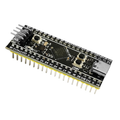
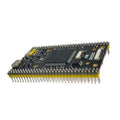
Overview
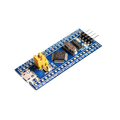
The STM32F103C8T6 "Blue Pill" is a 32-bit ARM Cortex-M3 development board built around ST Microelectronics' STM32F103C8T6 chip. Running at 72 MHz with 64 KB of Flash and 20 KB of SRAM, it is significantly more powerful than a classic ATmega328 Arduino while staying in a breadboard-friendly form factor. It is an excellent step up when your Arduino projects start running out of speed, memory, or peripherals.
This pre-soldered version comes with headers and a Micro-USB connector already installed so you can plug it in, program it, and start prototyping. The chip exposes up to 37 GPIO, multiple UART / SPI / I2C / CAN peripherals, 10 channels of 12-bit ADC, and PWM on nearly every pin. Onboard hardware includes a user LED on PC13, reset button, BOOT0 / BOOT1 jumpers for selecting the boot mode, an 8 MHz main crystal, and a 32.768 kHz RTC crystal.
This manual covers the full pinout, Boot mode configuration, programming via ST-Link / USB DFU / UART, wiring against Arduino / ESP32 / Raspberry Pi as an external programmer, a working "blink + serial" Arduino example, and FAQs about the Arduino IDE setup and common first-time issues.
At a Glance
Specifications
| Parameter | Value |
| Microcontroller | STM32F103C8T6 (ARM Cortex-M3) |
| Clock Speed | 72 MHz (internal PLL from 8 MHz crystal) |
| Flash Memory | 64 KB (many chips accept 128 KB flashing) |
| SRAM | 20 KB |
| Operating Voltage | 3.3V (onboard LDO; USB/5V input supported) |
| Input Voltage | 5V via USB or 5V pin; 3.3V via 3.3V pin |
| GPIO Pins | 37 (PA0-PA15, PB0-PB15, PC13-PC15) |
| Max Current per GPIO | 25 mA (total 150 mA across chip) |
| ADC | 10 channels, 12-bit resolution |
| Communication | 3 × USART, 2 × SPI, 2 × I2C, 1 × CAN, 1 × USB 2.0 FS |
| Timers | 4 × 16-bit timers (1 advanced, 3 general-purpose) |
| Onboard LED | PC13 (active LOW) |
| USB Connector | Micro-USB |
| Dimensions | ~53 mm × 22 mm |
Pinout Diagram

Wiring Guide
The Blue Pill can be programmed three main ways: via an ST-Link V2 through its 4-pin SWD header (most reliable), via USB DFU after flashing a bootloader, or via a USB-to-TTL adapter on UART1 (PA9 / PA10) using the factory ROM bootloader. The tables below show each option.
Wiring with ST-Link V2
The 4-pin header on the short edge of the board is the SWD (Serial Wire Debug) connector. This is the fastest, most reliable way to flash and debug the Blue Pill. You can keep a USB cable plugged into the board for power, or power it from ST-Link's 3.3V line.
| Blue Pill | ST-Link V2 | Details |
|---|---|---|
| 3.3V | 3.3V | Optional if board is USB-powered |
| GND | GND | Common ground, always required |
| SWCLK | SWCLK | Clock line |
| SWDIO (DIO) | SWDIO | Bidirectional data line |
Wiring with USB-to-TTL Adapter
Every STM32F103 ships with a factory ROM bootloader on UART1. Pull BOOT0 HIGH (to 3.3V) and reset to enter the bootloader, then flash using stm32flash or STM32CubeProgrammer. Once flashed you must set BOOT0 LOW again to run from Flash.
| Blue Pill | USB-UART (e.g. CP2102 / FT232RL) | Details |
|---|---|---|
| 5V | 5V | Power board via the 5V pin |
| GND | GND | Common ground |
| PA9 (USART1 TX) | RX | STM32 TX goes to adapter RX |
| PA10 (USART1 RX) | TX | STM32 RX goes to adapter TX |
| BOOT0 jumper | - | Set to 1 before flashing, 0 to run firmware |
Using an Arduino UNO as a USB-UART Bridge
If you don't have a dedicated USB-UART adapter, you can use an Arduino UNO. Remove the UNO's ATmega328 chip (or hold it in reset) so only the onboard USB-serial is active. Then wire it the same way as a USB-UART adapter.
| Blue Pill | Arduino UNO | Details |
|---|---|---|
| 5V | 5V | Power the Blue Pill |
| GND | GND | Common ground |
| PA10 (USART1 RX) | D1 (TX) | Data from UNO USB to STM32 |
| PA9 (USART1 TX) | D0 (RX) | Data from STM32 back to UNO USB |
| UNO RESET | GND | Keep the ATmega328 in reset |
Raspberry Pi as Programmer
A Raspberry Pi makes an excellent ST-Link host — connect an ST-Link V2 over USB and use openocd or st-flash. You can also talk to the Blue Pill's UART directly from the Pi's GPIO UART (GPIO14/15) using the ROM bootloader.
| Blue Pill | Raspberry Pi | Details |
|---|---|---|
| 3.3V | 3.3V (Pin 1) | Power |
| GND | GND (Pin 6) | Common ground |
| PA10 (USART1 RX) | GPIO14 / TXD (Pin 8) | Pi transmits to STM32 |
| PA9 (USART1 TX) | GPIO15 / RXD (Pin 10) | STM32 transmits back |
| BOOT0 jumper | - | Set to 1, reset, run stm32flash |
sudo raspi-config (Interface Options → Serial) and disable the serial console. Then use sudo apt install stm32flash and flash with stm32flash -w firmware.bin -v -g 0x0 /dev/serial0.
Code Examples
Most users program the Blue Pill with the Arduino IDE plus the official STM32 core. Below is a full "blink + serial" example that toggles the PC13 LED and prints a counter over Serial1 (the USART that maps to PA9 TX / PA10 RX). Open the Serial Monitor at 9600 baud to see output.
Arduino (STM32duino Core)
// Blue Pill blink + serial counter.
// Board in Arduino IDE: "Generic STM32F1 series" -> "BluePill F103C8"
// Upload method: STM32CubeProgrammer (Serial) or ST-Link.

#define LED_PIN PC13  // Onboard LED (active LOW)

void setup() {
  pinMode(LED_PIN, OUTPUT);
  Serial1.begin(9600);   // PA9 TX / PA10 RX
  Serial1.println("Blue Pill awake");
}

uint32_t counter = 0;

void loop() {
  digitalWrite(LED_PIN, LOW);   // LED on
  delay(500);
  digitalWrite(LED_PIN, HIGH);  // LED off
  delay(500);

  Serial1.print("Blink #");
  Serial1.println(counter++);
}
Reading an Analog Pin (ADC)
// Read a potentiometer (or any 0-3.3V signal) on PA0.
// The STM32 ADC is 12-bit (0-4095), unlike Arduino's 10-bit.

const int POT_PIN = PA0;

void setup() {
  analogReadResolution(12);  // Use the full 12 bits
  pinMode(POT_PIN, INPUT_ANALOG);
  Serial1.begin(9600);
}

void loop() {
  int raw = analogRead(POT_PIN);
  float volts = raw * (3.3f / 4095.0f);

  Serial1.print("Raw: "); Serial1.print(raw);
  Serial1.print(" | V: "); Serial1.println(volts, 3);
  delay(200);
}
Flashing with stm32flash (Raspberry Pi / Linux)
# 1. Install stm32flash:
sudo apt update
sudo apt install stm32flash

# 2. Wire Pi UART to STM32 PA9/PA10 as shown in the wiring table.
# 3. Move BOOT0 jumper to 1 and press RESET on the Blue Pill.

# 4. Write firmware.bin starting at the Flash base address:
sudo stm32flash -w firmware.bin -v -g 0x8000000 /dev/serial0

# 5. Move BOOT0 jumper back to 0 and press RESET to run your firmware.
Frequently Asked Questions
https://github.com/stm32duino/BoardManagerFiles/raw/main/package_stmicroelectronics_index.json to "Additional Board Manager URLs". Then in Tools → Board → Boards Manager install "STM32 MCU based boards". Pick board: Generic STM32F1 series, variant: BluePill F103C8.PC13, and it is active LOW — writing digitalWrite(PC13, LOW) turns it on. This is the opposite of most Arduino boards.