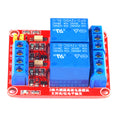
Overview
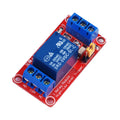
The ShillehTek 1-Channel 5V Relay Module lets an Arduino, Raspberry Pi, ESP32, or Raspberry Pi Pico switch a single high-voltage or high-current load with a low-voltage logic signal. The on-board SRD-05VDC-SL-C relay can switch up to 10A at 250VAC or 10A at 30VDC, making it suitable for controlling lamps, fans, motors, solenoids, water pumps, and AC mains appliances from a microcontroller.
The module is opto-coupled and uses an active-LOW input — pull the IN pin LOW to energize the relay coil and close the contacts. A red LED indicates relay state and a green LED indicates power. Three screw terminals (NO, COM, NC) provide both Normally Open and Normally Closed switching options, so you can wire it as either a "switch ON" or "switch OFF" device for your load.
This 5V variant is the most beginner-friendly relay because it can be powered directly from the 5V rail of an Arduino UNO, Raspberry Pi, or Pico — no external power supply required for the module itself.
At a Glance
Specifications
| Parameter | Value |
| Coil / Module Voltage | 5V DC |
| Trigger Current | ~15-20 mA per channel |
| Trigger Logic | Active LOW (LOW = relay ON) |
| Trigger Voltage Range | 0V (ON) / 3.3V-5V (OFF) |
| Max Switching Voltage | 250V AC / 30V DC |
| Max Switching Current | 10 A |
| Relay Part | SONGLE SRD-05VDC-SL-C |
| Output Configuration | SPDT (NO / COM / NC) |
| Indicator LEDs | Power (green), Relay state (red) |
| Mounting | 2 screw holes |
| Dimensions (approx.) | 50 x 26 x 18 mm |
Pinout Diagram

Wiring Guide
Arduino Wiring
The 5V relay module can be powered directly from the Arduino's 5V rail. Connect the IN pin to any digital output. Wire your load (lamp, fan, AC appliance) through the COM and NO terminals so the load is OFF by default and turns ON when the relay activates.
| Module Pin | Arduino UNO Pin |
|---|---|
| VCC | 5V |
| GND | GND |
| IN | Digital Pin 7 |
Load wiring (typical, switch high-side of an AC bulb):
| Screw Terminal | Connect To |
|---|---|
| COM | One leg of mains hot to bulb |
| NO | Other leg from bulb back to mains source |
| NC | Leave unused (or wire your "default ON" load) |
digitalWrite(relayPin, LOW) energizes the relay; HIGH releases it. Initialize the pin HIGH in setup() so the relay does not click ON during boot.
ESP32 Wiring
The ESP32 uses 3.3V GPIO, but the IN pin's threshold is around 2V on most relay modules — 3.3V drives it reliably. Power the module from the ESP32's 5V (VIN) pin if your board provides one, otherwise use an external 5V supply with a shared ground.
| Module Pin | ESP32 Pin | Details |
|---|---|---|
| VCC | VIN (5V) | Or external 5V |
| GND | GND | Shared with logic GND |
| IN | GPIO 23 | 3.3V drives the opto reliably |
pinMode(..., OUTPUT) on ESP32 to keep the relay off through reset.
Raspberry Pi Wiring
Power the 5V module from the Pi's 5V rail (Pin 2 or Pin 4). Drive the IN pin from any 3.3V GPIO. Always share ground between the Pi and the relay module.
| Module Pin | Raspberry Pi Pin | Details |
|---|---|---|
| VCC | Pin 2 (5V) | |
| GND | Pin 6 (GND) | Shared |
| IN | Pin 16 (GPIO 23) | 3.3V active LOW |
GPIO.cleanup() on exit.
Raspberry Pi Pico Wiring
Power the relay module's VCC from the Pico's VBUS pin (5V from USB) and drive the IN pin from any GPIO. The Pico's 3.3V logic is enough to switch the opto-isolator.
| Module Pin | Pico Pin | Details |
|---|---|---|
| VCC | VBUS (5V from USB) | Or external 5V |
| GND | GND | Shared |
| IN | GP15 | Active LOW |
Code Examples
Arduino
// 1-Channel 5V Relay Module - Arduino Example
// IN pin: Digital 7 (active LOW - LOW closes the relay)

const int RELAY_PIN = 7;

void setup() {
  // Set HIGH first so the relay does not click ON at boot
  digitalWrite(RELAY_PIN, HIGH);
  pinMode(RELAY_PIN, OUTPUT);
  Serial.begin(9600);
  Serial.println("Relay ready");
}

void loop() {
  // Turn the load ON for 2 seconds
  Serial.println("Relay ON");
  digitalWrite(RELAY_PIN, LOW);   // active LOW
  delay(2000);

  // Turn the load OFF for 2 seconds
  Serial.println("Relay OFF");
  digitalWrite(RELAY_PIN, HIGH);
  delay(2000);
}
ESP32 (Arduino IDE)
// 1-Channel 5V Relay Module - ESP32 Example
// IN pin: GPIO 23 (active LOW)

const int RELAY_PIN = 23;

void setup() {
  digitalWrite(RELAY_PIN, HIGH); // keep relay off through boot
  pinMode(RELAY_PIN, OUTPUT);
  Serial.begin(115200);
}

void loop() {
  Serial.println("ON");
  digitalWrite(RELAY_PIN, LOW);
  delay(2000);

  Serial.println("OFF");
  digitalWrite(RELAY_PIN, HIGH);
  delay(2000);
}
Raspberry Pi (Python)
#!/usr/bin/env python3
# 1-Channel 5V Relay Module - Raspberry Pi Example
# IN pin: GPIO 23 (active LOW)

import RPi.GPIO as GPIO
import time

RELAY_PIN = 23

GPIO.setmode(GPIO.BCM)
GPIO.setup(RELAY_PIN, GPIO.OUT, initial=GPIO.HIGH)  # start OFF

try:
    while True:
        print("Relay ON")
        GPIO.output(RELAY_PIN, GPIO.LOW)   # active LOW
        time.sleep(2)

        print("Relay OFF")
        GPIO.output(RELAY_PIN, GPIO.HIGH)
        time.sleep(2)
except KeyboardInterrupt:
    print("Stopped by user")
finally:
    GPIO.output(RELAY_PIN, GPIO.HIGH)
    GPIO.cleanup()
Raspberry Pi Pico (MicroPython)
# 1-Channel 5V Relay Module - Pico MicroPython Example
# IN pin: GP15 (active LOW)

from machine import Pin
import time

relay = Pin(15, Pin.OUT, value=1)  # start HIGH (relay OFF)

while True:
    print("Relay ON")
    relay.value(0)   # active LOW
    time.sleep(2)

    print("Relay OFF")
    relay.value(1)
    time.sleep(2)
Frequently Asked Questions
LOW to turn the load ON and HIGH to turn it OFF.digitalWrite(RELAY_PIN, HIGH) before pinMode(RELAY_PIN, OUTPUT). On Raspberry Pi, use GPIO.setup(RELAY_PIN, GPIO.OUT, initial=GPIO.HIGH). On Pico, pass value=1 to the Pin constructor.