

Project Overview
ESP32 + 2-Channel Relay Module: In this project, you will wire a 2-channel relay module to an ESP32 and control two separate devices (Relay 1 and Relay 2) using Arduino code. This is a clean foundation for switching lights, fans, pumps, solenoids, or any basic on/off load while keeping your ESP32 control signals simple and reusable for future WiFi automation builds.
- Time: 10 to 20 minutes
- Skill level: Beginner
- What you will build: An ESP32 controller that toggles Relay 1 and Relay 2 reliably, plus helper functions you can reuse for WiFi dashboards, timers, and automations later
Parts List
From ShillehTek
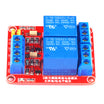
- ShillehTek 2-Channel 5V Relay Module - dual relay board for Arduino and Raspberry Pi
- Jumper wires - for ESP32 to relay control connections
- ESP-WROOM-32 ESP32 Dev Board CP2102 USB-C Pre-Soldered - the development board used in this build
External
- USB cable for ESP32
- Recommended: separate 5V power supply for the relay module (best reliability)
Note: ESP32 GPIO is 3.3V logic, while many 2-channel relay boards are powered from 5V. Power the relay board from 5V and always share ground between the ESP32 and relay module. If your relay module does not trigger reliably from 3.3V, you may need a relay board designed for 3.3V logic or an input driver.
Step-by-Step Guide
Step 1 - Identify your relay pins and operating behavior
Goal: Confirm the control pins and avoid common first-power issues.
What to do: Find the control header labels on your 2-channel relay module. Most boards use the following:
- VCC: relay board power (often 5V)
- GND: ground
- IN1: control pin for Relay 1
- IN2: control pin for Relay 2
Many relay modules are active LOW, meaning the relay turns ON when IN is pulled LOW. If your relay behavior seems backwards later, that is normal for active LOW boards.
If your board also has JD-VCC, it is the opto-isolated style. This guide covers the common VCC/GND/IN1/IN2 style.
Expected result: You know which pins are VCC, GND, IN1, and IN2, and you understand that active LOW behavior is common.
Step 2 - Wire the ESP32 to the relay module (control side)
Goal: Make the exact connections needed for reliable relay triggering.
What to do: Wire the control header using these connections:
- Relay VCC to 5V (best: external 5V supply, or ESP32 5V/VIN pin if available and powered by USB)
- Relay GND to ESP32 GND (shared ground)
- Relay IN1 to ESP32 GPIO 25
- Relay IN2 to ESP32 GPIO 26
Tip: Avoid using strapping pins that affect ESP32 boot mode. GPIO 25 and 26 are generally safe choices on most ESP32 dev boards.
Expected result: The relay module has 5V power, the ESP32 and relay share ground, and IN1/IN2 are connected to GPIO 25/26.
Step 3 - Upload the ESP32 test code (2 relays)
Goal: Run a simple loop that cycles Relay 1 and Relay 2 so you can verify wiring fast.
What to do: In the Arduino IDE, select your ESP32 board and upload the following sketch.
Code:
#define RELAY1_PIN 25  // GPIO 25 -> IN1
#define RELAY2_PIN 26  // GPIO 26 -> IN2

// Many relay modules are ACTIVE LOW:
// LOW = ON, HIGH = OFF
const bool ACTIVE_LOW = true;

void relayOn(int pin) {
  digitalWrite(pin, ACTIVE_LOW ? LOW : HIGH);
}

void relayOff(int pin) {
  digitalWrite(pin, ACTIVE_LOW ? HIGH : LOW);
}

void setup() {
  pinMode(RELAY1_PIN, OUTPUT);
  pinMode(RELAY2_PIN, OUTPUT);

  // Safe startup: both OFF
  relayOff(RELAY1_PIN);
  relayOff(RELAY2_PIN);
}

void loop() {
  // Relay 1 ON, Relay 2 OFF
  relayOn(RELAY1_PIN);
  relayOff(RELAY2_PIN);
  delay(1000);

  // Relay 1 OFF, Relay 2 ON
  relayOff(RELAY1_PIN);
  relayOn(RELAY2_PIN);
  delay(1000);

  // Both ON
  relayOn(RELAY1_PIN);
  relayOn(RELAY2_PIN);
  delay(1000);

  // Both OFF
  relayOff(RELAY1_PIN);
  relayOff(RELAY2_PIN);
  delay(1000);
}
If your relay turns ON when you expect OFF, flip the logic by changing ACTIVE_LOW to false.
Expected result: Relay 1 and Relay 2 alternate on a 1-second pattern (you should hear clicks and/or see CH1/CH2 LEDs change).
Step 4 - Verify operation with a quick checklist
Goal: Confirm both channels work and your power setup is stable.
What to do: Use this checklist while the code runs:
- You should hear a click or see LED changes on CH1 and CH2.
- If nothing clicks: confirm relay VCC is 5V and GND is shared.
- If only one channel works: swap IN1 and IN2 wires to see if the problem follows the wire or stays on the same relay channel.
- If the ESP32 reboots or disconnects: power the relay board from a separate 5V supply and keep wiring short/clean (shared ground still required).
Expected result: Both relays switch reliably without random ESP32 resets.
Step 5 - Connect your load using COM, NO, and NC (safety first)
Goal: Wire your device to the relay terminals correctly and safely.
What to do: Each relay channel has three screw terminals:
- COM (common)
- NO (normally open): OFF by default, closes when the relay turns ON
- NC (normally closed): ON by default, opens when the relay turns ON
Most projects use NO so the device is OFF unless your code turns it on.
Relays can switch higher voltage loads (including AC mains), but mains wiring can be dangerous. If you are not experienced, stick to low-voltage DC loads for testing. For any AC project, use a proper enclosure, strain relief, correct wire gauge, and a fuse where appropriate.
Expected result: Your load is connected to COM/NO (or COM/NC if needed) and switches when the relay toggles.
Conclusion
You now have an ESP32 controlling a 2-channel relay module, including a simple test loop and an active LOW option for common relay boards. With the same wiring and helper functions, you can later swap the loop for WiFi control, a web dashboard, timers, or automation logic.
Want the exact parts used in this build? Get the ShillehTek 2-Channel 5V Relay Module and more at ShillehTek.com. If you want help customizing this project or building something for your product, check out our IoT consulting services.




.png?v=25000753014097803521791168436)

.png?v=68677308723310773341791168436)


