

Project Overview
TP4056 USB-C charging board + 18650 cells: Build a repairable 9000 mAh USB-C power bank that charges from a USB-C charger and outputs 5 V over USB-A using a boost converter.
Commercial USB-C power banks cost $30+ for about 10,000 mAh. With three 18650 cells you can reach roughly the same capacity for under $15, and you can replace individual cells when they wear out. The basic setup is a TP4056 USB-C charger up front, three 18650s in parallel, and a small DC-DC boost converter on the back end to deliver 5 V USB output.
- Time: 45 to 90 minutes (plus charge and rest time for cell matching)
- Skill level: Beginner to Intermediate
- What you will build: A 3-cell (3P) 18650 power bank charged by TP4056 and boosted to 5 V USB output

Parts List
From ShillehTek
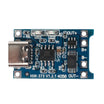
- TP4056 USB-C Charging Board (with protection) - charges the 1S (3.7 V nominal) 18650 pack and provides protected output pads
- 1S 3A BMS Protection Board - use this if your TP4056 board does not include protection
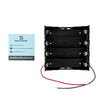
- 4 x 18650 Battery Holder - holds the cells; populate 3 slots for a 3P pack
- DuPont Wires - wiring and quick connections during testing
External
- Three matched 18650 cells (3000 mAh each for an approximate 9000 mAh parallel pack)
- A small DC-DC boost converter (5 V, 2 A output), for example MT3608, or a dedicated USB-out booster module
- 3D-printed or off-the-shelf project enclosure
- USB-A panel-mount jack for the output (or use the booster module’s onboard USB-A)
Note: For safety, use a TP4056 module with proper protection (or add a 1S BMS). Do not parallel cells with significantly different voltages.
Step-by-Step Guide
Step 1 - Plan the architecture (charger + parallel pack + boost)
Goal: Understand the correct block diagram before wiring anything.
What to do: Build a single-cell-voltage pack (3.7 V nominal) by putting your 18650 cells in parallel, not series. Three parallel 3000 mAh cells behave like one large 9000 mAh cell at the same voltage. A single TP4056 charges the bank as if it were one cell, and a single 5 V boost converter provides the USB output.

Code:
USB-C IN -> TP4056 -> B+/B- -> 3x 18650 (parallel)
                            -> Boost Converter VIN
                                           VOUT -> USB-A
Expected result: You know where the battery connects (B+/B-) and where the load connects (OUT+/OUT- into the boost converter).
Step 2 - Match the 18650 cells before paralleling
Goal: Prevent large equalization currents when connecting cells in parallel.
What to do: Match the cells’ resting voltage to within about 50 mV before paralleling. Charge all three to 4.20 V individually first, let them rest for 24 hours, then measure again. They should be within about 10 mV.
Expected result: All three cells are at nearly the same voltage before you wire them together in parallel.
Step 3 - Wire the battery holder for a 3P pack
Goal: Create one high-capacity 1S pack with two output wires.
What to do: Use the 4-cell holder but populate only 3 positions. Orient all three cells the same way (parallel means all positives on one end, all negatives on the other). Solder a thick wire across all three positive tabs and a thick wire across all three negative tabs. This forms a 9000 mAh equivalent "cell" with two leads.

Expected result: You have a single pair of battery leads representing the combined parallel pack.
Step 4 - Connect the TP4056 and (optional) BMS correctly
Goal: Wire charging and protected output safely.
What to do: If your TP4056 USB-C board has built-in protection (often indicated by a DW01 protection chip on the bottom), it typically exposes four pads: B+/B- to the battery, and OUT+/OUT- to the load. The default charge current is usually 1 A. If your TP4056 board lacks protection, add a 1S BMS protection board as appropriate for your module and wiring plan.
Expected result: The battery is connected to B+/B-, and you have a protected output (OUT+/OUT-) ready to feed the boost converter.
Step 5 - Add and adjust the 5V boost converter
Goal: Convert the battery voltage (about 3.0 to 4.2 V) into a stable 5 V USB output.
What to do: Connect the boost converter input to the TP4056 output pads (OUT+/OUT-). If using an adjustable module like an MT3608, set the output with a multimeter to about 5.05 V before connecting a phone or other device. Alternatively, use a dedicated "5V USB power-bank booster" module that already includes a USB-A jack.

Expected result: You can measure a steady ~5 V at the boost converter output (or at the USB-A output jack).
Step 6 - Estimate capacity, runtime, and charge time
Goal: Set realistic expectations for usable 5 V output and recharge time.
What to do: Use the following reference calculations.
- Pack capacity: 3 x 3000 mAh @ 3.7 V = 11.1 Wh
- Usable at 5 V output (boost is ~85% efficient): ~9.4 Wh / 5 V = 1880 mAh of "USB 5V" output
- iPhone 15 (battery ~12 Wh): roughly 0.8 full charges per power-bank fill
- Charge time from a 1 A USB-C charger: ~12 hours for a full empty-to-full bank
Expected result: You understand why a "9000 mAh" 3.7 V pack delivers significantly less mAh at 5 V after conversion losses.
Step 7 - (Optional) Add battery-level LED indication
Goal: Add a simple battery level indicator similar to commercial power banks.
What to do: Add a 4-LED voltage meter solution (for example, an LM3914-based indicator or a small ATtiny reading cell voltage) to create a four-bar indicator. This is a low-cost upgrade that improves usability.
Expected result: You have a basic LED indicator that reflects battery voltage level.
Conclusion
You built a DIY 18650 power bank using a TP4056 USB-C charging board, a 3P parallel cell pack, and a 5 V boost converter for USB output. This project covers lithium charging basics, protection, boost conversion, and pack assembly in a design where you can replace individual cells instead of discarding the whole bank.
Want the exact parts used in this build? Grab them from ShillehTek.com. If you want help customizing this project or building something for your product, check out our IoT consulting services.
Inspiration source: "Homemade DIY Power Bank Using 18650 Battery" on Instructables.




.png?v=25000753014097803521791168436)

.png?v=68677308723310773341791168436)


