

Project Overview
Arduino Nano + MPU9250 IMU: In this project, you will wire an MPU9250 (accelerometer + gyroscope + magnetometer) to an Arduino Nano and stream all 9 axes (accel + gyro + compass) to the Serial Monitor.
The MPU9250 is the MPU6050 with a magnetometer: 3-axis accelerometer + 3-axis gyroscope + 3-axis compass in one I b2C package. The ninth axis (magnetometer) gives you absolute heading, which is what makes this a popular IMU for drones, AR headsets, and navigation projects.
- Time: ~20 minutes
- Skill level: Beginner / Intermediate
- What you will build: An Arduino streaming 9 axes (accel + gyro + mag) over Serial.

Parts List
From ShillehTek
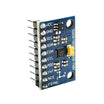
- MPU9250 GY-9250 Pre-Soldered 9-DOF IMU - the 9-axis motion sensor module (accel, gyro, magnetometer).
- Arduino Nano V3.0 Pre-Soldered - compact Arduino board for reading the IMU over I b2C.
- 120 PCS Dupont Jumper Wires - quick wiring between the Nano and the IMU.
External
- USB cable + Arduino IDE - to power/program the Nano and view Serial output.
Note: The magnetometer (AK8963) lives at I b2C address 0x0C and is accessed via the MPU9250 pass-through. The library handles it.
Step-by-Step Guide
Step 1 - Inspect the Module
Goal: Identify the main pins you will use for I b2C and note the optional pins.
What to do: Locate VCC, GND, SCL, and SDA on your GY-9250 board. You may also see optional pins like INT and address pins depending on the breakout.


Expected result: You know which pins to connect for power and I b2C (SDA/SCL).
Step 2 - Wire I b2C
Goal: Connect the MPU9250 to the Arduino Nano using I b2C.
What to do: Wire the module to the Nano as shown: VCC to 5V, GND to GND, SDA to A4, and SCL to A5.

Expected result: The Nano and MPU9250 are physically connected for I b2C communication.
Step 3 - Install Library and Upload a Sketch
Goal: Install the correct Arduino library and load an example that prints accel, gyro, and magnetometer values.
What to do: In the Arduino IDE Library Manager, install MPU9250 by hideakitai. Then open File e2 86 92 Examples e2 86 92 MPU9250 e2 86 92 readout (or use the equivalent example for that library version).

Code:
#include <MPU9250.h>

MPU9250 imu;

void setup() {
  Serial.begin(115200);
  Wire.begin();
  delay(2000);
  imu.setup(0x68);
}

void loop() {
  if (imu.update()) {
    Serial.print("aX="); Serial.print(imu.getAccX(), 2);
    Serial.print(" aY="); Serial.print(imu.getAccY(), 2);
    Serial.print(" aZ="); Serial.print(imu.getAccZ(), 2);
    Serial.print(" | gX="); Serial.print(imu.getGyroX(), 2);
    Serial.print(" gY="); Serial.print(imu.getGyroY(), 2);
    Serial.print(" gZ="); Serial.print(imu.getGyroZ(), 2);
    Serial.print(" | mX="); Serial.print(imu.getMagX(), 2);
    Serial.print(" mY="); Serial.print(imu.getMagY(), 2);
    Serial.print(" mZ="); Serial.println(imu.getMagZ(), 2);
  }
  delay(50);
}
Expected result: The sketch compiles and uploads to the Arduino Nano without errors.
Step 4 - Watch the Readings Change
Goal: Confirm you are receiving live 9-axis data over Serial.
What to do: Open the Serial Monitor at 115200 baud. Rotate and tilt the MPU9250 board to see the accelerometer, gyroscope, and magnetometer values change.

Expected result: You see continuously updating aX/aY/aZ, gX/gY/gZ, and mX/mY/mZ values.
Step 5 - Where to Take It Next
Goal: Identify practical next steps you can build on top of raw 9-axis data.
What to do: Use your current sketch as a base and expand into one of the following directions.
- Apply Madgwick or Mahony AHRS for true heading
- Calibrate the magnetometer with the figure-8 routine for accurate compass
- Build a head-tracker for VR projects
- Power a self-balancing two-wheel robot
Expected result: You have a clear next objective for turning sensor readouts into orientation or control.
Conclusion
The Arduino Nano and MPU9250 combination gives you 9-axis accel, gyro, and compass data in a single I b2C sensor stack. With the magnetometer included, you can move from relative motion sensing to absolute heading and orientation workflows.
Want the exact parts used in this build? Grab them from ShillehTek.com. If you want help customizing this project or building IMU firmware for your product, check out our IoT consulting services.
Credit: The MPU9250 photos and wiring diagrams in this tutorial are credited to Instructables.




.png?v=25000753014097803521791168436)

.png?v=68677308723310773341791168436)


