

Project Overview
Arduino + MAX3421E USB Host Shield barcode reader: Build an Arduino project that reads a USB HID-mode barcode scanner through a MAX3421E USB Host Shield and prints each scan to the Serial Monitor.
Most Arduino boards can talk to peripherals over UART, SPI, and I2C, but not USB host. The MAX3421E changes that by turning your Arduino into a USB host so it can read USB keyboards, gamepads, and (most importantly here) USB barcode scanners.
- Time: ~30 minutes
- Skill level: Intermediate
- What you will build: An Arduino reading scanned barcodes from a USB barcode scanner and printing them to Serial.

Parts List
From ShillehTek
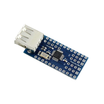
- MAX3421E Mini USB Host Shield 2.0 - adds USB host capability so Arduino can read a USB barcode scanner.
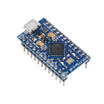
- Arduino Pro Micro (ATmega32U4) - runs the USB Host Shield library and prints scans to Serial.
- 120 PCS Dupont Jumper Wires - makes the SPI and control signal connections.
External
- USB HID-mode barcode scanner (many low-cost scanners ship in HID keyboard mode)
- 5 V power supply (optional, if the scanner draws more current than your setup can provide)
Note: The MAX3421E itself is 3.3 V; the breakout includes a regulator so it can be powered from 5 V.
Step-by-Step Guide
Step 1 - Inspect the MAX3421E USB Host Shield
Goal: Identify the USB connector and the SPI/control pins you will wire to the Arduino.
What to do: Locate the USB-A port (for the barcode scanner) and the SPI breakout pins on the shield/module. Confirm the board layout matches the pin labels you will use for wiring.


Expected result: You know where to plug in the USB barcode scanner and which pins will be wired for SPI, CS, and interrupts.
Step 2 - Wire the shield to the Arduino (SPI + control lines)
Goal: Connect power, SPI, chip select, and interrupt so the Arduino can communicate with the MAX3421E.
What to do: Make the following connections between your Arduino and the MAX3421E module. Use the SPI pins appropriate for your Arduino board.

- VCC to 5 V, GND to GND
- MOSI / MISO / SCK to the Arduino SPI pins
- SS / CS to D10 (or whichever CS the library expects)
- INT to D9
Expected result: The Arduino is physically connected to the MAX3421E for SPI communication and interrupt signaling.
Step 3 - Install the USB Host Shield Library 2.0
Goal: Add the required Arduino library and confirm the example sketches are available.
What to do: Install USB Host Shield Library 2.0 by Oleg Mazurov using the Arduino Library Manager. Then browse to File → Examples → USB Host Shield Library 2.0 → HID → USBHIDBootKbd.
Expected result: You can open the HID keyboard example sketch, which is the basis for reading a HID-mode barcode scanner.
Step 4 - Upload the barcode scanner (HID keyboard) sketch
Goal: Run firmware that treats the USB barcode scanner as a USB HID keyboard and prints characters to Serial.
What to do: Use the sketch below. A USB barcode scanner in HID mode behaves like a keyboard. This code prints each character as it arrives and prints a newline when the Enter key (0x28) is received, which commonly terminates a barcode scan.
Code:
#include <hidboot.h>
#include <usbhub.h>

USB Usb;
HIDBoot<USB_HID_PROTOCOL_KEYBOARD> kbd(&Usb);

class KbdRptParser : public KeyboardReportParser {
  void OnKeyDown(uint8_t mod, uint8_t key) override {
    uint8_t c = OemToAscii(mod, key);
    if (c) Serial.write(c);
    if (key == 0x28) Serial.println();   // Enter ends a barcode
  }
};
KbdRptParser P;

void setup() {
  Serial.begin(115200);
  if (Usb.Init() == -1) { Serial.println("USB init failed"); while (1); }
  kbd.SetReportParser(0, &P);
}

void loop() { Usb.Task(); }
Expected result: The sketch uploads successfully, initializes USB, and is ready to accept scanner input.
Step 5 - Scan a barcode and verify serial output
Goal: Confirm that scans appear as text in the Serial Monitor.
What to do: Plug the barcode scanner into the USB-A port on the host shield. Open the Serial Monitor at 115200 baud, then scan a barcode.

Expected result: The scanned barcode prints to the Serial Monitor, with each barcode ending on a new line.
Step 6 - Extend the project
Goal: Use the scanned barcode data in a real application.
What to do: Build on the working serial output by integrating the barcode string into your own logic.
- Look up the barcode in a local product database stored on microSD
- POST the barcode to a Wi-Fi-attached inventory server
- Replace the barcode scanner with a USB keyboard for command input
- Read USB gamepads to control RC cars / robots
Expected result: You have a clear next direction for turning barcode input into inventory, kiosk, or control workflows.
Conclusion
The MAX3421E USB Host Shield expands Arduino projects to support USB host peripherals, including USB HID-mode barcode scanners. With the wiring complete and the HID keyboard example running, your Arduino can capture barcode scans and print them to Serial as complete lines.
Want the exact parts used in this build? Grab them from ShillehTek.com. If you want help customizing this project or building inventory or kiosk firmware for your product, check out our IoT consulting services.



.png?v=25000753014097803521791168436)

.png?v=68677308723310773341791168436)


