

Project Overview
Arduino + ADXL345 accelerometer serial output: In this project, you will wire an ADXL345 3-axis accelerometer to an Arduino and stream live X/Y/Z acceleration data over Serial so you can measure motion and tilt in real time.
The ADXL345 is a precise 13-bit accelerometer with a 16 g range, I2C or SPI support, and built-in tap detection. It is a solid choice when you need more precision than simpler motion sensors.
- Time: ~15 minutes
- Skill level: Beginner
- What you will build: An Arduino streaming live X/Y/Z acceleration in g over Serial.

Parts List
From ShillehTek
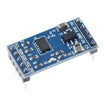
- ADXL345 Pre-Soldered Accelerometer - the 3-axis motion sensor module for this build
- Arduino Nano V3.0 Pre-Soldered - reads the sensor over I2C and prints values to Serial
- 120 PCS Dupont Jumper Wires - makes quick I2C wiring connections
External
- USB cable + Arduino IDE
Note: ADXL345 default I2C address is 0x53. If you tie the SDO pin HIGH, it switches to 0x1D.
Step-by-Step Guide
Step 1 - Inspect the Module
Goal: Identify the breakout board type and its key features before wiring.
What to do: Confirm you have an ADXL345 breakout (often labeled GY-291). Note the available pins (VCC, GND, SDA, SCL, and others depending on the carrier) and verify the board supports I2C.

Expected result: You know which pins to use for VCC, GND, SDA, and SCL.
Step 2 - Wire I2C
Goal: Connect the ADXL345 to the Arduino using I2C.
What to do: Wire the sensor to your Arduino Nano as shown: VCC to 5 V (the breakout has a regulator), GND to GND, SDA to A4, and SCL to A5.

Expected result: The ADXL345 is physically connected to the Arduino via I2C.
Step 3 - Install the Library and Sketch
Goal: Load a working example that reads acceleration and prints it to Serial.
What to do: In the Arduino IDE, install Adafruit ADXL345 and Adafruit Unified Sensor. Then upload the sketch below.
Code:
#include <Wire.h>
#include <Adafruit_Sensor.h>
#include <Adafruit_ADXL345_U.h>

Adafruit_ADXL345_Unified accel = Adafruit_ADXL345_Unified(12345);

void setup() {
  Serial.begin(9600);
  if (!accel.begin()) { Serial.println("ADXL345 not found"); while (1); }
  accel.setRange(ADXL345_RANGE_4_G);
}

void loop() {
  sensors_event_t e;
  accel.getEvent(&e);
  Serial.print("X="); Serial.print(e.acceleration.x, 2);
  Serial.print(" Y="); Serial.print(e.acceleration.y, 2);
  Serial.print(" Z="); Serial.print(e.acceleration.z, 2);
  Serial.println(" m/s^2");
  delay(200);
}
Expected result: The sketch compiles and uploads successfully, and Serial output begins when you open the Serial Monitor.
Step 4 - Tilt and Shake
Goal: Verify the sensor responds to gravity and motion.
What to do: Open the Serial Monitor at 9600 baud. Slowly tilt the board and then gently shake it to see the X/Y/Z values change.


Expected result: Z reads near 9.8 m/s^2 when flat, and the values change as you tilt or move the sensor.
Step 5 - Where to Take It Next
Goal: Choose a next feature to build on top of basic readings.
What to do: Consider extending the project with one of these ideas:
- Detect tap, double-tap, or free-fall using the chip s built-in interrupts
- Use it as a tilt switch and trigger an LED when angle exceeds a threshold
- Log to microSD for vibration analysis on motors or pumps
- Pair with a Raspberry Pi for activity tracking on a Klipper print head
Expected result: You have a clear next step for turning raw acceleration into an application feature.
Conclusion
You built an Arduino + ADXL345 setup that streams real-time 3-axis acceleration over Serial, making it easy to observe tilt, motion, and vibration. This gives you predictable motion data you can use in logging, detection, or control projects.
Want the exact parts used in this build? Grab them from ShillehTek.com. If you want help customizing this project or building something for your product, check out our IoT consulting services.
Credits: Some ADXL345 photos and wiring diagrams are credited to Instructables, which served as a reference for this version.




.png?v=25000753014097803521788741467)

.png?v=68677308723310773341788741467)


