Overview
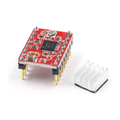
The MKS TMC2209 is a silent, high-performance stepper motor driver that drops into the StepStick footprint of A4988 / DRV8825 boards. Built around Trinamic's TMC2209 IC, it offers up to 256 microsteps via the chip's built-in interpolation, ultra-quiet StealthChop2 mode, and an optional UART interface for runtime configuration. It's the go-to driver for 3D printer upgrades, CNC retrofits, and any robotics project where stepper noise was a problem.
This module includes a heatsink for sustained current operation, a Vref trimpot for setting motor current, and dual PDN_UART pads so you can either ground them (legacy mode, drop-in replacement) or wire them up for full Trinamic UART control. The DIAG pin gives stall detection, and INDEX outputs once per electrical revolution for synchronization.
At a Glance
Specifications
| Parameter | Value |
| IC | Trinamic TMC2209 |
| Motor Supply (VM) | 4.75V - 29V |
| Logic Supply (VIO) | 3.0V - 5V |
| Phase Current (RMS) | Up to 2.0A continuous (with cooling) |
| Phase Current (Peak) | Up to 2.8A |
| Microstepping | 1, 2, 4, 8, 16, 32, 64, 128, 256 (256 via interpolation) |
| Mode Selection | MS1, MS2 pins (legacy) or UART register write |
| Quiet Mode | StealthChop2 (silent, low torque) / SpreadCycle (loud, high torque) |
| Stall Detection | StallGuard4 on DIAG pin (UART mode) |
| Index Output | 1 pulse per electrical revolution on INDEX pin |
| UART | Single-wire UART via PDN_UART pin |
| Operating Temperature | -40°C to +125°C (with heatsink and airflow) |
Pinout Diagram

Wiring Guide
Step/Dir Mode (drop-in for A4988)
For most users this is the simplest setup — wire it just like an A4988. Tie PDN_UART pads to GND, set MS1/MS2 for microsteps, and pulse STEP at your desired step rate.
| Driver Pin | Connect To |
|---|---|
| VM | Motor supply (typ. 12V or 24V) |
| GND (motor side) | Motor supply ground |
| VIO | 3.3V or 5V from MCU |
| GND (logic side) | MCU ground |
| EN | MCU GPIO (LOW = enabled) |
| STEP | MCU GPIO (one pulse per microstep) |
| DIR | MCU GPIO (HIGH/LOW selects direction) |
| MS1, MS2 | See microstep table below |
| PDN_UART (both) | GND (legacy mode) |
| M1A, M1B | Motor coil A leads |
| M2A, M2B | Motor coil B leads |
Microstep selection (legacy MS1/MS2):
| MS1 | MS2 | Microsteps |
|---|---|---|
| LOW | LOW | 8 |
| HIGH | LOW | 16 |
| LOW | HIGH | 32 |
| HIGH | HIGH | 64 |
UART Mode (full Trinamic features)
Tie one PDN_UART pad to your MCU TX (through 1kΩ resistor) and the other to MCU RX. Software like the TMCStepper Arduino library lets you tune StealthChop, SpreadCycle, current limits, and stall detection at runtime.
| Driver Pin | Connect To |
|---|---|
| PDN_UART | MCU TX (via 1kΩ resistor) |
| PDN_UART | MCU RX (direct) |
| DIAG | MCU input (StallGuard interrupt) |
| INDEX | MCU input (1 pulse / 4 fullsteps) |
Setting Motor Current (Vref Trimpot)
Vref sets the peak motor current. Measure the voltage between the brass-screw trimpot wiper and GND with the driver powered (logic side only is fine). Use the formula:
IRMS = (Vref × 1.77) / 2.5
or equivalently:
Vref = IRMS × 1.41
| Target Current (RMS) | Vref Setting | Typical Use |
|---|---|---|
| 0.5A | 0.71V | Small NEMA 14 / extruder |
| 0.8A | 1.13V | NEMA 17 (light load) |
| 1.0A | 1.41V | NEMA 17 standard |
| 1.4A | 1.97V | NEMA 17 high torque |
| 2.0A | 2.82V | Max with active cooling |
Code Examples
Arduino — Basic Step/Dir Loop
// TMC2209 Step/Dir basic test - rotates back and forth

const int EN_PIN = 8;
const int DIR_PIN = 4;
const int STEP_PIN = 5;

const int STEPS_PER_REV = 200 * 16;  // 200 fullsteps * 16 microsteps

void setup() {
  pinMode(EN_PIN, OUTPUT);
  pinMode(DIR_PIN, OUTPUT);
  pinMode(STEP_PIN, OUTPUT);
  digitalWrite(EN_PIN, LOW);  // enabled (active LOW)
}

void rotate(bool dir, int steps, int delayUs) {
  digitalWrite(DIR_PIN, dir);
  for (int i = 0; i < steps; i++) {
    digitalWrite(STEP_PIN, HIGH);
    delayMicroseconds(2);
    digitalWrite(STEP_PIN, LOW);
    delayMicroseconds(delayUs);
  }
}

void loop() {
  rotate(true, STEPS_PER_REV, 200);   // 1 rev forward
  delay(500);
  rotate(false, STEPS_PER_REV, 200);  // 1 rev back
  delay(500);
}
Arduino — UART Mode with TMCStepper Library
// TMC2209 - UART configuration via TMCStepper library
// Library: TMCStepper by teemuatlut (Library Manager)

#include <TMCStepper.h>
#include <SoftwareSerial.h>

#define EN_PIN    8
#define DIR_PIN   4
#define STEP_PIN  5
#define R_SENSE   0.11f       // sense resistor on most boards
#define DRIVER_ADDRESS 0b00   // MS1=LOW, MS2=LOW

SoftwareSerial uart(2, 3);  // RX, TX
TMC2209Stepper driver(&uart, R_SENSE, DRIVER_ADDRESS);

void setup() {
  pinMode(EN_PIN, OUTPUT);
  pinMode(DIR_PIN, OUTPUT);
  pinMode(STEP_PIN, OUTPUT);
  digitalWrite(EN_PIN, LOW);

  uart.begin(115200);
  driver.begin();
  driver.toff(5);
  driver.rms_current(800);     // 800 mA RMS
  driver.microsteps(16);
  driver.en_spreadCycle(false); // false = StealthChop (quiet)
}

void loop() {
  digitalWrite(DIR_PIN, HIGH);
  for (int i = 0; i < 3200; i++) {
    digitalWrite(STEP_PIN, HIGH);
    delayMicroseconds(2);
    digitalWrite(STEP_PIN, LOW);
    delayMicroseconds(200);
  }
  delay(1000);
}
Frequently Asked Questions
driver.TPWMTHRS()), or raise it above 22 kHz with a register tweak. The whine usually disappears once the motor is moving at typical speeds.driver.SGTHRS(value)). The DIAG pin pulses HIGH when load increases beyond the threshold. Tuning the threshold takes some trial and error — start with 80 and adjust based on your motor and feed rate.