

Project Overview
XIAO ESP32S3 Sense + Camera: Build a tiny web photo app that captures a fresh JPEG from the Seeed XIAO ESP32S3 Sense camera in the browser and lets you download the exact same frame using a cached download route and robust camera initialization.
- Time: 15 to 45 minutes
- Skill level: Beginner to Intermediate
- What you will build: A web server on the XIAO ESP32S3 Sense that captures, caches, previews, and reliably downloads the same JPEG frame you just saw.

Parts List
From ShillehTek
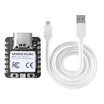
- Seeed XIAO ESP32S3 Sense (camera version) - the board with onboard camera used for this sketch
- USB-C cable and power - stable 5 V supply for reliable camera and PSRAM behavior
External
- Arduino IDE or PlatformIO with ESP32 board support - compile and flash the sketch
- Computer with USB-C port - to upload firmware and read Serial Monitor
Note: The sketch auto-detects PSRAM and falls back to DRAM or a QVGA @16 MHz mode. Ensure a stable 5 V supply for reliable camera initialization.
Step-by-Step Guide
Step 1 - Set up Arduino for ESP32 S3
Goal: Prepare your development environment to compile and upload the sketch to the XIAO ESP32S3 Sense.
What to do: Install the ESP32 board package via the Arduino Boards Manager, then select the XIAO ESP32S3 board. Optionally enable PSRAM in Tools if your board exposes that setting; the sketch works with or without PSRAM and will auto-detect and fall back.
Expected result: You can compile example ESP32 sketches and select the XIAO ESP32S3 as the target board.
Step 2 - Paste the sketch
Goal: Copy the full sketch to Arduino and update your Wi-Fi credentials.
What to do: Open a new sketch in Arduino IDE and paste the full sketch below. Replace the ssid and password variables with your network credentials. The sketch includes robust camera init that tries PSRAM then DRAM then a QVGA 16 MHz fallback, and it provides the /capture and /download routes for cached JPEG delivery.
Code:
// XIAO ESP32S3 Sense – Simple Web Photo App (robust camera init + cached download)
// Routes:
//   /          -> Home page with Take Photo & Download buttons
//   /snap      -> Page that shows the latest captured image (calls /capture under the hood)
//   /capture   -> Captures a fresh JPEG (image/jpeg) AND caches it in RAM
//   /download  -> Returns the last cached JPEG (exact image shown on /snap). If none, captures once.

// --- Includes ---
#include "esp_camera.h"
#include "esp_heap_caps.h"
#include <WiFi.h>
#include <WebServer.h>

// -------------------- Pin Map (XIAO ESP32S3 Sense) --------------------
#define PWDN_GPIO_NUM   -1
#define RESET_GPIO_NUM  -1
#define XCLK_GPIO_NUM   10
#define SIOD_GPIO_NUM   40  // SDA
#define SIOC_GPIO_NUM   39  // SCL
#define Y9_GPIO_NUM     48
#define Y8_GPIO_NUM     11
#define Y7_GPIO_NUM     12
#define Y6_GPIO_NUM     14
#define Y5_GPIO_NUM     16
#define Y4_GPIO_NUM     18
#define Y3_GPIO_NUM     17
#define Y2_GPIO_NUM     15
#define VSYNC_GPIO_NUM  38
#define HREF_GPIO_NUM   47
#define PCLK_GPIO_NUM   13
// ---------------------------------------------------------------------

// ===== WiFi =====
const char* ssid     = "Your_Internet_Name";
const char* password = "Your_Internet_Password";

WebServer server(80);

// ===== Cached photo (last capture) =====
static uint8_t* g_last_jpg = nullptr;
static size_t   g_last_len = 0;
static uint32_t g_last_ms  = 0;

static void free_cached_photo() {
  if (g_last_jpg) {
    free(g_last_jpg);
    g_last_jpg = nullptr;
    g_last_len = 0;
    g_last_ms  = 0;
  }
}

static void cache_photo(const uint8_t* buf, size_t len) {
  // Replace existing cache
  free_cached_photo();
  g_last_jpg = (uint8_t*)malloc(len);
  if (g_last_jpg) {
    memcpy(g_last_jpg, buf, len);
    g_last_len = len;
    g_last_ms  = millis();
  } else {
    // Allocation failed; keep cache empty
    g_last_len = 0;
    g_last_ms  = 0;
  }
}

// ===== Forward decls =====
static bool try_init_camera(framesize_t fs, bool use_psram, int xclk_mhz);
static bool init_camera_best();
static bool capture_into_cache();  // helper used by /download when no cache yet

// ====== Camera init helpers (robust) ======
static bool try_init_camera(framesize_t fs, bool use_psram, int xclk_mhz) {
  camera_config_t c = {};
  c.ledc_channel = LEDC_CHANNEL_0;
  c.ledc_timer   = LEDC_TIMER_0;

  c.pin_d0 = Y2_GPIO_NUM; c.pin_d1 = Y3_GPIO_NUM; c.pin_d2 = Y4_GPIO_NUM; c.pin_d3 = Y5_GPIO_NUM;
  c.pin_d4 = Y6_GPIO_NUM; c.pin_d5 = Y7_GPIO_NUM; c.pin_d6 = Y8_GPIO_NUM; c.pin_d7 = Y9_GPIO_NUM;

  c.pin_xclk  = XCLK_GPIO_NUM;
  c.pin_pclk  = PCLK_GPIO_NUM;
  c.pin_vsync = VSYNC_GPIO_NUM;
  c.pin_href  = HREF_GPIO_NUM;

  c.pin_sscb_sda = SIOD_GPIO_NUM;
  c.pin_sscb_scl = SIOC_GPIO_NUM;

  c.pin_pwdn  = PWDN_GPIO_NUM;
  c.pin_reset = RESET_GPIO_NUM;

  c.xclk_freq_hz = xclk_mhz * 1000000;   // 16 or 20 MHz
  c.pixel_format = PIXFORMAT_JPEG;
  c.frame_size   = fs;
  c.jpeg_quality = 15;                   // smaller = better quality; 15 is reasonable
  c.fb_count     = 1;                    // single FB = less memory
  c.fb_location  = use_psram ? CAMERA_FB_IN_PSRAM : CAMERA_FB_IN_DRAM;
  c.grab_mode    = CAMERA_GRAB_WHEN_EMPTY;

  esp_err_t err = esp_camera_init(&c);
  if (err != ESP_OK) {
    Serial.printf("esp_camera_init failed @fs=%d psram=%d xclk=%dMHz -> 0x%x\n",
                  (int)fs, (int)use_psram, xclk_mhz, err);
    return false;
  }
  return true;
}

static bool init_camera_best() {
  bool have_psram = false;
  #ifdef BOARD_HAS_PSRAM
    have_psram = psramFound();
  #endif
  have_psram = have_psram || (heap_caps_get_free_size(MALLOC_CAP_SPIRAM) > 0);

  Serial.printf("Free heap: %u, PSRAM free: %u, have_psram=%d\n",
                (unsigned)esp_get_free_heap_size(),
                (unsigned)heap_caps_get_free_size(MALLOC_CAP_SPIRAM),
                have_psram ? 1 : 0);

  framesize_t candidates[] = { FRAMESIZE_VGA, FRAMESIZE_QVGA };
  for (framesize_t fs : candidates) {
    if (have_psram && try_init_camera(fs, true, 20))  { Serial.println("Camera OK (PSRAM, 20MHz)"); return true; }
    if (try_init_camera(fs, false, 20))               { Serial.println("Camera OK (DRAM, 20MHz)");  return true; }
    esp_camera_deinit();
    delay(50);
  }

  if (try_init_camera(FRAMESIZE_QVGA, false, 16)) {
    Serial.println("Camera OK (DRAM, 16MHz, QVGA fallback)");
    return true;
  }
  esp_camera_deinit();
  return false;
}

// ====== HTTP Handlers ======
static void handleRoot() {
  String html = R"HTML(


<meta name="viewport" content="width=device-width,initial-scale=1">
<title>ESP32-CAM Photo App</title>


  <h1>ESP32-CAM Photo App</h1>
  <p><a href="/snap"><button>Take & Show Photo</button></a></p>
  <p><a href="/download"><button>Download Last Photo</button></a></p>


)HTML";
  server.send(200, "text/html", html);
}

// Simple page that shows the latest captured photo inline
static void handleSnapPage() {
  // Add a timestamp query param to bust cache on /capture
  String html = R"HTML(


<meta name="viewport" content="width=device-width,initial-scale=1">
<title>Photo Captured</title>


  <h1>Photo</h1>
  <p><img src="/capture?t=)HTML" + String(millis()) + R"HTML(" alt="latest photo"></p>
  <p>
    <a href="/download"><button>Download This Photo</button></a>
    <a href="/"><button>Back</button></a>
    <a href="/snap"><button>Retake</button></a>
  </p>


)HTML";

  server.send(200, "text/html", html);
}

// Captures a fresh JPEG AND caches it; returns image/jpeg
static void handleCapture() {
  // Flush a frame or two so we get a fresh one
  for (int i = 0; i < 2; ++i) {
    camera_fb_t* drop = esp_camera_fb_get();
    if (drop) esp_camera_fb_return(drop);
    delay(15);
  }

  camera_fb_t *fb = esp_camera_fb_get();
  if (!fb) {
    server.send(500, "text/plain", "Camera capture failed");
    return;
  }

  // Cache this exact image so /download returns the same one user sees
  cache_photo(fb->buf, fb->len);

  server.sendHeader("Cache-Control", "no-store");
  server.send_P(200, "image/jpeg", (const char*)fb->buf, fb->len);
  esp_camera_fb_return(fb);
}

// Returns the last cached JPEG (exactly what /capture produced). If no cache, captures once.
static void handleDownload() {
  if (!g_last_jpg || g_last_len == 0) {
    // No cached photo yet -> capture once and cache
    if (!capture_into_cache()) {
      server.send(500, "text/plain", "No photo available and capture failed");
      return;
    }
  }

  // Filename with capture time (ms since boot) for convenience
  char name[48];
  snprintf(name, sizeof(name), "photo_%lu.jpg", (unsigned long)g_last_ms);

  server.sendHeader("Content-Type", "image/jpeg");
  server.sendHeader("Content-Disposition", String("attachment; filename=") + name);
  server.sendHeader("Cache-Control", "no-store");
  server.send_P(200, "image/jpeg", (const char*)g_last_jpg, g_last_len);
}

// Helper: capture a photo and cache it (used if /download is called first)
static bool capture_into_cache() {
  // Flush frames
  for (int i = 0; i < 2; ++i) {
    camera_fb_t* drop = esp_camera_fb_get();
    if (drop) esp_camera_fb_return(drop);
    delay(15);
  }

  camera_fb_t *fb = esp_camera_fb_get();
  if (!fb) return false;

  cache_photo(fb->buf, fb->len);
  esp_camera_fb_return(fb);
  return g_last_jpg && g_last_len > 0;
}

// ===== Arduino setup/loop =====
void setup() {
  Serial.begin(115200);
  delay(300);

  if (!init_camera_best()) {
    Serial.println("FATAL: Camera init failed at all fallbacks.");
    while (true) { delay(1000); }
  }

  WiFi.mode(WIFI_STA);
  WiFi.begin(ssid, password);
  Serial.printf("Connecting to WiFi '%s' ...\n", ssid);
  uint32_t start = millis();
  while (WiFi.status() != WL_CONNECTED && millis() - start < 20000) {
    delay(300);
    Serial.print(".");
  }
  Serial.println();
  if (WiFi.status() != WL_CONNECTED) {
    Serial.println("WiFi failed (continuing anyway).");
  } else {
    Serial.println("WiFi connected!");
    Serial.print("IP address: ");
    Serial.println(WiFi.localIP());
  }

  server.on("/", handleRoot);
  server.on("/snap", handleSnapPage);
  server.on("/capture", handleCapture);
  server.on("/download", handleDownload);
  server.begin();
  Serial.println("Web server started");
}

void loop() {
  server.handleClient();
}
Expected result: The sketch compiles, you updated the Wi-Fi credentials, and the device boots and prints an IP address in Serial Monitor.
Step 3 - Flash it and verify
Goal: Upload the compiled sketch and confirm the web server starts.
What to do: Compile and upload the sketch to the XIAO ESP32S3 Sense, then open the Serial Monitor at 115200. Wait for messages that the camera initialized and that the web server started, and note the printed IP address.
Expected result: Serial prints indicate camera init success and the web server prints the device IP. If Wi-Fi connects, the IP is shown; if not, the server still runs on the local interface.
Step 4 - Use the web app
Goal: Capture and download the exact same JPEG frame from the browser.
What to do: Visit http://<device-ip>/ in your browser. Click Take & Show Photo which lands on /snap and triggers /capture under the hood. The image displayed is served as image/jpeg. Click Download This Photo to get the exact same cached JPEG via /download.
Expected result: The browser shows the captured JPEG, and the downloaded file is byte-identical to the preview image served by /capture because the sketch caches the last frame and /download returns that buffer with Cache-Control: no-store.
Step 5 - Wrap up and next steps
Goal: Understand extension ideas and integration points.
What to do: Consider adding motion-triggered capture with a PIR, uploading frames to S3 with presigned URLs, or adding a JSON status endpoint for health checks and fleet monitoring.
Expected result: You have a reliable camera preview and exact-download workflow to extend into storage or monitoring systems.
Conclusion
You built a simple web photo app on the XIAO ESP32S3 Sense camera that captures a fresh JPEG in the browser and offers a cached download route so the file you save is exactly the image you just saw. The sketch uses robust camera initialization with PSRAM and DRAM fallbacks to maximize reliability.
Want the exact parts used in this build? Grab them from ShillehTek.com. If you want help integrating this into a product pipeline or need custom work, check out our consulting: ShillehTek IoT consulting.


.png?v=25000753014097803521791168436)

.png?v=68677308723310773341791168436)


