

Video Tutorial (Optional)
Watch first if you want to follow along with the Raspberry Pi Pico W motor control programming using the L298N motor driver.
Project Overview
Raspberry Pi Pico W + L298N motor driver: In Part 3 of this robotics course, you write MicroPython code to drive two DC motors with an L298N so your robot can move forward, backward, left, and right using PWM speed control.
- Time: 20 to 40 minutes
- Skill level: Beginner
- What you will build: A basic motor control program that drives a two-motor robot in all directions with adjustable PWM speed
Parts List
From ShillehTek
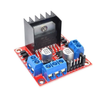
- ShillehTek L298N Motor Driver Board - dual H-bridge driver for two DC motors with ENA/ENB PWM speed control
- ShillehTek 120pcs 20cm Dupont Wires - for connecting the Pico W to the L298N and motors
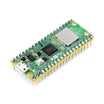
- Raspberry Pi Pico 2W - the WiFi microcontroller board used in this build
External
- Two DC motors - the robot drive motors
- Suitable power source for motors and logic (as required by your chassis and L298N board)
Note: This code uses Pico GPIO pins 0, 1, 2, 3 for IN1 to IN4, and PWM on GPIO8 (ENA) and GPIO9 (ENB). Confirm your wiring matches these assignments.
Step-by-Step Guide
Step 1 - Understand the L298N pins you will control
Goal: Know which L298N pins set direction and which pins control speed.
What to do: Identify the L298N input pins and enable pins:
- IN1 and IN2: Control Motor A direction (forward or backward).
- IN3 and IN4: Control Motor B direction (forward or backward).
- ENA and ENB: Enable pins for Motor A and Motor B. These accept PWM signals for speed control.
Refer to your motor driver datasheet or pinout diagram for the exact header labeling on your board.
Expected result: You understand that IN pins set motor direction and ENA/ENB take PWM to control speed.
Step 2 - Write the MicroPython motor control code in Thonny
Goal: Create a working program that drives both motors forward, backward, left, and right with user-selected speed.
What to do: Open Thonny, create a new Python file, and use the code below as your starting point.
Code:
"""
This program controls two DC motors using PWM on a Raspberry Pi Pico.
It allows the user to set a speed (0-100%) and moves the motors forward, backward,
left, and right in a loop. If the motors move in the wrong direction,
reverse their polarity by swapping the connections on the respective DC motor.
"""


from machine import Pin, PWM
from time import sleep

# ───── Helper function to convert 0–100% into duty_u16 value (0–65535) ─────
def percent_to_duty(percentage):
    # Clamp the percentage between 0 and 100
    if percentage < 0:
        percentage = 0
    elif percentage > 100:
        percentage = 100
    return int((65535 * percentage) / 100)

# ───── MOTOR B (Existing) ─────
in3 = Pin(2, Pin.OUT)   # GPIO2
in4 = Pin(3, Pin.OUT)   # GPIO3
enb = PWM(Pin(9))       # GPIO9 for PWM
enb.freq(1000)          # Set PWM frequency to 1 kHz (reduces audible noise, balances efficiency)

def motorB_forward(duty):
    in3.high()
    in4.low()
    enb.duty_u16(duty)

def motorB_backward(duty):
    in3.low()
    in4.high()
    enb.duty_u16(duty)

def motorB_stop():
    in3.low()
    in4.low()
    enb.duty_u16(0)

# ───── MOTOR A (New) ─────
in1 = Pin(0, Pin.OUT)   # GPIO0
in2 = Pin(1, Pin.OUT)   # GPIO1
ena = PWM(Pin(8))       # GPIO8 for PWM
ena.freq(1000)          # Set PWM frequency to 1 kHz

def motorA_forward(duty):
    in1.high()
    in2.low()
    ena.duty_u16(duty)

def motorA_backward(duty):
    in1.low()
    in2.high()
    ena.duty_u16(duty)

def motorA_stop():
    in1.low()
    in2.low()
    ena.duty_u16(0)

# ───── MAIN LOOP ─────
try:
    while True:
        # Ask the user for a speed percentage
        user_input = input("Enter speed (0–100) for both motors (Ctrl-C to quit): ")
        if not user_input.isdigit():
            print("Please enter a valid integer between 0 and 100!")
            continue

        speed_percent = int(user_input)
        # Convert percentage to duty cycle (0–65535)
        duty_value = percent_to_duty(speed_percent)

        # 1. Move FORWARD at user-specified speed
        print(f"Moving both motors FORWARD at {speed_percent}%")
        motorA_forward(duty_value)
        motorB_forward(duty_value)
        sleep(2)

        # Stop motors
        print("Stopping motors...")
        motorA_stop()
        motorB_stop()
        sleep(1)

        # 2. Move BACKWARD at user-specified speed
        print(f"Moving both motors BACKWARD at {speed_percent}%")
        motorA_backward(duty_value)
        motorB_backward(duty_value)
        sleep(2)

        # Stop motors
        print("Stopping motors...")
        motorA_stop()
        motorB_stop()
        sleep(1)

        # 3. Turn LEFT
        #    (Motor A backward, Motor B forward)
        print(f"Turning LEFT at {speed_percent}%")
        motorA_backward(duty_value)
        motorB_forward(duty_value)
        sleep(2)

        # Stop motors
        print("Stopping motors...")
        motorA_stop()
        motorB_stop()
        sleep(1)

        # 4. Turn RIGHT
        #    (Motor A forward, Motor B backward)
        print(f"Turning RIGHT at {speed_percent}%")
        motorA_forward(duty_value)
        motorB_backward(duty_value)
        sleep(2)

        # Stop motors
        print("Stopping motors...")
        motorA_stop()
        motorB_stop()
        sleep(1)

except KeyboardInterrupt:
    motorA_stop()
    motorB_stop()
    print("\nProgram stopped by user.")
Expected result: Your program defines motor direction and stop functions, then repeatedly prompts for a speed percentage and runs forward, stop, backward, stop, left, stop, right, stop.
Step 3 - Upload and test motor responsiveness
Goal: Confirm the robot moves correctly in each direction at different PWM speeds.
What to do: Upload the code to your Raspberry Pi Pico W and run it, then observe movement:
- Confirm it moves forward and backward as expected.
- Confirm it turns left and right smoothly.
- If you need to fine-tune speed, adjust the PWM behavior by changing the speed input you provide.
- If a motor spins the opposite direction from what you expect, reverse that motor’s polarity by swapping its two motor wires.
Expected result: The robot responds to the looped commands and changes speed based on the percentage you enter.
Conclusion
You programmed motor control on a Raspberry Pi Pico W using an L298N motor driver, including PWM speed control, so your robot can drive forward, backward, left, and right. This gives you a solid movement baseline for the next course step.
Want the parts for your robot build? Grab what you need from ShillehTek.com. If you want help customizing motor control, pin mappings, or turning this into a polished robotics demo, check out our IoT consulting services.






.png?v=25000753014097803521791168436)

.png?v=68677308723310773341791168436)


