

Video Tutorial (Optional)
Watch first if you want to see the calibration motion and the heading output in real time.
If you want more detail, see the original YouTube link referenced in the article: https://www.youtube.com/watch?v=Kzjnu8bGVYo
Project Overview
In this project, you use a Raspberry Pi Pico W with an MPU9250 magnetometer to calculate a heading angle (azimuth) in degrees and translate it into a compass direction (North, East, South, West, etc.).
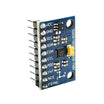
The MPU9250 is a motion-tracking device that combines a 3-axis accelerometer, 3-axis gyroscope, and 3-axis magnetometer. Here, the onboard magnetometer is used to estimate heading relative to north, which is useful for basic navigation projects.
- Time: 20 to 45 minutes
- Skill level: Intermediate
- What you will build: A MicroPython script that calibrates the MPU9250 magnetometer, filters readings, and prints heading angle and compass direction
Parts List
From ShillehTek
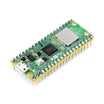
- Raspberry Pi Pico 2W - the WiFi microcontroller board used in this build
External
- MPU9250 IMU module (with AK8963 magnetometer)
- Breadboard and jumper wires (or equivalent wiring)
- Micro-USB cable and a computer for MicroPython
- MPU9250 MicroPython libraries: https://github.com/kevinmcaleer/mpu9250 (MPU9250, ak8963, MPU6500)
Note: This project uses I2C on the Pico W (I2C(0)) with SDA on GP0 and SCL on GP1, matching the example code below.
Step-by-Step Guide
Step 1 - Understand hard-iron and soft-iron biases
Goal: Know why magnetometer calibration is required for stable, accurate heading results.
What to do: Account for magnetic distortions caused by your environment and nearby electronics and metal.
Hard iron bias is a fixed offset caused by persistent magnetic fields (Earth field and nearby ferromagnetic materials). It is corrected by subtracting a constant offset found during calibration.
Soft iron bias comes from non-uniform distortion of the magnetic field caused by nearby objects. It is corrected by collecting readings while rotating the sensor through 3D space and applying correction factors.
The MicroPython library used below includes a calibration function that addresses both. For deeper background on calibration, see: https://www.appelsiini.net/2018/calibrate-magnetometer/
Expected result: You understand why you must calibrate and why nearby magnetic material can skew heading readings.
Step 2 - Add a low-pass filter to reduce spikes
Goal: Reduce random spikes and sudden fluctuations in magnetometer readings.
What to do: Use a simple low-pass filter so the output is more stable by weighting the previous value more than the newest sample (weights must add to 1).
Code:
def low_pass_filter(prev_value, new_value):
    return 0.85 * prev_value + 0.15 * new_value
Expected result: You have a reusable filter function you can apply to the magnetometer X and Y readings before computing heading.
Step 3 - Wire the MPU9250 to the Pico W
Goal: Make the physical connections so the Pico W can read the MPU9250 over I2C.
What to do: Make the connections as shown in the wiring diagram.

Expected result: The MPU9250 is powered and connected to the Pico W I2C pins so the example code can communicate with the sensor.
Step 4 - Install the libraries and run the heading code
Goal: Read magnetometer data, apply filtering, calculate heading angle, and print both degrees and a compass direction.
What to do: Download and add these libraries to your project from: https://github.com/kevinmcaleer/mpu9250
- MPU9250
- ak8963
- MPU6500
Then run the following MicroPython example. It calibrates the sensor, applies a low-pass filter to the magnetic X and Y values, computes heading, applies declination, and prints both versions.
Code:
from machine import I2C, Pin
import math
import utime

from mpu9250 import MPU9250

i2c = I2C(0, sda=Pin(0), scl=Pin(1), freq=400000)
sensor = MPU9250(i2c)
filtered_magx, filtered_magy = 0, 0
DECLINATION = -1 * 3.19

# Want to thank Kevin McAleer

def low_pass_filter(prev_value, new_value):
    return 0.85 * prev_value + 0.15 * new_value


def compass(angle):
    if angle > 337 or angle <= 22:
        direction = 'North'
    elif angle > 22 and angle <= 67:
        direction = 'North East'
    elif angle > 67 and angle <= 112:
        direction = "East"
    elif angle > 112 and angle <= 157:
        direction = "South East"
    elif angle > 157 and angle <= 202:
        direction = "South"
    elif angle > 202 and angle <= 247:
        direction = "South West"
    elif angle > 247 and angle <= 292:
        direction = "West"
    elif angle > 292 and angle <= 337:
        direction = "North West"
    return direction


sensor.ak8963.calibrate()

while True:

    # We do not need the z value
    magx_new, magy_new, _ = sensor.magnetic

    filtered_magx = low_pass_filter(filtered_magx, magx_new)
    filtered_magy = low_pass_filter(filtered_magy, magy_new)

    heading_angle_in_degrees = math.atan2(filtered_magx, filtered_magy) * (180 / math.pi)
    heading_angle_in_degrees_plus_declination = heading_angle_in_degrees + DECLINATION

    if heading_angle_in_degrees_plus_declination < 0:
        heading_angle_in_degrees += 360
        heading_angle_in_degrees_plus_declination += 360

    print('###Without Declination###')
    print(heading_angle_in_degrees)
    print(compass(heading_angle_in_degrees))
    print('###Plus Declination###')
    print(heading_angle_in_degrees_plus_declination)
    print(compass(heading_angle_in_degrees_plus_declination))

    utime.sleep_ms(100)
Calibration is critical. Ensure the accelerometer is on a flat, horizontal surface, and once calibration begins, move the sensor around in a figure-8 motion (as shown in the video).
You also need declination to correct for the difference between magnetic north and true north. Look up the declination for your location and update DECLINATION in the code.
Expected result: The serial output prints a heading angle in degrees and a text direction both without declination and with declination, and it should be comparable to a phone compass app when calibrated correctly.
Conclusion
You used a Raspberry Pi Pico W with the MPU9250 magnetometer to calibrate magnetic readings, smooth them with a low-pass filter, and calculate a heading angle (azimuth) with an optional declination correction. The final output prints both degrees and a compass direction label.
Want the exact parts used in your next sensor build? Grab what you need from ShillehTek.com. If you want help customizing this project, improving accuracy, or building a navigation-ready prototype, check out our IoT consulting services.






.png?v=25000753014097803521791168436)

.png?v=68677308723310773341791168436)


