

Project Overview
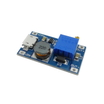
MT3608 Boost Converter Tutorial: In this guide, you will use the MT3608 DC-DC step-up boost converter to raise a lower input voltage to a higher adjustable output for electronics and robotics projects. You will learn how to set the output voltage safely, what battery types work well, and how to protect the module when powering real circuits.
- Time: 15 to 30 minutes
- Skill level: Beginner
- What you will build: A simple adjustable power setup using the MT3608 boost converter to provide a stable higher voltage from a lower-voltage battery source
Parts List
From ShillehTek
- MT3608 DC-DC Step-Up Boost Converter 2A Adjustable Power Module - adjustable DC-DC boost module for stepping up battery voltage
- Jumper wires - for temporary connections during setup and testing
External
- Multimeter - to measure and confirm OUT+ and OUT- voltage before connecting a load
- Arduino Uno or another microcontroller - example load for a regulated 5V supply
- 4.8V Ni-MH battery pack or a 2S Li-Po / Li-Ion battery - example input power sources
- 2A fuse for protection - optional safety protection against shorts/overcurrent
- Small screwdriver for adjusting the onboard trimmer - to set the output voltage
Note: Always measure the output voltage with a multimeter before connecting your board, sensor, or module. The MT3608 is adjustable, so you do not want to guess the output.
Step-by-Step Guide
Step 1 - Understand the MT3608 Pinout

Goal: Identify the input and output terminals before wiring the module.
What to know: The MT3608 module is built around the MT3608 boost converter IC and gives you an easy way to increase voltage from a lower source.
- IN+ - Positive input from your battery or power source
- IN- - Ground input from your battery or power source
- OUT+ - Positive boosted output to your circuit
- OUT- - Ground output to your circuit
Expected result: You should be able to clearly identify where the source voltage goes in and where the boosted voltage comes out.
Step 2 - Connect the Input Power

Goal: Power the converter from a lower-voltage source.
What to do: Connect your battery or power source to the input side of the module.
- Connect the positive wire from the battery to
IN+ - Connect the ground wire from the battery to
IN-
Tip: Common options include a Ni-MH battery pack or a Li-Ion/Li-Po battery setup, depending on your project.
Expected result: The converter is now receiving input power and is ready for output adjustment.
Step 3 - Adjust the Output Voltage

Goal: Set the output voltage to the exact level your project needs.
What to do: Before connecting your electronics, use a multimeter on the output side and adjust the small trimmer potentiometer.
- Connect the multimeter probes to
OUT+andOUT- - Power the module from your battery
- Use a small screwdriver to slowly turn the trimmer
- Watch the voltage on the multimeter until it reaches your target output
Important: On some modules, especially the first time you use them, you may need to turn the trimmer several full rotations before the output changes noticeably.
Expected result: The output voltage is adjusted to the level required by your controller, sensor, or other load.
Step 4 - Know the Current Limits

Goal: Avoid overheating or damaging the module.
What to know: The MT3608 is commonly used for lighter loads and is generally best kept at 2A or less. Since the chip is small, heat can build up if you push it too hard for too long.
Best practice: Keep expectations realistic. This module is great for many electronics projects, but it is not the right choice for every high-current application.
Expected result: You understand the safe operating range before connecting a demanding load.
Step 5 - Add Fuse Protection for Safer Power Distribution

Goal: Protect the boost converter from excessive current draw.
What to do: Add a 2A fuse in series with the power path when your load might draw unpredictable current, especially in motor-driven or experimental setups.
Why it matters: If the current rises too high, the fuse blows first and helps prevent the converter from being damaged.
Expected result: Your circuit has an extra layer of protection against shorts or overcurrent conditions.
Step 6 - Example Setup for a 5V Controller
Goal: Use the MT3608 to power a 5V microcontroller from a lower-voltage battery source.
What to do:
- Connect the battery pack to
IN+andIN- - Use a multimeter to adjust the module output to
5V - Connect
OUT+to the5Vpin on the Arduino Uno - Connect
OUT-to theGNDpin on the Arduino Uno
Tip: You can also use the boosted output as part of a larger power distribution setup if your project includes regulators or additional modules.
Expected result: Your controller receives a stable 5V supply from a lower-voltage battery source through the MT3608.
Conclusion
The MT3608 boost converter is a simple and useful module when you need to raise a lower input voltage to a higher adjustable output for electronics, Arduino, and robotics projects. The key habits are straightforward: wire the input and output correctly, measure the voltage before connecting your load, stay within reasonable current limits, and add fuse protection when needed.
Want the exact parts used in this build? Grab them from ShillehTek.com, including the MT3608 DC-DC Step-Up Boost Converter 2A Adjustable Power Module.
If you want help customizing this project or building something for your product, check out our IoT and Robotics Consulting by ShillehTek.




.png?v=25000753014097803521791168436)

.png?v=68677308723310773341791168436)


