

Video Tutorial (Optional)
Watch first if you want to see the full AWS Lambda, Step Functions, and CloudWatch Scheduler setup end to end.
Project Overview
AWS Lambda + AWS Step Functions + Amazon CloudWatch Scheduler: In this tutorial, you build an automated task scheduler that chains Lambda functions in a Step Functions state machine and triggers it on a recurring schedule using CloudWatch Scheduler.
This approach is useful for production workflows that need reliable automation, especially for recurring jobs like ETLs.
- Time: 30 to 60 minutes
- Skill level: Beginner to Intermediate
- What you will build: A scheduled Step Functions workflow that runs two Python Lambdas on a cron interval
Support and links:
- Subscribe to our YouTube Channel: YouTube - Shilleh.
- Support Us: Buy Me A Coffee
- Hire Expert IoT Services: UpWork.
- ShillehTek Website (Exclusive Discounts): https://shillehtek.com/collections/all
- Shop ShillehTek:
Parts List
From ShillehTek
- ShillehTek Store - optional hardware, kits, and project parts
External
- AWS account with permissions to create Lambda, Step Functions state machines, and CloudWatch Scheduler schedules
- AWS Lambda (Python 3.12 runtime) - runs the serverless functions
- AWS Step Functions - orchestrates the Lambda workflow
- Amazon CloudWatch Scheduler - triggers the state machine on a cron interval
Note: This walkthrough uses two simple Python 3.12 Lambda functions and a basic Step Functions flow that checks for a 200 status code before moving to the next task.
Step-by-Step Guide
Step 1 - Set up your Lambda functions
Goal: Create two simple Python Lambda functions that return JSON responses with a 200 status code.
What to do: In AWS Lambda, create two functions using the Python 3.12 runtime.
Name them test-yt-1 and test-yt-2 (or use your own names, but keep them consistent when wiring the Step Function).
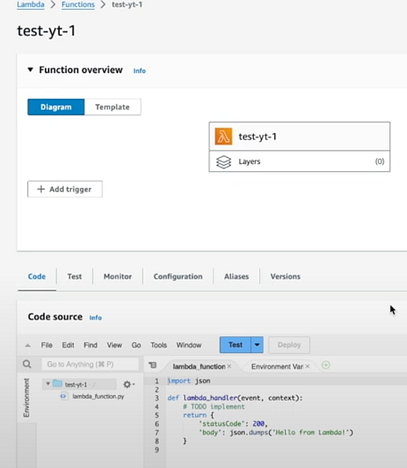
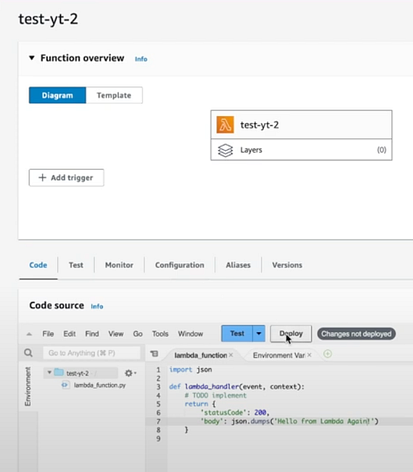
Expected result: You have two Lambda functions available in AWS that can be invoked independently.
Step 2 - Set up your Step Function
Goal: Build a Step Functions state machine that runs test-yt-1 first and then conditionally runs test-yt-2 when the first function succeeds.
What to do: Create a Step Functions workflow that:
- Starts by executing
test-yt-1 - Evaluates the output with a Choice state
- If the status code is 200, proceeds to
test-yt-2 - Ends after
test-yt-2completes successfully
This tutorial uses a simple example where:
-
test-yt-1returns a JSON response with status code 200 and the message"Hello from Lambda!" -
test-yt-2returns a JSON response with status code 200 and the message"Hello from Lambda Again!"
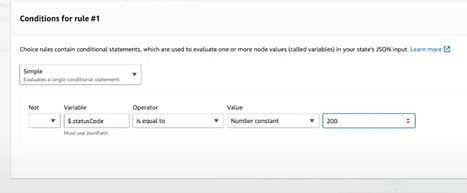
Expected result: Your state machine can run both Lambdas in sequence and uses logic to decide whether to proceed to the second Lambda.
Step 3 - Create a CloudWatch Scheduler rule (cron)
Goal: Trigger the Step Functions state machine automatically on a repeating schedule.
What to do: In Amazon CloudWatch Scheduler, create a schedule that targets your Step Functions state machine and uses the action to Start execution.
In this example, a cron-based schedule is used to run every 2 minutes:
cron(0/2 * * * ? *)
Understanding cron fields: A cron expression consists of five fields separated by spaces:
- Minutes: (0-59)
- Hours: (0-23)
- Day of the Month: (1-31)
- Month: (1-12)
- Day of the Week: (0-7) (Sunday is both 0 and 7)
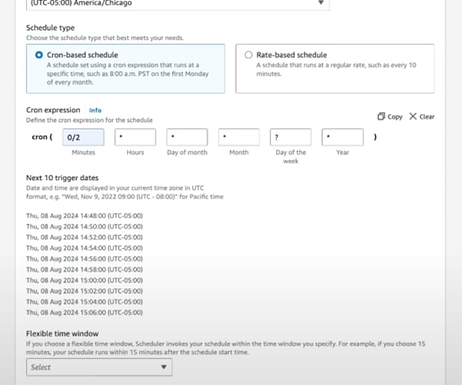
When selecting the target, choose your Step Functions state machine and ensure the target action is set to start an execution.
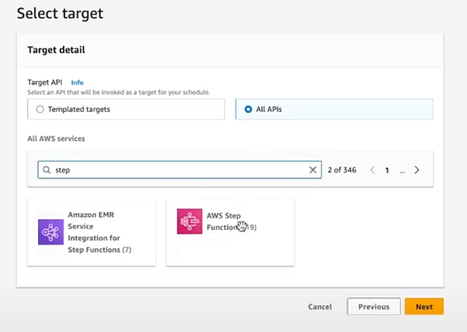
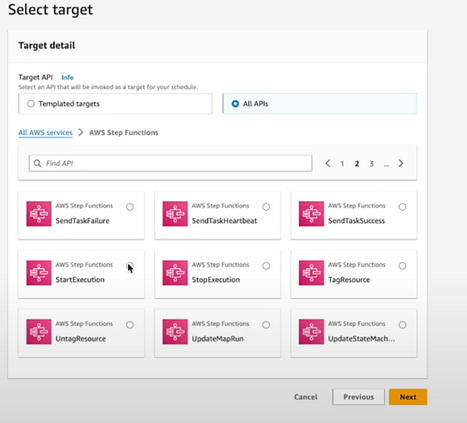
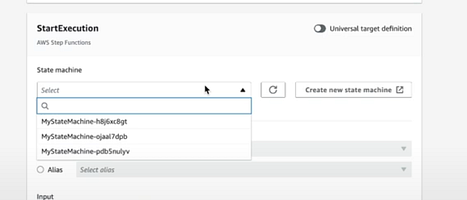
Expected result: CloudWatch Scheduler automatically invokes your Step Function on the schedule you defined, without any manual triggering.
Conclusion
You just set up automated task scheduling in AWS by chaining AWS Lambda functions with AWS Step Functions and triggering the workflow on a recurring cron schedule using Amazon CloudWatch Scheduler. This pattern is a practical foundation for recurring production workflows, including ETL processes and other scheduled automation.
Want parts and tools for your next build? Shop at ShillehTek.com. If you want help designing or automating your own IoT or cloud workflow, check out our consulting at https://shillehtek.com/pages/iot-consulting or hire via UpWork.


.png?v=25000753014097803521791168436)

.png?v=68677308723310773341791168436)