

Project Overview
Arduino Nano + AD8232 ECG module wearable monitor: This project combines an AD8232 ECG front-end, an Arduino Nano, and a 2.8 inch ILI9341 TFT screen into a battery-powered ECG unit you can wear on a lanyard. It shows individual heart beats in a large textbook-style trace, a long rhythm strip, and a Poincar9 plot for analyzing heart rate variability.
- Time: A weekend (4 to 8 hours including the case)
- Skill level: Intermediate
- What you will build: A self-contained, battery-operated ECG monitor with three on-screen display modes.

Important: This is a hobby project for educational purposes only. It is not a medical device, has not been certified to IEC 60601, and must not be used for diagnosis or treatment. Always operate it on batteries only - never plug it into a mains-powered PC while electrodes are attached to your body. If you have a pacemaker or implanted defibrillator, do not attach electrodes to yourself.
Parts List
From ShillehTek
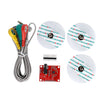
- AD8232 ECG Module Heart Rate & ECG Monitoring Sensor Kit - the analog front-end
- Arduino Nano V3.0 Pre-Soldered CH340G ATmega328P - the controller (any Uno/Mini with a 16 MHz 328P also works)
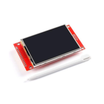
- ILI9341 2.8 inch SPI TFT LCD Touch Screen Module 240x320 - the on-device display
- 830 Point Solderless Breadboard - prototype the circuit before final assembly
- 120pcs 20cm Dupont Jumper Wires - quick breadboard wiring
- 820PCS 1/4W 1% Metal Film Resistors Kit - covers the 100k, 180k, 1k and divider resistors needed
- 200-Piece Light Touch Button Switch Kit - pushbutton for changing display modes
- TP4056 LiPo Battery Charging Board with Protection - charger/protection if you use a Li-ion cell
External
- Sticky ECG electrode pads (most AD8232 modules ship with a few)
- 4AA battery holder, or a single 3.7 V Li-ion cell (around 1000 mAh)
- Stripboard or a small piece of perfboard for the resistor divider network
- An on/off slide switch and a barrel jack (if charging the Li-ion cell)
- Sheet polystyrene, foam-core, or a 3D-printed enclosure
- Kitchen aluminum foil for shielding (optional but worthwhile)
Note: The AD8232's logic is 3.3 V and the Arduino Nano runs at 5 V. This build uses simple resistor dividers on the SPI lines to the display rather than a dedicated level shifter.
Step-by-Step Guide
Step 1 - Safety, disclaimers, and what this build is (and is not)
Goal: Understand the limits of a hobby ECG before you wire anything up.
What to do: Read this whole step before continuing. Real medical ECG equipment must conform to IEC 60601, which covers patient leakage current, electrical isolation (4000 VAC double isolation for applied parts), single-fault behavior, EMC, and even defibrillator survival. This DIY build does not meet that standard, so keep things safe by working strictly off batteries and never touching a mains-powered PC while electrodes are connected to skin.
The AD8232's input pins have about 10 G9 impedance and the electrodes are connected through 180 k9 resistors, so worst-case fault current at 3.3 V is about 18 5A. Skin-to-skin resistance through the electrodes is around 150 k9, so a 6 V battery would only push roughly 40 5A even in a worst case.

Expected result: You're comfortable with the rules: battery-only operation, no mains-tethered PC, and no use as a substitute for real medical advice.
Step 2 - Wire up the AD8232 module
Goal: Get clean ECG samples streaming into the Arduino's Serial Plotter.
What to do: The AD8232 is a low-noise instrumentation amplifier with built-in signal conditioning purpose-built for ECG work. Connect it to the Arduino as shown in the diagram below. For initial bring-up, hook the LO+ and LO- leads-off pins to two LEDs through 1 k9 resistors so you can see when an electrode disconnects. Once you've finished testing, remove the LEDs, since they hold the LO pins low and stop the Arduino from registering the HIGH signal correctly.


Sticky ECG pads are consumables, so you can also DIY them. The original author used tinplate cut to size, snap-style poppers, and a homemade gel of thick shampoo mixed with salt. A bit of masking tape holds them onto the chest for a few hours.

Place the electrodes as follows:
- LA on the left chest, just below the clavicle.
- RA on the right chest, just below the clavicle.
- RL low on the abdomen (despite the name Right Leg). Avoid muscles to keep EMG noise out.

Upload the bring-up sketch (ArdECG0.ino from the original repo), open Tools 2 Serial Plotter, and set the baud rate to 57600. You should see the classic ECG trace.

Expected result: A recognizable ECG trace scrolls in the Serial Plotter when you place electrodes correctly, and both LO LEDs light up when a lead is disconnected.
Step 3 - Generate a fake pulse for debugging
Goal: Run the firmware without a human attached, useful when iterating on display code.
What to do: The bring-up sketch can synthesize a fake pulse of roughly the right amplitude and frequency. Add 100 k9 resistors at the AD8232's RA, LA, and RL pads to convince the chip the electrodes are connected. The fake pulse is not biologically accurate; it is there so you can develop the display logic without attaching electrodes every time.

Expected result: Plotter or display shows a steady fake heartbeat at roughly the correct rate without needing electrodes.
Step 4 - A quick look at what an ECG actually measures
Goal: Build enough cardiology intuition to make sense of the trace.
What to do: The heart's sinoatrial (SA) node fires roughly once a second. Its impulse spreads to the atrial muscles, then through the atrioventricular (AV) node, which delays the signal by 120 to 200 ms, before reaching the ventricular muscles via the Purkinje fibers. The whole cycle takes around 500 ms.

Each muscle cell sits at about 2290 mV at rest. When triggered, sodium channels open (depolarization), the cell's voltage rises to zero, and about 100 ms later potassium channels open (repolarization). Action potentials propagate through muscle at 0.3 to 0.4 m/s and through Purkinje fibers at 2 to 3 m/s. By the time these signals reach the skin, they are around 1 mV.
A clinical 12-lead ECG uses 6 chest electrodes (V1 to V6) plus RA, LA, and a reference. Each lead is a difference between two electrodes:
- Lead I = LA 2 RA
- Lead II = LL 2 RA
- Lead III = LL 2 LA
- Augmented and chest leads (aVR, aVL, aVF, V1 to V6) are weighted differences against averaged references.


Expected result: You can recognize P, QRS, and T components on the trace and understand what each represents.
Step 5 - Add the 2.8 inch ILI9341 TFT display
Goal: Replace the Serial Plotter with a self-contained on-board display.
What to do: Use a 320x240 SPI TFT with the ILI9341 controller. A touch-equipped one is fine, but this firmware does not use the touch overlay (it stops working below about 4.5 V, which can be a problem on falling battery voltage). Most modules include a 662K 3.3 V regulator on the back so the VCC and LED pins can run from 5 V directly.


The display's logic pins still want 3.3 V, so the build uses simple resistor dividers on each SPI signal coming out of the Nano rather than a dedicated level shifter. Wire it up per the schematic and load the ArdECG1.ino sketch (along with SimpleILI9341.cpp and SimpleILI9341.h in the same folder).


If the Fake Pulse sub-circuit is on your schematic, comment out the #define bHasFakeECG line near the top of the sketch before doing real recordings.
Expected result: The TFT shows a live ECG trace driven by the SimpleILI9341 driver with no PC required.
Step 6 - Three display modes via a pushbutton
Goal: Switch between three useful views with a single button press.
What to do: The firmware cycles between a Large (single-beat detail), Small (rhythm strip), and Poincar9 (R-R interval plot) display. Wire a momentary pushbutton from the configured input pin to ground and let the firmware handle debouncing.

Expected result: Pressing the button cycles through the three modes on screen.
Step 7 - The large display
Goal: Inspect a single beat in textbook detail.
What to do: The large mode draws a red grid that mimics a printed ECG chart (200 ms per large square horizontally, 0.5 mV per large square vertically). It also shows a beats-per-minute count in the top-left corner and tries to lock the QRS peak to the left third of the screen so the trace does not slide around as much.


An elevated ST segment can hint at a myocardial infarction; a depressed ST may suggest ischemia, but both can also be a sign of poorly placed electrodes. Do not panic over a hobby trace.
Expected result: A clean PQRST waveform on a chart-style grid with a stable BPM readout.
Step 8 - The small display (rhythm strip)
Goal: Look at many beats at a glance to see overall rhythm.
What to do: The small display compresses many heartbeats horizontally so you can spot irregularities. As a reference, normal adult resting heart rates are 60 to 100 bpm; below that is bradycardia, above is tachycardia. Heart rate variability (HRV), the natural beat-to-beat variation in R-R interval, is generally a positive sign and tends to decrease with age.

Ectopic beats, intervals noticeably shorter or longer than the surrounding ones (typically more than 20 to 30 percent off), can be benign (caffeine, stress) or worth medical attention. Always check with a clinician rather than diagnosing yourself from a hobby trace.
Expected result: A scrolling rhythm strip across the TFT.
Step 9 - The Poincar9 display
Goal: Visualize beat-to-beat variability as a 2D scatter plot.
What to do: The Poincar9 mode plots the current R-R interval on the x-axis against the next R-R interval on the y-axis. The firmware keeps a circular buffer of 500 points; when the buffer is full, old points are overwritten in black. Axes are labeled in BPM rather than seconds.

A normal plot shows a diagonal cluster tapering to the bottom left (HRV decreases as heart rate increases). Tachycardia clusters near the bottom left, bradycardia is scattered up-right, arrhythmias scatter off the main diagonal, and fibrillation can produce a large cloud near the lower left.
Expected result: A scatter plot that fills in over a few minutes and tells a different story than the time-domain views.
Step 10 - Optional digital filtering
Goal: Cut mains hum without distorting the wave.
What to do: With electrodes well-placed and the unit running on its own battery, noise is already low. To reduce the mains hum that can creep in (worse near desk lamps and other mains gear), the firmware includes a 50 Hz notch filter (and a 60 Hz one for North America). A 40 Hz low-pass option is also there. Multiply the real-valued biquad coefficients by 65536 before plugging them into the integer-math filter routines.

A high-pass at 2 Hz was tried and rejected: it removed slow baseline drift but distorted the P and T waves. Compare the trace with and without each filter and decide what you prefer.
Expected result: Less mains hum without obvious distortion of the QRS shape.
Step 11 - Building the wearable unit
Goal: Move from breadboard to a compact, robust assembly.
What to do: Solder the resistor-divider network onto a small piece of stripboard and attach it to the back of the TFT module's pin header. Stick the AD8232 module to the back of the display with double-sided foam pads and a 2.5 mm spacer. Suspend the Arduino Nano between the two boards using soldered wire links for a compact, rigid stack.


Expected result: A finished, wearable unit that runs all day on a Li-ion cell.
Step 12 - Power supply
Goal: About 8 hours of run time on a single charge.
What to do: Total current draw is around 127 mA, so for 8 hours of run time you want at least about 1000 mAh of battery. Two options:
- 4AA cells - Easy to swap, but bulky. The 4-cell pack starts above 6 V (too high for the Nano's 5V pin) so feed it into the Nano's Vin pin and use the on-board regulator.
- 1Li-ion cell (about 1000 mAh) - The circuit runs down to about 3 V, so a single Li-ion cell connected directly to the 5V pin works. Add a TP4056-based charger and a barrel jack for charging.


Expected result: A full day's worth of monitoring on a single charge.
Step 13 - Where to take it next
Goal: Identify practical extensions to the project.
What to do: Some directions worth exploring:
- Long-term logging. A whole day at 5 ms sample period is roughly 17 MB, within reach of an SD card paired with a buffering second Arduino, or a large flash memory chip if you want predictable write timing.
- Smarter Poincar9 review. If you store a whole day's data, you can click on a point in the Poincar9 plot and jump straight to the corresponding beat to inspect it.
- Pulse arrival time. Pair with a pulse oximeter on a finger; the time between the R-wave and the optical pulse is correlated with blood pressure and arterial stiffness.
- Electrooculography. With electrodes near the eye sockets, the AD8232 can pick up around 0.7 mV as you look left and right. The module's high-pass filter limits low-frequency response, so very slow eye movements can be distorted.

Expected result: A clear roadmap for adding logging, analytics, or new biosignal types to the build.
Conclusion
You've built a battery-powered, wearable ECG monitor around an AD8232 front end, an Arduino Nano, and an ILI9341 TFT, with three display modes and a practical power scheme. It is not a medical device, but it is a hands-on way to learn analog signal conditioning, biosignals, and embedded graphics.
Want the exact parts used in this build? Grab them from ShillehTek.com. If you want help customizing this project or building something similar for your product, check out our IoT consulting services.
Credits: All photos and images in this tutorial are credited to Instructables. The original guide by Peter Balch served as the reference for this ShillehTek version.


.png?v=25000753014097803521791168436)

.png?v=68677308723310773341791168436)


