Overview
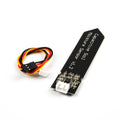
This soil moisture sensor measures the water content in soil using two probe blades that sit in the dirt. The probes are wired to a small comparator board (FC-28 / YL-69 style) which conditions the signal and exposes both an analog output (proportional to moisture) and a digital threshold output (HIGH/LOW above or below the trim-pot set-point). Drop it into a flower pot, garden bed, or hydroponics rig and your microcontroller can decide when to water.
It's a resistive sensor — it measures conductivity between the probes — so it works on Arduino, ESP32, Raspberry Pi (with an external ADC), and the Raspberry Pi Pico. The trim pot on the board sets the threshold for the digital output, useful for "alarm when dry" projects without writing comparison code.
Resistive probes corrode over time when continuously powered in damp soil. For long-term deployments, switch the sensor's VCC through a transistor or GPIO and only power it briefly when you take a reading.
At a Glance
Specifications
| Parameter | Value |
| Sensor Type | Resistive (2-probe blade) |
| Operating Voltage | 3.3V - 5V DC |
| Operating Current | < 20 mA |
| Comparator IC | LM393 (on-board, threshold via pot) |
| Analog Output (AO) | ~0V (wet) to ~VCC (dry) |
| Digital Output (DO) | HIGH/LOW based on pot threshold |
| Indicator LEDs | Power + DO active |
| Probe Length | ~60 mm |
| Probe Material | Tinned copper (corrosion-prone) |
| Cable Length | ~20 cm (Dupont female sockets) |
| Operating Temperature | 10 - 30 degC (typical) |
| PCB Dimensions | ~30 x 16 mm |
Pinout Diagram

Wiring Guide
Arduino Wiring
Connect AO to an analog pin (A0) and optionally DO to a digital pin if you want the threshold alarm. The probe plugs into the small board with the included 2-pin header (orientation doesn't matter).
| Sensor Pin | Arduino Pin |
|---|---|
| VCC | 5V (or D7 for switched power) |
| GND | GND |
| AO | A0 |
| DO | D2 (optional) |
ESP32 Wiring
Powering the sensor at 3.3V keeps AO safely within the ESP32's ADC range. Use any ADC1 channel (GPIO 32-39) for the analog input.
| Sensor Pin | ESP32 Pin | Details |
|---|---|---|
| VCC | 3V3 (or GPIO 5 for switched power) | 3.3V keeps AO < 3.3V |
| GND | GND | |
| AO | GPIO 34 | ADC1 channel |
| DO | GPIO 35 |
Raspberry Pi Wiring
The Pi has no analog input, so you'll need an ADS1115 (or similar I2C ADC) to read the AO line. The DO line can connect directly to a GPIO for on/off threshold logic.
| Connection | Pi / ADC |
|---|---|
| Sensor VCC | Pin 1 (3.3V) |
| Sensor GND | Pin 6 (GND) |
| Sensor AO | ADS1115 A0 |
| Sensor DO | Pin 11 (GPIO 17) |
| ADS1115 SDA | Pin 3 (GPIO 2) |
| ADS1115 SCL | Pin 5 (GPIO 3) |
Raspberry Pi Pico Wiring
The Pico has built-in analog inputs on GP26-28 (12-bit ADC). Powering the sensor at 3.3V keeps AO within range.
| Sensor Pin | Pico Pin |
|---|---|
| VCC | 3V3 (OUT) |
| GND | GND |
| AO | GP26 (ADC0) |
| DO | GP15 (optional) |
Code Examples
Arduino - Print Moisture Percent
// Soil Moisture Sensor - print analog reading and percent on Arduino
// Calibrate DRY_VAL by holding the probe in air, WET_VAL by submerging in water.

const int aoPin = A0;
const int doPin = 2;

const int DRY_VAL = 880;   // air / very dry
const int WET_VAL = 350;   // submerged in water

void setup() {
  Serial.begin(9600);
  pinMode(doPin, INPUT);
}

void loop() {
  int raw = analogRead(aoPin);
  int pct = map(raw, DRY_VAL, WET_VAL, 0, 100);
  pct = constrain(pct, 0, 100);

  Serial.print("Raw=");  Serial.print(raw);
  Serial.print("  Moisture="); Serial.print(pct); Serial.print(" %");
  if (digitalRead(doPin) == LOW) Serial.print("  [DRY ALARM]");
  Serial.println();

  delay(1000);
}
ESP32 - Switched-Power Reading
// ESP32 - power the soil sensor only while reading, to slow corrosion
// VCC -> GPIO 5 (switched);  AO -> GPIO 34;  DO -> GPIO 35

const int powerPin = 5;
const int aoPin    = 34;
const int doPin    = 35;

const int DRY_VAL = 3300;
const int WET_VAL = 1300;

void setup() {
  Serial.begin(115200);
  pinMode(powerPin, OUTPUT);
  pinMode(doPin, INPUT);
  analogReadResolution(12);
}

int readSoil() {
  digitalWrite(powerPin, HIGH);
  delay(200);                       // settle time
  long sum = 0;
  for (int i = 0; i < 20; i++) { sum += analogRead(aoPin); delay(5); }
  digitalWrite(powerPin, LOW);
  return sum / 20;
}

void loop() {
  int raw = readSoil();
  int pct = map(raw, DRY_VAL, WET_VAL, 0, 100);
  pct = constrain(pct, 0, 100);
  Serial.printf("Raw=%4d  Moisture=%3d %%\n", raw, pct);
  delay(60000);                     // once a minute is plenty
}
Raspberry Pi Pico - MicroPython
# Soil moisture on Raspberry Pi Pico (MicroPython)
# AO -> GP26 (ADC0)

from machine import ADC, Pin
import time

ao = ADC(26)

DRY = 52000   # 16-bit reading in air
WET = 22000   # 16-bit reading submerged

while True:
    raw = ao.read_u16()
    pct = (DRY - raw) * 100 // (DRY - WET)
    pct = max(0, min(100, pct))
    print("Raw={:5d}   Moisture={:3d} %".format(raw, pct))
    time.sleep(1)
Raspberry Pi (Python + ADS1115)
#!/usr/bin/env python3
# Soil moisture + ADS1115 on Raspberry Pi
# pip install adafruit-circuitpython-ads1x15

import time
import board, busio
from adafruit_ads1x15.ads1115 import ADS1115
from adafruit_ads1x15.analog_in import AnalogIn

i2c = busio.I2C(board.SCL, board.SDA)
ads = ADS1115(i2c)
ao  = AnalogIn(ads, 0)

DRY = 3.20   # volts in air
WET = 1.30   # volts submerged

while True:
    v   = ao.voltage
    pct = max(0, min(100, int((DRY - v) * 100 / (DRY - WET))))
    print("V={:.3f}   Moisture={} %".format(v, pct))
    time.sleep(1)