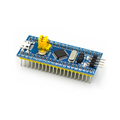
Overview
The STM32F411CEU6 "Black Pill" is the spiritual upgrade to the famous STM32 Blue Pill — same hacker-friendly form factor, but with a faster ARM Cortex-M4F core, more flash, more RAM, and a USB-C connector that just works. With a 100 MHz CPU, 512 KB of flash, 128 KB of SRAM, and a hardware floating-point unit, it leaves the AVR-class Arduino Uno far behind for performance-critical projects.
This board is pre-soldered with male headers along both edges and a 4-pin SWD header at the top, making it ready for breadboard prototyping or a programmer/debugger like ST-Link V2. Two on-board buttons (NRST and BOOT0) handle reset and DFU bootloader entry — useful for flashing over USB without an external programmer.
You can program the Black Pill with the Arduino IDE (via the STM32duino core), STM32CubeIDE, PlatformIO, or even MicroPython. It's a strong choice for audio/DSP projects, fast sensor fusion, motor control, or any time you need more compute headroom than a classic 8-bit MCU offers.
At a Glance
Specifications
| Parameter | Value |
| Microcontroller | STM32F411CEU6 |
| CPU Core | ARM Cortex-M4 with FPU and DSP instructions |
| Maximum Clock | 100 MHz |
| Flash Memory | 512 KB |
| SRAM | 128 KB |
| Operating Voltage | 3.3V (USB 5V via on-board LDO) |
| GPIO Pins | 36 (PA0-PA15, PB0-PB15, PC13-PC15) |
| ADC | 1 × 12-bit, up to 10 channels (PA0-PA7, PB0, PB1) |
| Communication Buses | 3 × I2C, 5 × USART, 5 × SPI/I2S |
| USB | USB 2.0 Full-Speed (DP/DM on PA11/PA12) |
| Debug Interface | SWD (PA13/PA14) on top header |
| On-board Buttons | NRST (reset) and BOOT0 (bootloader) |
| On-board LED | User LED on PC13 (active low) |
| Crystal | 25 MHz HSE + 32.768 kHz LSE |
| Form Factor | Black Pill (Blue Pill compatible) |
| Dimensions | ~52 × 21 mm |
Pinout Diagram

Wiring Guide
Power and Programming
The Black Pill is powered through its USB-C port (5V), through the 5V pin (5V regulated input), or through 3V3 (already regulated). The on-board AMS1117-3.3 regulator drops 5V down to 3.3V for the MCU.
| Pin | Function | Notes |
|---|---|---|
| USB-C | +5V power + USB DFU | Hold BOOT0, press/release NRST to enter DFU |
| 5V | +5V input | Use when not powering via USB |
| 3V3 | 3.3V output | ~250 mA available for sensors |
| GND | Ground | Multiple GND pins for convenience |
| SWD: GND, DCLK, DIO, 3V3 | ST-Link V2 debug | Connect to ST-Link header on top edge |
On-board LED + External Button
The user LED is on PC13 and is active low — write LOW to turn it on, HIGH to turn it off. For an external button, use any GPIO with the internal pull-up enabled.
| Component | Black Pill Pin |
|---|---|
| User LED (built-in) | PC13 (active low) |
| External LED + 220Ω | Any GPIO, e.g. PA0 |
| Button to GND | Any GPIO with pull-up, e.g. PA1 |
I2C Devices
The Black Pill has three I2C peripherals. The most common pin mapping uses I2C1 on PB6 (SCL) and PB7 (SDA), which matches Arduino's "Wire" library on STM32duino.
| I2C Bus | SCL | SDA |
|---|---|---|
| I2C1 | PB6 or PB8 | PB7 or PB9 |
| I2C2 | PB10 | PB3 |
| I2C3 | PA8 | PB4 or PB8 |
SPI Devices
The Black Pill exposes three SPI peripherals. SPI1 is the most popular because it's on the side of the chip closest to the GND/5V power rails.
| SPI Bus | SCK | MISO | MOSI |
|---|---|---|---|
| SPI1 | PA5 | PA6 | PA7 |
| SPI2 | PB13 | PB14 | PB15 |
| SPI3 | PB3 | PB4 | PB5 |
UART / Serial
USART1 is the easiest UART to use because it sits next to the SPI1 pins and is the default Serial1 in the STM32duino core.
| USART | TX | RX | Arduino Name |
|---|---|---|---|
| USART1 | PA9 or PB6 | PA10 or PB7 | Serial1 |
| USART2 | PA2 | PA3 | Serial2 |
| USART6 | PA11 | PA12 | Serial6 |
Code Examples
Arduino (STM32duino) — Blink the User LED
// STM32F411 Black Pill - Blink Example (PC13 user LED)
// Board: "Generic STM32F4 series" -> "BlackPill F411CE"
// Upload method: USB DFU (hold BOOT0, tap NRST first time)

#define LED_PIN PC13   // User LED is on PC13 (active LOW)

void setup() {
  pinMode(LED_PIN, OUTPUT);
}

void loop() {
  digitalWrite(LED_PIN, LOW);   // ON
  delay(250);
  digitalWrite(LED_PIN, HIGH);  // OFF
  delay(250);
}
Arduino — Serial Monitor over USB CDC
// STM32F411 Black Pill - Print to Serial Monitor over USB CDC
// In the Tools menu, set "USB support" to "CDC (generic Serial supersede U(S)ART)".

void setup() {
  Serial.begin(115200);
  while (!Serial) { /* wait for USB enumeration */ }
}

void loop() {
  Serial.print("Uptime: ");
  Serial.print(millis() / 1000);
  Serial.println(" s");
  delay(1000);
}
Arduino — I2C Bus Scanner
// STM32F411 Black Pill - I2C Bus Scanner
// Default Wire bus uses I2C1 on PB6 (SCL) and PB7 (SDA).

#include <Wire.h>

void setup() {
  Serial.begin(115200);
  while (!Serial) {}
  Wire.begin();
  Serial.println("\nI2C Scanner");
}

void loop() {
  byte found = 0;
  for (byte addr = 1; addr < 127; addr++) {
    Wire.beginTransmission(addr);
    if (Wire.endTransmission() == 0) {
      Serial.print("Found device at 0x");
      if (addr < 16) Serial.print('0');
      Serial.println(addr, HEX);
      found++;
    }
  }
  Serial.print(found);
  Serial.println(" device(s) found.\n");
  delay(2000);
}
MicroPython — Hello World
# STM32F411 Black Pill - MicroPython Hello World
# Flash the official MicroPython STM32F411 firmware first.
# Then connect via USB serial and run this script.

from pyb import LED, Pin, delay

led = LED(1)  # PC13 user LED maps to LED(1) on most ports

while True:
    led.toggle()
    delay(250)