Overview
The A4988 is the workhorse stepper-motor driver used in 3D printers, CNC mills, laser engravers, and any project that needs precise rotational control. It accepts simple STEP and DIR signals from your microcontroller, then handles the complex bipolar coil switching, current limiting, and microstepping internally — turning a 200-step-per-revolution NEMA 17 motor into a 3200-step-per-revolution motor at 1/16 microstepping.
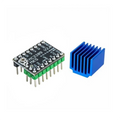
This pre-soldered module ships with a heatsink already attached to the IC, ready to handle the full ±2A per coil for hours of printing. The on-board current-limit potentiometer lets you trim VREF to your motor's rated current — a 30-second adjustment that prevents overheating and skipped steps.
Use it with RAMPS 1.4, Arduino, ESP32, Raspberry Pi, Pico, or any board that can produce step pulses. Standard 3D printer firmware (Marlin, Klipper, RepRapFirmware) drives it natively.
At a Glance
Specifications
| Parameter | Value |
| Driver IC | Allegro A4988SETTR-T |
| Motor Voltage (VMOT) | 8V to 35V |
| Logic Voltage (VDD) | 3.0V to 5.5V |
| Coil Current (per phase) | 2A peak, 1.5A continuous (with heatsink + airflow) |
| Microstep Modes | Full, 1/2, 1/4, 1/8, 1/16 |
| Current Adjustment | VREF potentiometer on board |
| Step Frequency | Up to 250 kHz (2 µs minimum step pulse) |
| Protections | Over-current, thermal shutdown, UVLO |
| Compatible Motors | Bipolar steppers (NEMA 8, 11, 14, 17, 23) |
| Pin Count | 16 (8 per side) |
| Heatsink | Pre-attached aluminum |
| Dimensions | ~20 × 15 mm |
Pinout Diagram

Wiring Guide
Arduino Wiring
Minimum required wiring: VDD/GND for logic, VMOT/GND for motor power, 4 pins for the motor coils (1A/1B/2A/2B), and STEP/DIR for control. Tie RST and SLP together (both pulled high) to keep the driver enabled.
| A4988 Pin | Arduino Pin | Notes |
|---|---|---|
| VMOT | +12V (or motor PSU) | Motor power, 8-35V |
| GND (motor side) | Motor PSU GND | Bottom right |
| 2B, 2A, 1A, 1B | Stepper coil wires | Match coil pairs (test with multimeter) |
| VDD | 5V | Logic supply |
| GND (logic side) | GND | Bottom left |
| STEP | Digital 3 | Pulse to step |
| DIR | Digital 4 | HIGH/LOW = direction |
| RST | Tied to SLP | Both go to logic VDD |
| SLP | Tied to RST | Both go to logic VDD |
| EN | GND or D5 | LOW = enabled |
| MS1, MS2, MS3 | Tied LOW or HIGH | See microstep table |
ESP32 / Raspberry Pi Pico Wiring
Same as Arduino but with 3.3V VDD. The A4988 logic threshold is 0.7 × VDD, so a 3.3V GPIO HIGH (3.3V) easily satisfies it.
| A4988 Pin | ESP32 Pin | Pico Pin |
|---|---|---|
| VDD | 3.3V | 3V3 |
| STEP | GPIO 18 | GP15 |
| DIR | GPIO 19 | GP14 |
| EN | GPIO 21 (optional) | GP13 (optional) |
| VMOT | External motor PSU (12V) | External motor PSU (12V) |
| RST + SLP | Tied to VDD | Tied to VDD |
Setting the Current Limit (CRITICAL)
Without setting the current limit first, the driver may overdrive the motor and overheat. Use a multimeter to measure VREF (the voltage on the trim pot wiper) and adjust until it matches your motor's rating.
| Step | Action |
|---|---|
| 1 | Power the driver (VMOT + VDD), motor disconnected. |
| 2 | Calculate target VREF: VREF = motor_current × 8 × Rs where Rs = 0.1Ω (most boards). For a 1A motor: VREF = 1 × 8 × 0.1 = 0.8V. For 1.5A: VREF = 1.2V. |
| 3 | Touch + lead of multimeter to the metal screwdriver tip and the trim-pot screw. |
| 4 | Touch − lead to GND on the board. |
| 5 | Slowly turn the trim pot until you read the calculated VREF voltage. |
Microstepping Selection
MS1, MS2, MS3 set the microstep resolution. Tying them to GND or VDD selects the mode. Most 3D printers run 1/16 microstepping.
| MS1 | MS2 | MS3 | Resolution |
|---|---|---|---|
| LOW | LOW | LOW | Full step |
| HIGH | LOW | LOW | 1/2 step |
| LOW | HIGH | LOW | 1/4 step |
| HIGH | HIGH | LOW | 1/8 step |
| HIGH | HIGH | HIGH | 1/16 step |
Code Examples
Arduino — Simple Step Sequence
// A4988 Stepper Driver - Arduino Example
// STEP = D3, DIR = D4, EN = D5
// Set VREF to your motor's rated current BEFORE first run.

#define STEP_PIN  3
#define DIR_PIN   4
#define EN_PIN    5

const int stepsPerRev = 200;       // NEMA 17 = 200 full steps/rev
const int microsteps  = 16;        // matching MS1/MS2/MS3 = HIGH/HIGH/HIGH
const int totalSteps  = stepsPerRev * microsteps;

void setup() {
  pinMode(STEP_PIN, OUTPUT);
  pinMode(DIR_PIN, OUTPUT);
  pinMode(EN_PIN, OUTPUT);
  digitalWrite(EN_PIN, LOW);   // enable driver
}

void loop() {
  digitalWrite(DIR_PIN, HIGH); // forward
  for (int i = 0; i < totalSteps; i++) {
    digitalWrite(STEP_PIN, HIGH);
    delayMicroseconds(500);    // tune for desired RPM
    digitalWrite(STEP_PIN, LOW);
    delayMicroseconds(500);
  }
  delay(500);

  digitalWrite(DIR_PIN, LOW);  // reverse
  for (int i = 0; i < totalSteps; i++) {
    digitalWrite(STEP_PIN, HIGH);
    delayMicroseconds(500);
    digitalWrite(STEP_PIN, LOW);
    delayMicroseconds(500);
  }
  delay(500);
}
Arduino — AccelStepper Library
// A4988 - Smooth motion with AccelStepper library
// Library: AccelStepper by Mike McCauley (Library Manager)

#include <AccelStepper.h>

#define STEP_PIN 3
#define DIR_PIN  4

AccelStepper stepper(AccelStepper::DRIVER, STEP_PIN, DIR_PIN);

void setup() {
  stepper.setMaxSpeed(1000);     // steps/sec
  stepper.setAcceleration(500);  // steps/sec^2
  stepper.moveTo(3200);          // one revolution at 1/16 microstepping
}

void loop() {
  if (stepper.distanceToGo() == 0) {
    stepper.moveTo(-stepper.currentPosition());   // reverse
  }
  stepper.run();
}
Raspberry Pi Pico (MicroPython)
# A4988 - Pico MicroPython
# STEP = GP15, DIR = GP14

from machine import Pin
import time

step = Pin(15, Pin.OUT)
direction = Pin(14, Pin.OUT)

def step_motor(steps, dir_value, delay_us=500):
    direction.value(dir_value)
    for _ in range(steps):
        step.value(1)
        time.sleep_us(delay_us)
        step.value(0)
        time.sleep_us(delay_us)

while True:
    step_motor(3200, 1)   # forward 1 rev (16x microstepping)
    time.sleep(0.5)
    step_motor(3200, 0)   # reverse
    time.sleep(0.5)
Frequently Asked Questions
driver_config: a4988. In Marlin, set #define X_DRIVER_TYPE A4988 in Configuration.h. The A4988 is the default driver for many older 3D printer boards (RAMPS 1.4, Cheetah, etc.).