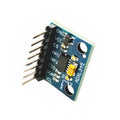
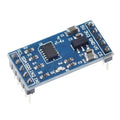
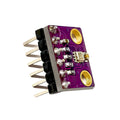
Overview
The MPU9250 is a 9-axis inertial measurement unit (IMU) that combines a 3-axis accelerometer, 3-axis gyroscope, and 3-axis magnetometer into a single chip. That means a full picture of motion and orientation in space: how your device is accelerating, how fast it's rotating, and which way is north — all in one small breakout board. It's the standard choice for drones, robots, stabilized cameras, VR/AR controllers, attitude/heading reference systems, and gesture-controlled projects.
Internally, the MPU9250 is a package with two dies: an MPU6500 (accel + gyro) and an AK8963 (magnetometer). The chip communicates over I2C or SPI and includes an onboard Digital Motion Processor (DMP) for sensor fusion. ShillehTek's authentic GY-9250 module ships pre-soldered with headers attached and exposes all function pins (VCC, GND, SCL, SDA, EDA, ECL, ADO, INT, NCS, FSYNC) for maximum flexibility. The default I2C address is 0x68, selectable to 0x69 via the ADO pin.
This manual covers specifications, the pinout, wiring for Arduino, ESP32, Raspberry Pi, and the Pico, a working "hello world" code example for each platform, and FAQs on calibration, tilt compensation, and interrupts.
At a Glance
Specifications
| Parameter | Value |
| Sensor IC | InvenSense MPU-9250 (MPU6500 + AK8963) |
| Accelerometer Ranges | ±2g, ±4g, ±8g, ±16g (16-bit) |
| Gyroscope Ranges | ±250, ±500, ±1000, ±2000 °/s (16-bit) |
| Magnetometer Range | ±4,800 µT (14-bit or 16-bit) |
| Communication | I2C (up to 400 kHz) or SPI (up to 1 MHz) |
| I2C Addresses | 0x68 (ADO = LOW) / 0x69 (ADO = HIGH) |
| Magnetometer Address | 0x0C (bypass mode) |
| Operating Voltage | 3.3V - 5V (onboard regulator) |
| Sample Rate | Up to 4 kHz (gyro), 1 kHz (accel), 100 Hz (mag) |
| DMP | Onboard Digital Motion Processor |
| Current Draw | ~3.5 mA (typical) |
| Pin Count | 10 (VCC, GND, SCL, SDA, EDA, ECL, ADO, INT, NCS, FSYNC) |
Pinout Diagram

Wiring Guide
Arduino Wiring
The onboard regulator allows 5V supply from an Arduino Uno. Only four pins are needed for basic I2C readings.
| Module Pin | Arduino Pin | Details |
|---|---|---|
| VCC | 5V | Power (5V safe via regulator) |
| GND | GND | Ground |
| SCL | A5 (SCL) | I2C clock |
| SDA | A4 (SDA) | I2C data |
| ADO | Not connected / GND | Address = 0x68 |
| INT | D2 (optional) | Data-ready interrupt |
ESP32 Wiring
The ESP32 is a 3.3V device. Power the module from the 3.3V rail for cleanest readings.
| Module Pin | ESP32 Pin | Details |
|---|---|---|
| VCC | 3.3V | Power |
| GND | GND | Ground |
| SCL | GPIO 22 | Default I2C SCL |
| SDA | GPIO 21 | Default I2C SDA |
| ADO | Not connected / GND | Address = 0x68 |
| INT | GPIO 4 (optional) | Data-ready interrupt |
Raspberry Pi Wiring
Use hardware I2C. Enable it with sudo raspi-config and verify the module with i2cdetect -y 1.
| Module Pin | Raspberry Pi Pin | Details |
|---|---|---|
| VCC | 3.3V (Pin 1) | Power |
| GND | GND (Pin 6) | Ground |
| SCL | GPIO 3 (Pin 5) | I2C1 SCL |
| SDA | GPIO 2 (Pin 3) | I2C1 SDA |
| ADO | GND | Address = 0x68 |
| INT | GPIO 17 (Pin 11, optional) | Data-ready interrupt |
Raspberry Pi Pico Wiring
Use I2C0 on GP0 and GP1. MicroPython works with the mpu9250 driver package.
| Module Pin | Pico Pin | Details |
|---|---|---|
| VCC | 3.3V (Pin 36) | Power |
| GND | GND (Pin 38) | Ground |
| SCL | GP1 (Pin 2) | I2C0 SCL |
| SDA | GP0 (Pin 1) | I2C0 SDA |
| ADO | GND | Address = 0x68 |
| INT | Any GP (optional) | Data-ready interrupt |
Code Examples
Arduino
// MPU9250 - Read accel, gyro, and mag (9 axes)
// Requires: MPU9250 library by hideakitai

#include <MPU9250.h>

MPU9250 mpu;

void setup() {
  Serial.begin(115200);
  Wire.begin();
  delay(100);

  if (!mpu.setup(0x68)) {
    Serial.println("MPU9250 not found. Check wiring.");
    while (1);
  }
  Serial.println("MPU9250 ready.");
}

void loop() {
  if (mpu.update()) {
    Serial.print("Ax: "); Serial.print(mpu.getAccX());
    Serial.print(" Ay: "); Serial.print(mpu.getAccY());
    Serial.print(" Az: "); Serial.println(mpu.getAccZ());

    Serial.print("Gx: "); Serial.print(mpu.getGyroX());
    Serial.print(" Gy: "); Serial.print(mpu.getGyroY());
    Serial.print(" Gz: "); Serial.println(mpu.getGyroZ());

    Serial.print("Mx: "); Serial.print(mpu.getMagX());
    Serial.print(" My: "); Serial.print(mpu.getMagY());
    Serial.print(" Mz: "); Serial.println(mpu.getMagZ());
    Serial.println();
  }
  delay(100);
}
ESP32
// MPU9250 on ESP32 via I2C (GPIO21 SDA, GPIO22 SCL)

#include <MPU9250.h>

MPU9250 mpu;

void setup() {
  Serial.begin(115200);
  Wire.begin(21, 22);
  delay(100);
  if (!mpu.setup(0x68)) {
    Serial.println("MPU9250 not found.");
    while (1);
  }
}

void loop() {
  if (mpu.update()) {
    Serial.printf("Roll=%.2f Pitch=%.2f Yaw=%.2f\n",
                  mpu.getRoll(), mpu.getPitch(), mpu.getYaw());
  }
  delay(20);
}
Raspberry Pi
# MPU9250 on Raspberry Pi via I2C
# Install: pip install mpu9250-jmdev smbus2
# Enable I2C: sudo raspi-config -> Interface Options -> I2C

import time
from mpu9250_jmdev.registers import AK8963_ADDRESS, GFS_1000, AFS_8G, AK8963_BIT_16, AK8963_MODE_C100HZ
from mpu9250_jmdev.mpu_9250 import MPU9250

mpu = MPU9250(
    address_ak=AK8963_ADDRESS,
    address_mpu_master=0x68,
    address_mpu_slave=None,
    bus=1,
    gfs=GFS_1000,
    afs=AFS_8G,
    mfs=AK8963_BIT_16,
    mode=AK8963_MODE_C100HZ)

mpu.configure()

while True:
    print("Accel:", mpu.readAccelerometerMaster())
    print("Gyro :", mpu.readGyroscopeMaster())
    print("Mag  :", mpu.readMagnetometerMaster())
    print("-" * 40)
    time.sleep(0.5)
Raspberry Pi Pico (MicroPython)
# MPU9250 on Pico via I2C0 (GP0 SDA, GP1 SCL)
# Upload mpu9250.py and ak8963.py driver files to the Pico first.

from machine import I2C, Pin
from mpu9250 import MPU9250
import time

i2c = I2C(0, sda=Pin(0), scl=Pin(1), freq=400000)
print("I2C scan:", [hex(d) for d in i2c.scan()])

sensor = MPU9250(i2c)

while True:
    print("Accel:", sensor.acceleration)
    print("Gyro :", sensor.gyro)
    print("Mag  :", sensor.magnetic)
    print("-" * 30)
    time.sleep(0.5)
Frequently Asked Questions
atan2(My, Mx). Libraries like Mahony/Madgwick filters do this for you automatically.