Overview
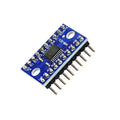
The bi-directional logic level converter is a tiny but essential board that safely translates logic signals between 3.3V and 5V devices. You need one whenever you're connecting a 5V Arduino to a 3.3V sensor, driving a 5V peripheral from a 3.3V ESP32 or Raspberry Pi, or putting an I2C bus between mixed-voltage devices. Connect a 3.3V logic signal on one side and it comes out 5V on the other — cleanly, and without risking a blown GPIO pin.
This 4-channel module uses MOSFET-based bi-directional level shifting. Two channels (labeled Chan1 and Chan2) share the same low-voltage (LV) and high-voltage (HV) references, giving you four independent signal paths total. It works with I2C, SPI, UART, and most general-purpose digital signals up to a few megahertz — perfect for sensors like BME280, MPU6050, or ADS1115 when mixing voltage domains.
This manual covers specifications, the pinout, wiring for Arduino, ESP32, Raspberry Pi, and the Pico, a working I2C "hello world" using the level converter, and FAQs about signal speed, I2C pull-ups, and which side is which.
At a Glance
Specifications
| Parameter | Value |
| Design | MOSFET-based bi-directional translator |
| Channels | 4 total (2 per chip) |
| Low-Voltage Side (LV) | 1.8V - 3.6V (3.3V typical) |
| High-Voltage Side (HV) | 2.8V - 5.5V (5V typical) |
| Protocols Supported | I2C, SPI, UART, 1-Wire, GPIO |
| Max Signal Speed | ~2 MHz (typical I2C fast-mode) |
| Built-in Pull-ups | 10 kΩ on each channel (LV and HV sides) |
| Operating Current | Negligible (MOSFET-based) |
| Board Format | Pre-soldered with male headers (both sides) |
| Pin Count | 12 (6 per side: LV/HV, GND, 2x TX, 2x RX) |
Pinout Diagram

Wiring Guide
The level converter is most commonly used to bridge I2C between a 5V Arduino and a 3.3V sensor, or a 3.3V ESP32/Pi/Pico and a 5V peripheral. Each example below uses the shifter on an I2C bus.
Arduino Wiring
Use the level converter when connecting a 5V Arduino Uno to a 3.3V-only sensor (e.g., a bare BME280 chip). Power both sides from their respective supplies.
| Level Converter | Connection | Details |
|---|---|---|
| LV | 3.3V rail | Low-side reference voltage |
| HV | Arduino 5V | High-side reference voltage |
| GND (both) | Common ground | Tie LV GND and HV GND together |
| LV1 (TXI / RXO on LV) | Sensor SDA (3.3V) | I2C data, low-side |
| HV1 (TXO / RXI on HV) | Arduino A4 (SDA, 5V) | I2C data, high-side |
| LV2 | Sensor SCL (3.3V) | I2C clock, low-side |
| HV2 | Arduino A5 (SCL, 5V) | I2C clock, high-side |
ESP32 Wiring
Use the level converter when the ESP32 (3.3V) needs to control a 5V peripheral — a 5V relay input, WS2801 strip, or 5V-logic display.
| Level Converter | ESP32 Side | Peripheral Side |
|---|---|---|
| LV | ESP32 3.3V | — |
| HV | — | 5V supply |
| GND | ESP32 GND | Peripheral GND |
| LV1 ↔ HV1 | GPIO 21 (SDA) | 5V peripheral SDA |
| LV2 ↔ HV2 | GPIO 22 (SCL) | 5V peripheral SCL |
Raspberry Pi Wiring
Use the level converter when the Pi (3.3V GPIO) talks to a 5V-input peripheral that doesn't accept 3.3V logic (e.g., some relay modules, 5V LCDs, or WS2811 LEDs).
| Level Converter | Raspberry Pi Side | Peripheral Side |
|---|---|---|
| LV | 3.3V (Pin 1) | — |
| HV | — | 5V (from external supply or Pi 5V Pin 2) |
| GND | GND (Pin 6) | Peripheral GND |
| LV1 ↔ HV1 | GPIO 2 (SDA) | 5V peripheral SDA |
| LV2 ↔ HV2 | GPIO 3 (SCL) | 5V peripheral SCL |
Raspberry Pi Pico Wiring
The Pico is a 3.3V-logic board. Use the level converter to talk safely to 5V peripherals.
| Level Converter | Pico Side | Peripheral Side |
|---|---|---|
| LV | 3.3V (Pin 36) | — |
| HV | — | 5V (VBUS Pin 40 via USB, or external 5V) |
| GND | GND (Pin 38) | Peripheral GND |
| LV1 ↔ HV1 | GP0 (SDA / TX) | Peripheral SDA / RX |
| LV2 ↔ HV2 | GP1 (SCL / RX) | Peripheral SCL / TX |
Code Examples
The level converter is transparent to software — your microcontroller reads and writes exactly as if it were talking to a same-voltage device. Below are minimal examples that exercise the shifted bus.
Arduino
// Level-shifted I2C scan from 5V Arduino to 3.3V devices
// The shifter is on SDA/SCL; your code doesn't change.

#include <Wire.h>

void setup() {
  Serial.begin(9600);
  Wire.begin();
  Serial.println("Scanning I2C bus through level shifter...");
}

void loop() {
  byte count = 0;
  for (byte addr = 1; addr < 127; addr++) {
    Wire.beginTransmission(addr);
    if (Wire.endTransmission() == 0) {
      Serial.print("Found device at 0x");
      if (addr < 16) Serial.print("0");
      Serial.println(addr, HEX);
      count++;
    }
  }
  Serial.print("Total devices: ");
  Serial.println(count);
  delay(3000);
}
ESP32
// ESP32 (3.3V) driving a 5V peripheral through the level shifter.
// Toggles a 5V output via one channel.

const int logicOut = 5;  // ESP32 GPIO, shifted to 5V on the other side

void setup() {
  Serial.begin(115200);
  pinMode(logicOut, OUTPUT);
}

void loop() {
  digitalWrite(logicOut, HIGH);
  Serial.println("5V side: HIGH");
  delay(500);
  digitalWrite(logicOut, LOW);
  Serial.println("5V side: LOW");
  delay(500);
}
Raspberry Pi
# Raspberry Pi I2C scan through the level shifter
# Requires: sudo raspi-config -> Interface Options -> I2C enabled
# Install: sudo apt install i2c-tools
#          pip install smbus2

from smbus2 import SMBus

bus = SMBus(1)
print("Scanning I2C bus (through level shifter)...")
found = []
for addr in range(1, 128):
    try:
        bus.read_byte(addr)
        found.append(hex(addr))
    except OSError:
        pass
print("Devices:", found if found else "none")
bus.close()
Raspberry Pi Pico (MicroPython)
# Pico I2C scan through the level shifter (GP0 SDA, GP1 SCL)

from machine import I2C, Pin

i2c = I2C(0, sda=Pin(0), scl=Pin(1), freq=100000)
devices = i2c.scan()
print("Devices found (through shifter):", [hex(d) for d in devices])