Overview
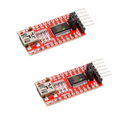
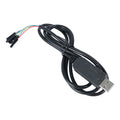
The CP2102 is the workhorse USB-to-serial converter chip from Silicon Labs, found in millions of dev boards and used by anyone who needs to flash firmware, debug serial output, or talk to a microcontroller from a PC. This module breaks out the chip into a USB-A male connector at one end and a 6-pin header at the other, with TXD, RXD, RTS, CTS, GND, and a selectable VCCIO output (3.3V or 5V).
Drivers are widely supported — Windows 10/11, macOS, and Linux all have CP2102 drivers either built-in or available from Silicon Labs. Plug it in and you get a /dev/ttyUSB0 (Linux), /dev/cu.SLAB_USBtoUART (macOS), or COMx (Windows) port.
Use it to flash ESP32, ESP8266, STM32 Blue Pill, AVR microcontrollers in bootloader mode, or any board with a UART bootloader. The on-board jumper selects between 3.3V or 5V on the VCCIO pin so you can power small target boards directly. TX and RX LEDs blink to confirm activity, and a power LED shows USB is connected.
At a Glance
Specifications
| Parameter | Value |
| USB Interface | USB 2.0 Full-Speed (12 Mbps) |
| USB Connector | USB-A male (plug) |
| Drivers | Windows 10/11, macOS, Linux (built-in or from Silicon Labs) |
| UART Pins | VCCIO, GND, TXD, RXD, RTS, CTS |
| Logic Voltage | 3.3V or 5V (jumper-selectable) |
| Output Current | Up to 100 mA on VCCIO |
| Baud Rate | 300 to 921,600 bps |
| UART Format | Data: 5/6/7/8 bits, Stop: 1/2, Parity: none/odd/even/mark/space |
| Flow Control | RTS / CTS hardware |
| LEDs | Power, TX activity, RX activity |
| Dimensions | ~50 × 16 mm |
Pinout Diagram

Wiring Guide
Generic UART Target Wiring
Three wires for basic UART: GND (always), TXD on the converter to RXD on the target, and RXD on the converter to TXD on the target (TX-RX cross). VCCIO can power the target if it draws under 100 mA.
| CP2102 Pin | Target MCU |
|---|---|
| VCCIO | VCC (if powering target) |
| GND | GND |
| TXD | RX |
| RXD | TX |
| RTS | Optional flow control |
| CTS | Optional flow control |
Flashing ESP32 / ESP8266
Bare ESP modules need their boot pins manually toggled to enter download mode. Most dev boards do this automatically using RTS and DTR — but the CP2102 module also has RTS, so you can wire DIY ESP boards too.
| CP2102 | ESP32 / ESP8266 |
|---|---|
| VCCIO (3.3V) | 3.3V |
| GND | GND |
| TXD | RX0 (GPIO3) |
| RXD | TX0 (GPIO1) |
Flashing STM32 (BOOT0 method)
STM32 has a built-in UART bootloader. Set BOOT0 = HIGH, BOOT1 = LOW, then reset the chip — it will accept firmware over UART1.
| CP2102 | STM32 |
|---|---|
| VCCIO (3.3V) | 3.3V |
| GND | GND |
| TXD | PA10 (USART1 RX) |
| RXD | PA9 (USART1 TX) |
Code Examples
Linux / macOS — Open Serial Port
# Linux: device shows up as /dev/ttyUSB0 (or USB1, USB2...)
ls -l /dev/ttyUSB*
sudo screen /dev/ttyUSB0 115200

# macOS: device shows up as /dev/cu.SLAB_USBtoUART
ls -l /dev/cu.*
screen /dev/cu.SLAB_USBtoUART 115200

# Quit screen with: Ctrl-A, then K, then Y
Python — Read from CP2102 with PySerial
#!/usr/bin/env python3
# Install: pip3 install pyserial

import serial
import time

# Linux:  '/dev/ttyUSB0'
# macOS:  '/dev/cu.SLAB_USBtoUART'
# Windows: 'COM3' (check Device Manager)
PORT = '/dev/ttyUSB0'
BAUD = 115200

ser = serial.Serial(PORT, BAUD, timeout=1)
print(f"Connected to {PORT} @ {BAUD}")

while True:
    line = ser.readline().decode('utf-8', errors='replace').strip()
    if line:
        print(line)
Frequently Asked Questions
sudo usermod -a -G dialout $USER then log out and back in.