

Project Overview
ECG Monitoring with AD8232 Sensor and Arduino: In this tutorial, you will learn how to interface the AD8232 ECG (Electrocardiogram) sensor module with an Arduino Uno to monitor heart activity in real time. You will visualize ECG waveforms using the Arduino Serial Plotter and optionally through the Processing IDE for a more detailed graph with BPM estimation.
- Time: 15 to 20 minutes
- Skill level: Beginner
- What you will build: A real-time ECG monitoring system that displays heart signal waveforms and detects lead-off conditions.

Parts List
From ShillehTek
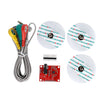
- AD8232 ECG Module - Heart Rate & ECG Monitoring Sensor Kit - single-lead ECG breakout with electrode cable for Arduino
- 400-Point Small Solderless Breadboard for Arduino, Raspberry Pi & ESP32 - for prototyping the wiring connections
- 120pcs 20cm Dupont Jumper Wires for Arduino & Raspberry Pi - for connecting the sensor to the Arduino
External
- Arduino Uno or compatible 5V board - ShillehTek does not sell Arduino boards; use any standard Uno for this tutorial
- ECG electrode pads (3 pads) - disposable sticky pads that attach to the skin
- USB cable - to program the Arduino and provide power
- Computer with Arduino IDE installed
Note: The AD8232 module is NOT a medical device. It is designed for educational and experimental use only. Do not use it to diagnose or treat any medical condition.
Step-by-Step Guide
Step 1 - Understanding ECG Basics
Goal: Learn what an ECG signal looks like and what its components mean.
What to do: An ECG (electrocardiogram) is a recording of the electrical signals produced by the heart during each heartbeat. The waveform has several key components that correspond to different phases of the cardiac cycle.

The P wave represents atrial contraction. The QRS complex (the tall spike) represents ventricular depolarization and contraction - this is the main heartbeat signal. The T wave represents ventricular repolarization (recovery). Monitoring these components can help detect arrhythmias, heart attacks, and other cardiac conditions.
Expected result: You understand the basic shape of an ECG waveform and what to expect when viewing your sensor output.
Step 2 - Get to Know the AD8232 ECG Sensor Module
Goal: Understand the AD8232 breakout board and its pin connections.
What to do: The AD8232 is an integrated signal conditioning chip designed specifically for ECG and biopotential measurement. It extracts, amplifies, and filters small electrical signals from the heart even in noisy conditions caused by motion or poor electrode contact.

The module exposes nine connections. The ones you will use with Arduino are: GND, 3.3V, OUTPUT (analog ECG signal), LO- (leads-off detection minus), and LO+ (leads-off detection plus). The board also has RA (Right Arm), LA (Left Arm), and RL (Right Leg) pins for custom electrode connections, plus an onboard LED that pulses with your heartbeat.
Expected result: You can identify the key pins on the AD8232 module and understand what each one does.
Step 3 - Wire the AD8232 to the Arduino
Goal: Connect the AD8232 ECG sensor to the Arduino Uno.
What to do: Wire the five essential pins from the AD8232 to the Arduino using the table below. The OUTPUT pin sends the analog ECG signal to the Arduino's A0 input, while LO+ and LO- let the Arduino detect when an electrode has come loose.

| AD8232 Pin | Arduino Pin |
|---|---|
| GND | GND |
| 3.3V | 3.3V |
| OUTPUT | A0 |
| LO- | D11 |
| LO+ | D10 |

Expected result: Five wires connected between the AD8232 and the Arduino. Double-check all connections before powering on.
Step 4 - Attach the ECG Electrode Pads
Goal: Place the electrode pads correctly on your body for a clear ECG reading.
What to do: Snap the three electrode cables onto the sticky pads before attaching them to your skin. The closer the pads are to the heart, the stronger the signal. Place them according to the color-coded cable guide:
- Red (RA): Right arm, just below the collarbone or on the inner wrist
- Yellow (LA): Left arm, mirroring the red pad position
- Green (RL): Right leg, on the lower abdomen or right hip area (this is the reference electrode)

Expected result: All three electrode pads are firmly attached and the cables are snapped in. The onboard LED on the AD8232 should start pulsing with your heartbeat.
Step 5 - Upload the Arduino Code
Goal: Upload the ECG reading sketch to the Arduino and view the waveform.
What to do: Copy the code below into the Arduino IDE. Select Arduino Uno as your board and choose the correct COM port, then click Upload.
Code:
void setup() {
  // Initialize serial communication at 9600 baud
  Serial.begin(9600);
  pinMode(10, INPUT); // Setup for leads-off detection LO+
  pinMode(11, INPUT); // Setup for leads-off detection LO-
}

void loop() {
  if ((digitalRead(10) == 1) || (digitalRead(11) == 1)) {
    Serial.println('!');
  } else {
    // Send the analog ECG value from A0
    Serial.println(analogRead(A0));
  }
  // Small delay to avoid saturating the serial buffer
  delay(1);
}
The code continuously reads the analog signal from the AD8232 on pin A0 and sends it over serial. If either lead-off detection pin reads HIGH, it prints an exclamation mark instead, indicating that an electrode is not making good contact.
After uploading, open Tools > Serial Plotter (set baud rate to 9600) to see the ECG waveform in real time.

Expected result: You should see a repeating ECG waveform pattern with clear QRS peaks in the Serial Plotter. If you see a flat line or erratic noise, check your electrode connections and pad placement.
Step 6 - (Optional) Visualize with Processing IDE
Goal: Display a more detailed ECG graph with BPM calculation using the Processing IDE.
What to do: If you want a more polished visualization beyond the Arduino Serial Plotter, you can use the free Processing IDE. Close the Arduino Serial Monitor first (only one program can use the serial port at a time), then run the following Processing sketch:
Code:
import processing.serial.*;

Serial myPort;
int xPos = 1;
float height_old = 0;
float height_new = 0;
float inByte = 0;
int BPM = 0;
int beat_old = 0;
float[] beats = new float[500];
int beatIndex;
float threshold = 620.0;
boolean belowThreshold = true;
PFont font;

void setup () {
  size(1000, 400);
  println(Serial.list());
  // Change the index [2] to match your Arduino port
  myPort = new Serial(this, Serial.list()[2], 9600);
  myPort.bufferUntil('\n');
  background(0xff);
  font = createFont("Arial", 12, true);
}

void draw () {
  inByte = map(inByte, 0, 1023, 0, height);
  height_new = height - inByte;
  line(xPos - 1, height_old, xPos, height_new);
  height_old = height_new;

  if (xPos >= width) {
    xPos = 0;
    background(0xff);
  } else {
    xPos++;
  }

  if (millis() % 128 == 0) {
    fill(0xFF);
    rect(0, 0, 200, 20);
    fill(0x00);
    text("BPM: " + inByte, 15, 10);
  }
}

void serialEvent (Serial myPort) {
  String inString = myPort.readStringUntil('\n');
  if (inString != null) {
    inString = trim(inString);
    if (inString.equals("!")) {
      stroke(0, 0, 0xff);
      inByte = 512;
    } else {
      stroke(0xff, 0, 0);
      inByte = float(inString);
      if (inByte > threshold && belowThreshold == true) {
        calculateBPM();
        belowThreshold = false;
      } else if (inByte < threshold) {
        belowThreshold = true;
      }
    }
  }
}

void calculateBPM () {
  int beat_new = millis();
  int diff = beat_new - beat_old;
  float currentBPM = 60000 / diff;
  beats[beatIndex] = currentBPM;
  float total = 0.0;
  for (int i = 0; i < 500; i++) {
    total += beats[i];
  }
  BPM = int(total / 500);
  beat_old = beat_new;
  beatIndex = (beatIndex + 1) % 500;
}
Note: You may need to change Serial.list()[2] to a different index (0, 1, 3, etc.) depending on which port your Arduino is connected to. Check the list printed in the Processing console when the sketch starts.
Expected result: A scrolling ECG waveform drawn in red on a white background, with a blue flat line when leads are disconnected. The top-left corner displays an approximate BPM value.
Conclusion
In this tutorial, you learned how to connect the AD8232 ECG sensor module to an Arduino Uno, place electrode pads on your body, and visualize real-time heart activity as an ECG waveform. You used the Arduino Serial Plotter for quick visualization and optionally the Processing IDE for a more detailed graph with BPM estimation. This project is a great introduction to biomedical signal processing and can serve as a starting point for more advanced health monitoring systems.
Thank you to How2Electronics for the original tutorial and imagery that inspired this guide.
Want the exact parts used in this build? Grab them from ShillehTek.com. If you want help customizing this project or building something for your product, check out our IoT consulting services.




.png?v=25000753014097803521791168436)

.png?v=68677308723310773341791168436)


