Overview
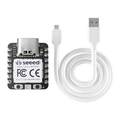
The Seeed Studio XIAO ESP32-C6 is the newest Wi-Fi flavor of the XIAO family, built around Espressif's ESP32-C6 — the first ESP chip to support Wi-Fi 6, Zigbee 3.0, Thread 1.3, and Bluetooth 5.3 LE. That radio combination makes it Matter-ready: a single board can join Apple Home, Google Home, Amazon Alexa, and Samsung SmartThings without bridges or extra hardware.
Despite the radio horsepower, the form factor is tiny — 21 × 17.5 mm, the same as every other XIAO. You get 11 GPIOs, 4 ADC channels, hardware I2C, SPI, UART, low-power I2C, SDIO, and an integrated U.FL connector for an external 2.4 GHz antenna. USB-C handles power and programming; on-board RESET and BOOT buttons make recovery painless.
Program it with Arduino IDE (esp32 core 3.x and up), MicroPython, or ESP-IDF 5+. For Matter projects, the ESP-IDF Matter SDK is the right path. For battery-powered Zigbee or Thread sensors, the C6's deep-sleep current is in the microamp range — perfect for years-long coin-cell-powered devices.
At a Glance
Specifications
| Parameter | Value |
| Microcontroller | ESP32-C6 (single-core 32-bit RISC-V high-perf core) |
| Maximum Clock | 160 MHz (HP core) + 20 MHz LP core |
| Flash Memory | 4 MB |
| SRAM | 512 KB |
| Wi-Fi | 2.4 GHz IEEE 802.11ax (Wi-Fi 6) + 802.11 b/g/n |
| Bluetooth | BLE 5.3 |
| 802.15.4 | Zigbee 3.0 + Thread 1.3 (Matter-ready) |
| USB | USB-C (Native USB Serial/JTAG) |
| GPIO | 11 pins (D0-D10) |
| Analog Input | A0, A1, A2 (12-bit ADC) |
| Standard I2C | SDA=D4 (GPIO22), SCL=D5 (GPIO23) |
| Low-Power I2C | LP_SDA=GPIO6, LP_SCL=GPIO7 (back side) |
| SPI | SCK=D8 (GPIO19), MISO=D9 (GPIO20), MOSI=D10 (GPIO18) |
| UART | TX=D6 (GPIO16), RX=D7 (GPIO17) |
| SDIO | 4-bit SDIO on D3-D5, D8-D10 |
| JTAG (MTDO/MTDI/MTCK/MTMS) | GPIO5/4/6/7 on back pads |
| Antenna | On-board PCB + IPEX U.FL |
| Battery Input | BAT pads on the back (3.7V LiPo) |
| Dimensions | 21 × 17.5 mm |
Pinout Diagram

Wiring Guide
Power and Programming
USB-C handles 5V power and code upload through the native USB Serial/JTAG controller. A 3.7V LiPo cell can be soldered to the BAT pads underneath.
| Pin | Function | Notes |
|---|---|---|
| USB-C | 5V power + flashing | JTAG also exposed over USB |
| 5V | +5V input/output | Pass-through from USB-C |
| 3V3 | 3.3V regulator output | ~700 mA available |
| GND | Ground | |
| BAT pads | 3.7V LiPo input | On-board charging from USB-C |
External LED + Button
The XIAO ESP32-C6 doesn't expose a user LED on a clean GPIO. Add an external LED on a free GPIO via a 220Ω resistor.
| Component | XIAO Pin | Details |
|---|---|---|
| LED + 220Ω → GND | D0 (GPIO0) | Anode to GPIO, cathode to GND through resistor |
| Button → GND | D1 (GPIO1) | Use INPUT_PULLUP |
I2C Devices
Standard I2C is on D4 (SDA) and D5 (SCL). The Wire library on the ESP32 Arduino core picks these up by default.
| Sensor Pin | XIAO ESP32-C6 Pin |
|---|---|
| VCC | 3V3 |
| GND | GND |
| SDA | D4 (GPIO22) |
| SCL | D5 (GPIO23) |
SPI Devices
SPI is on D8 (SCK), D9 (MISO), D10 (MOSI). Pick any free GPIO for CS — D7 is a common choice.
| SPI Signal | XIAO Pin | GPIO |
|---|---|---|
| SCK | D8 | GPIO19 |
| MISO | D9 | GPIO20 |
| MOSI | D10 | GPIO18 |
| CS | D7 | GPIO17 (or any free GPIO) |
UART / Serial
D6 is TX and D7 is RX for Serial1. The USB-C port acts as default Serial for the Arduino IDE Serial Monitor.
| UART Signal | XIAO Pin | GPIO |
|---|---|---|
| TX (Serial1) | D6 | GPIO16 |
| RX (Serial1) | D7 | GPIO17 |
| Serial Monitor | USB-C | Native USB CDC |
Code Examples
Arduino — External LED Blink
// XIAO ESP32-C6 - Blink an external LED on D0
// Board: "XIAO_ESP32C6" in the Arduino IDE (esp32 core v3+)

#define LED_PIN D0   // GPIO0

void setup() {
  pinMode(LED_PIN, OUTPUT);
}

void loop() {
  digitalWrite(LED_PIN, HIGH);
  delay(500);
  digitalWrite(LED_PIN, LOW);
  delay(500);
}
Arduino — Wi-Fi 6 Connect
// XIAO ESP32-C6 - Connect to Wi-Fi (802.11ax/n/g/b)
// Replace YOUR_SSID / YOUR_PASS with your credentials.

#include <WiFi.h>

const char* ssid     = "YOUR_SSID";
const char* password = "YOUR_PASS";

void setup() {
  Serial.begin(115200);
  delay(500);

  WiFi.mode(WIFI_STA);
  WiFi.begin(ssid, password);

  Serial.print("Connecting");
  while (WiFi.status() != WL_CONNECTED) {
    delay(500);
    Serial.print('.');
  }
  Serial.println();
  Serial.printf("Connected, IP = %s\n", WiFi.localIP().toString().c_str());
  Serial.printf("RSSI: %d dBm\n", WiFi.RSSI());
}

void loop() {
  delay(10000);
  Serial.printf("Heap: %u  RSSI: %d\n", ESP.getFreeHeap(), WiFi.RSSI());
}
Arduino — BLE 5.3 Beacon
// XIAO ESP32-C6 - Simple BLE Advertise (5.3 LE)
// Uses NimBLE-Arduino: install from Library Manager.

#include <NimBLEDevice.h>

void setup() {
  Serial.begin(115200);
  NimBLEDevice::init("ShillehTek-C6");

  NimBLEAdvertising* adv = NimBLEDevice::getAdvertising();
  adv->setName("ShillehTek-C6");
  adv->start();
  Serial.println("Advertising...");
}

void loop() {
  delay(1000);
}
MicroPython — Wi-Fi Scan
# XIAO ESP32-C6 - MicroPython Wi-Fi Scan
# Requires the official MicroPython ESP32-C6 firmware.

import network
import time

wlan = network.WLAN(network.STA_IF)
wlan.active(True)

print("Scanning Wi-Fi...")
networks = wlan.scan()
for ssid, bssid, channel, rssi, security, hidden in networks:
    print("{:32}  ch{:2}  {:4} dBm".format(ssid.decode(), channel, rssi))