Overview
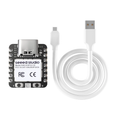
The Seeed Studio XIAO ESP32-C3 is a thumbnail-sized development board built around Espressif's ESP32-C3 — a single-core 32-bit RISC-V microcontroller with built-in 2.4 GHz Wi-Fi and Bluetooth Low Energy 5.0. At just 21 × 17.5 mm, it's one of the smallest fully-featured Wi-Fi dev boards you can buy, while still exposing 11 GPIOs, 3 reliable ADC channels, hardware I2C/SPI/UART, and an external antenna connector.
It's pre-soldered with castellated edges, so you can drop it on a breadboard for prototyping or reflow it directly onto a custom PCB for production. The USB-C port handles both power and programming; the RESET and BOOT buttons make recovery trivial when something goes wrong.
This board shines in battery-powered IoT and wearable projects: deep-sleep current is in the microamp range, BLE and Wi-Fi share the same antenna, and the form factor lets you tuck it into spaces that an ESP32 DevKit-V1 simply can't fit. Program it with the Arduino IDE (esp32 core), MicroPython, or ESP-IDF.
At a Glance
Specifications
| Parameter | Value |
| Microcontroller | ESP32-C3 (single-core 32-bit RISC-V) |
| Maximum Clock | 160 MHz |
| Flash Memory | 4 MB (external SPI flash) |
| SRAM | 400 KB |
| ROM | 384 KB |
| Wi-Fi | 2.4 GHz IEEE 802.11 b/g/n |
| Bluetooth | BLE 5.0 (no Classic) |
| USB | USB-C (Native USB Serial/JTAG) |
| GPIO | 11 pins (D0-D10) |
| Analog Input | 3 reliable channels (A0, A1, A2 on ADC1) + A3 on ADC2 (use only if A0-A2 unavailable) |
| I2C | SDA=D4 (GPIO6), SCL=D5 (GPIO7) |
| SPI | SCK=D8 (GPIO8), MISO=D9 (GPIO9), MOSI=D10 (GPIO10) |
| UART | TX=D6 (GPIO21), RX=D7 (GPIO20) |
| Power Input | 5V via USB-C, or 3.7V LiPo via solder pads on back |
| Output Pins | 5V (USB pass-through), 3V3 (regulator output) |
| Antenna | On-board PCB antenna + IPEX U.FL connector |
| Dimensions | 21 × 17.5 mm |
Pinout Diagram

Wiring Guide
Power and Programming
The XIAO ESP32-C3 is powered through USB-C (5V) or through the 5V/3V3/GND header pins. A 3.7V LiPo battery can be soldered to the BAT pads on the back of the board for portable use.
| Pin | Function | Notes |
|---|---|---|
| USB-C | 5V power + flashing | No external programmer needed |
| 5V | +5V input/output | Pass-through from USB-C |
| 3V3 | 3.3V regulator output | ~700 mA available for sensors |
| GND | Ground | Two GND pins |
| BAT pads | 3.7V LiPo input | Solder pads on PCB underside |
External LED + Button
Unlike larger ESP32 boards, the XIAO ESP32-C3 does not have a user-controllable on-board LED — only power and charge indicators. Add an external LED on any GPIO with a 220Ω current-limit resistor.
| Component | XIAO Pin | Details |
|---|---|---|
| LED + 220Ω → GND | D0 (GPIO2) | Anode to GPIO, cathode to GND through resistor |
| Button → GND | D1 (GPIO3) | Use INPUT_PULLUP |
I2C Devices
I2C uses D4 for SDA and D5 for SCL. The Wire library on the ESP32 Arduino core picks these pins up automatically.
| Sensor Pin | XIAO ESP32-C3 Pin |
|---|---|
| VCC | 3V3 |
| GND | GND |
| SDA | D4 (GPIO6) |
| SCL | D5 (GPIO7) |
SPI Devices
SPI maps to D8 (SCK), D9 (MISO), and D10 (MOSI). Pick any free GPIO for the CS line — D7 (GPIO20) is a common choice.
| SPI Signal | XIAO Pin | GPIO |
|---|---|---|
| SCK | D8 | GPIO8 |
| MISO | D9 | GPIO9 |
| MOSI | D10 | GPIO10 |
| CS | D7 | GPIO20 (or any free GPIO) |
UART / Serial
D6 is TX and D7 is RX for the second UART (Serial1). The USB-C port acts as the default Serial for the Arduino IDE Serial Monitor.
| UART Signal | XIAO Pin | GPIO |
|---|---|---|
| TX (Serial1) | D6 | GPIO21 |
| RX (Serial1) | D7 | GPIO20 |
| Serial Monitor | USB-C | Native USB CDC |
Code Examples
Arduino — External LED Blink
// XIAO ESP32-C3 - Blink an external LED on D0
// Board: "XIAO_ESP32C3" in the Arduino IDE (esp32 core)

#define LED_PIN D0   // GPIO2

void setup() {
  pinMode(LED_PIN, OUTPUT);
}

void loop() {
  digitalWrite(LED_PIN, HIGH);
  delay(250);
  digitalWrite(LED_PIN, LOW);
  delay(250);
}
Arduino — Wi-Fi Scan
// XIAO ESP32-C3 - Scan for nearby Wi-Fi networks
// Prints SSID, RSSI, and encryption type to Serial Monitor.

#include <WiFi.h>

void setup() {
  Serial.begin(115200);
  delay(500);
  WiFi.mode(WIFI_STA);
  WiFi.disconnect();
  delay(100);
  Serial.println("Wi-Fi scan starting...");
}

void loop() {
  int n = WiFi.scanNetworks();
  Serial.printf("Found %d networks:\n", n);
  for (int i = 0; i < n; i++) {
    Serial.printf("  %2d) %-32s  %4d dBm  %s\n",
                  i + 1,
                  WiFi.SSID(i).c_str(),
                  WiFi.RSSI(i),
                  WiFi.encryptionType(i) == WIFI_AUTH_OPEN ? "OPEN" : "ENC");
  }
  Serial.println();
  delay(5000);
}
Arduino — I2C Bus Scanner
// XIAO ESP32-C3 - I2C Bus Scanner
// SDA = D4 (GPIO6), SCL = D5 (GPIO7)

#include <Wire.h>

void setup() {
  Serial.begin(115200);
  while (!Serial) {}
  Wire.begin();   // Defaults to SDA=GPIO6, SCL=GPIO7 on XIAO ESP32-C3
  Serial.println("\nI2C Scanner");
}

void loop() {
  byte found = 0;
  for (byte addr = 1; addr < 127; addr++) {
    Wire.beginTransmission(addr);
    if (Wire.endTransmission() == 0) {
      Serial.printf("  Found device at 0x%02X\n", addr);
      found++;
    }
  }
  Serial.printf("%d device(s) found.\n\n", found);
  delay(2000);
}
MicroPython — BLE Advertise Hello
# XIAO ESP32-C3 - MicroPython BLE Advertise
# Flash the official MicroPython ESP32-C3 firmware, then run this.

import bluetooth
from time import sleep

ble = bluetooth.BLE()
ble.active(True)

name = b"XIAO-C3"
adv = bytearray(b'\x02\x01\x06')              # Flags: LE general discoverable
adv += bytes([len(name) + 1, 0x09]) + name    # Complete local name

ble.gap_advertise(100_000, adv_data=adv)
print("Advertising as", name.decode())

while True:
    sleep(1)