Overview
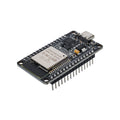
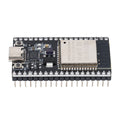
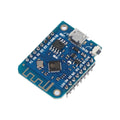
The ESP8266 NodeMCU board with built-in 0.96-inch 128×64 OLED display is the most ready-to-go IoT development board you can buy — everything you need to build a connected display project (weather widget, IoT dashboard, MQTT subscriber, network monitor, sensor visualizer) is integrated into one board. The ESP8266 chip handles WiFi (802.11 b/g/n) and runs your code; the SSD1306 OLED gives you an instant 128×64 visual output without any extra wiring; the onboard CH340 USB-to-serial bridge makes it programmable directly from a Type-C cable.
Use it for IoT projects that need a small visual output (weather station, AQI monitor, crypto ticker, network attached display, MQTT subscriber, temperature/humidity logger, NTP clock, etc.). Programmable from the Arduino IDE with the ESP8266 board package, MicroPython, or NodeMCU's Lua firmware. The OLED shares I2C with GPIO5 (SCL) and GPIO4 (SDA) by default, leaving 9 other usable GPIO pins free for sensors, buttons, and accessories.
The board has all the standard ESP8266 features: 4 MB flash, deep-sleep capability, OTA firmware updates over WiFi, SPI / UART / I2C buses, ADC input, and onboard 3.3V regulator. Power can come from the Type-C port (5V from PC or USB charger) or directly from the VIN pin (5V) or 3V3 pin.
At a Glance
Specifications
| Parameter | Value |
| Microcontroller | ESP-12E module (ESP8266EX SoC) |
| Clock Speed | 80 MHz (160 MHz boostable) |
| Flash Memory | 4 MB |
| RAM | ~50 kB usable |
| WiFi | 802.11 b/g/n, 2.4 GHz |
| OLED Display | 0.96 inch, 128×64 px, white or blue, SSD1306 driver |
| OLED Interface | I2C, default address 0x3C |
| OLED I2C Pins | SCL = GPIO5 (D1), SDA = GPIO4 (D2) |
| USB Bridge | CH340 (USB Type-C connector) |
| Operating Voltage | 3.3V (regulator from 5V USB or VIN) |
| VIN Range | 4.5V - 12V (regulator handles down to 3.3V) |
| GPIO Pins | D0-D8 (note D3, D4 have boot strapping caveats) |
| ADC | 1 channel, 10-bit, 0-3.3V (A0) |
| Dimensions | ~58 × 31 mm |
Pinout Diagram

Pin Reference
| NodeMCU Label | GPIO | Function | Notes |
|---|---|---|---|
| D0 | GPIO16 | WAKE (deep sleep wakeup) | Wire to RST for deep-sleep wake |
| D1 | GPIO5 | I2C SCL | Wired to onboard OLED SCL |
| D2 | GPIO4 | I2C SDA | Wired to onboard OLED SDA |
| D3 | GPIO0 | FLASH (boot mode) | Pull HIGH at boot (default has pull-up) |
| D4 | GPIO2 | TXD1 / built-in LED | Pull HIGH at boot |
| D5 | GPIO14 | SPI SCLK | HSPI clock |
| D6 | GPIO12 | SPI MISO | HSPI input |
| D7 | GPIO13 | SPI MOSI | HSPI output |
| D8 | GPIO15 | SPI CS | Pull LOW at boot |
| RX | GPIO3 | UART RXD | Connected to USB serial |
| TX | GPIO1 | UART TXD | Connected to USB serial |
| A0 | ADC0 | Analog input | 0-3.3V, 10-bit |
| 3V3 / VIN / GND | — | Power | 3V3 regulated, VIN takes 5-12V |
Code Examples
Display "Hello World" on the OLED (Arduino IDE)
#include <Wire.h>
#include <Adafruit_GFX.h>
#include <Adafruit_SSD1306.h>

#define SCREEN_WIDTH 128
#define SCREEN_HEIGHT 64
Adafruit_SSD1306 display(SCREEN_WIDTH, SCREEN_HEIGHT, &Wire, -1);

void setup() {
  Serial.begin(115200);
  Wire.begin(4, 5);  // SDA=GPIO4, SCL=GPIO5
  if (!display.begin(SSD1306_SWITCHCAPVCC, 0x3C)) {
    Serial.println("OLED not found");
    for (;;);
  }
  display.clearDisplay();
  display.setTextSize(2);
  display.setTextColor(SSD1306_WHITE);
  display.setCursor(0, 16);
  display.println("Hello!");
  display.display();
}

void loop() {}
WiFi-Connected OLED IP Display
#include <ESP8266WiFi.h>
#include <Wire.h>
#include <Adafruit_GFX.h>
#include <Adafruit_SSD1306.h>

Adafruit_SSD1306 display(128, 64, &Wire, -1);
const char* ssid = "your-ssid";
const char* pwd  = "your-pwd";

void setup() {
  Wire.begin(4, 5);
  display.begin(SSD1306_SWITCHCAPVCC, 0x3C);
  display.clearDisplay();
  display.setTextSize(1);
  display.setTextColor(SSD1306_WHITE);
  display.setCursor(0,0);
  display.println("Connecting WiFi...");
  display.display();

  WiFi.begin(ssid, pwd);
  while (WiFi.status() != WL_CONNECTED) delay(200);

  display.clearDisplay();
  display.setCursor(0,0);
  display.println("Connected!");
  display.println(WiFi.localIP());
  display.display();
}

void loop() {}
Frequently Asked Questions
Wire.begin(4, 5) before display.begin() — the OLED is wired to GPIO4 (SDA) and GPIO5 (SCL), not the default ESP8266 I2C pins. Also confirm the I2C address is 0x3C (some clones are 0x3D). Run an I2C scanner to verify the device shows up.https://arduino.esp8266.com/stable/package_esp8266com_index.json to "Additional Board Manager URLs". Then Tools → Board → Boards Manager, search "esp8266" and install. Pick "NodeMCU 1.0 (ESP-12E Module)".