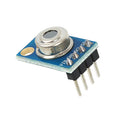
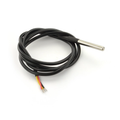
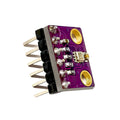
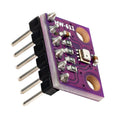
Overview
The MAX6675 is a tiny, friendly little module that lets you read a K-type thermocouple from any microcontroller using a 3-wire SPI-style interface. Thermocouples are the workhorse of high-temperature measurement — they survive in places where ordinary digital temperature sensors melt, char, or just give up. With a standard K-type probe, this module reads temperatures from 0°C all the way up to 1024°C, with a clean 0.25°C resolution.
Where things like the DS18B20 max out around 125°C, the MAX6675 happily handles soldering irons, kilns, BBQ smokers, reflow ovens, espresso boilers, and engine exhaust manifolds. The chip handles the hard parts for you: it amplifies the tiny microvolt thermocouple signal, performs cold-junction compensation using an internal sensor, and gives you a clean 12-bit digital reading over SPI.
Hooking it up is satisfyingly simple. Power and ground, three SPI-ish wires (CS, SCK, SO), and a 2-screw terminal that holds the bare ends of your K-type thermocouple wire. Tighten the screws, observe the polarity (red is negative, yellow is positive in standard K-type), and within a few lines of code you're streaming high-temperature readings to your serial monitor.
At a Glance
Specifications
| Parameter | Value |
| Operating Voltage | 3.3V - 5V DC |
| Operating Current | ~1.5 mA |
| Temperature Range | 0°C to 1024°C |
| Resolution | 0.25°C |
| Accuracy | ±1.5°C (typical, 0-700°C) |
| ADC Resolution | 12-bit |
| Conversion Time | ~170 ms (read every ~220 ms) |
| Interface | Read-only SPI (CS, SCK, SO) |
| Thermocouple Type | K-type (Chromel/Alumel) |
| Cold Junction Comp. | Internal, automatic |
| Open Thermocouple Detect | Yes |
| Module Dimensions | ~25 x 15 mm |
Pinout Diagram

+ and - printed next to the screw terminal.Wiring Guide
Arduino Wiring
The MAX6675 is read-only SPI, so you can either use Arduino's hardware SPI pins or any 3 digital pins with a bit-bang library. The Adafruit MAX6675 library works with any pins.
| Module Pin | Arduino Pin |
|---|---|
| VCC | 5V |
| GND | GND |
| SCK | D6 |
| CS | D5 |
| SO | D4 |
+, red to -. Snug, not gorilla-tight.ESP32 Wiring
ESP32 has plenty of GPIO and a hardware SPI peripheral (VSPI). You can use either bit-bang on any pins or HSPI/VSPI.
| Module Pin | ESP32 Pin |
|---|---|
| VCC | 3.3V |
| GND | GND |
| SCK | GPIO18 (VSPI SCK) |
| CS | GPIO5 (VSPI CS) |
| SO | GPIO19 (VSPI MISO) |
Raspberry Pi Wiring
Use the Pi's hardware SPI. Enable SPI in sudo raspi-config → Interfaces.
| Module Pin | Pi Pin |
|---|---|
| VCC | 3.3V (pin 1) |
| GND | GND (pin 6) |
| SCK | GPIO11 / SCLK (pin 23) |
| CS | GPIO8 / CE0 (pin 24) |
| SO | GPIO9 / MISO (pin 21) |
Raspberry Pi Pico Wiring
Pico has two SPI peripherals. We'll use SPI0 on its default pins.
| Module Pin | Pico Pin |
|---|---|
| VCC | 3V3 (OUT) — pin 36 |
| GND | GND — pin 38 |
| SCK | GP18 (SPI0 SCK) — pin 24 |
| CS | GP17 — pin 22 |
| SO | GP16 (SPI0 RX) — pin 21 |
Code Examples
Arduino
// MAX6675 K-type thermocouple - Arduino
// Library: Adafruit MAX6675 (Library Manager)

#include <max6675.h>

const int CS_PIN  = 5;
const int SCK_PIN = 6;
const int SO_PIN  = 4;

MAX6675 thermo(SCK_PIN, CS_PIN, SO_PIN);

void setup() {
  Serial.begin(9600);
  delay(500); // chip needs time to stabilize on first power-up
  Serial.println("MAX6675 ready");
}

void loop() {
  float c = thermo.readCelsius();
  float f = thermo.readFahrenheit();

  if (isnan(c)) {
    Serial.println("Thermocouple disconnected!");
  } else {
    Serial.print("Temp: ");
    Serial.print(c);
    Serial.print(" C  /  ");
    Serial.print(f);
    Serial.println(" F");
  }

  delay(250); // MAX6675 needs ~220ms between reads
}
ESP32
// MAX6675 K-type thermocouple - ESP32
// Same Adafruit MAX6675 library works fine on ESP32.

#include <max6675.h>

const int CS_PIN  = 5;   // GPIO5
const int SCK_PIN = 18;  // GPIO18
const int SO_PIN  = 19;  // GPIO19

MAX6675 thermo(SCK_PIN, CS_PIN, SO_PIN);

void setup() {
  Serial.begin(115200);
  delay(500);
  Serial.println("MAX6675 ready");
}

void loop() {
  float c = thermo.readCelsius();
  if (isnan(c)) {
    Serial.println("Thermocouple disconnected!");
  } else {
    Serial.printf("Temp: %.2f C\n", c);
  }
  delay(300);
}
Raspberry Pi (Python)
# MAX6675 K-type thermocouple - Raspberry Pi
# Uses kernel SPI via spidev. Enable SPI in raspi-config first.
# pip install spidev

import spidev
import time

spi = spidev.SpiDev()
spi.open(0, 0)            # bus 0, CE0
spi.max_speed_hz = 1000000
spi.mode = 0

def read_temp_c():
    raw = spi.xfer2([0x00, 0x00])
    value = (raw[0] << 8) | raw[1]

    # Bit 2 = open-thermocouple flag
    if value & 0x4:
        return None

    # Bits 14:3 hold the 12-bit temperature, 0.25 C per step
    temp = (value >> 3) * 0.25
    return temp

try:
    while True:
        c = read_temp_c()
        if c is None:
            print("Thermocouple disconnected!")
        else:
            print(f"Temp: {c:.2f} C")
        time.sleep(0.3)
except KeyboardInterrupt:
    spi.close()
Raspberry Pi Pico (MicroPython)
# MAX6675 K-type thermocouple - Pico (MicroPython)
# SPI0: SCK=GP18, MISO=GP16, CS=GP17

from machine import Pin, SPI
import time

spi = SPI(0, baudrate=1000000, polarity=0, phase=0,
          sck=Pin(18), mosi=Pin(19), miso=Pin(16))
cs = Pin(17, Pin.OUT, value=1)

def read_temp_c():
    cs.value(0)
    raw = spi.read(2)
    cs.value(1)
    value = (raw[0] << 8) | raw[1]

    if value & 0x4:
        return None
    return (value >> 3) * 0.25

while True:
    c = read_temp_c()
    if c is None:
        print("Thermocouple disconnected!")
    else:
        print("Temp: {:.2f} C".format(c))
    time.sleep(0.3)
Frequently Asked Questions
delay(250) between reads. The chip needs ~220 ms per conversion — read it too fast and you'll get stale or zeroed values.