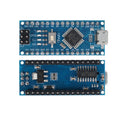
Overview
The ShillehTek Arduino Nano V3.0 is a compact, breadboard-friendly microcontroller board built around the ATmega328P running at 16MHz. This modernized version replaces the legacy Mini-USB port with a USB Type-C connector and uses the CH340C USB-to-Serial chip for broad driver compatibility across Windows, macOS, and Linux. The board ships pre-soldered with headers, so you can drop it straight into a breadboard and start prototyping.
With 22 usable digital I/O pins (including 6 PWM outputs), 8 analog inputs with 10-bit resolution, hardware I2C (A4/A5), SPI (D10-D13), and UART (D0/D1), the Nano covers the vast majority of hobbyist projects — sensor reading, motor control, LED animations, data logging, IoT prototypes, and robotics. It is fully compatible with the Arduino IDE and PlatformIO, and works with thousands of existing Arduino libraries.
The USB Type-C port and CH340C combination makes this board ideal for modern setups where Mini-USB cables are increasingly rare. Whether you're a beginner running your first Blink sketch or an experienced maker building a complex project, the Nano V3.0 delivers proven ATmega328P performance in a tiny 45mm x 18mm footprint.
At a Glance
Specifications
| Parameter | Value |
| Microcontroller | ATmega328P (AVR 8-bit) |
| Clock Speed | 16 MHz (external crystal) |
| USB-to-Serial Chip | CH340C |
| USB Connector | USB Type-C |
| Operating Voltage | 5V |
| Input Voltage (VIN) | 7-12V recommended (6-20V limit) |
| Digital I/O Pins | 22 (of which 6 provide PWM) |
| Analog Input Pins | 8 (A0-A7, 10-bit ADC) |
| DC Current per I/O Pin | 20 mA (40 mA absolute max) |
| Flash Memory | 32 KB (2 KB used by bootloader) |
| SRAM / EEPROM | 2 KB / 1 KB |
| Communication Interfaces | UART (D0/D1), I2C (A4/A5), SPI (D10-D13) |
| Dimensions | 45mm x 18mm |
Pinout Diagram

Wiring Guide
Powering the Nano
The Nano V3.0 can be powered through one of three methods. Only supply power through one source at a time to avoid damaging the onboard regulator.
| Source | Pin / Port | Details |
|---|---|---|
| USB Type-C | USB-C port | 5V regulated — easiest for programming and testing |
| Regulated 5V | 5V pin | Bypasses onboard regulator — must be clean 5V |
| Unregulated DC | VIN pin | 7-12V recommended; onboard regulator steps down to 5V |
| 3.3V Output | 3V3 pin | Provides ~50mA for 3.3V sensors and modules |
I2C Peripheral Wiring
The Nano's I2C bus uses pins A4 (SDA) and A5 (SCL). These are shared by every I2C device — just connect all SDA lines together and all SCL lines together, ensuring each device has a unique 7-bit address.
| I2C Peripheral Pin | Nano Pin |
|---|---|
| VCC | 5V (or 3V3 for 3.3V modules) |
| GND | GND |
| SDA | A4 |
| SCL | A5 |
SPI Peripheral Wiring
The Nano's hardware SPI peripheral uses fixed pins D10-D13. SS (Slave Select) can be any digital pin, but D10 is conventional.
| SPI Peripheral Pin | Nano Pin |
|---|---|
| VCC | 5V or 3V3 |
| GND | GND |
| SCK (Clock) | D13 |
| MISO (Master In) | D12 |
| MOSI (Master Out) | D11 |
| SS / CS (Slave Select) | D10 (or any digital pin) |
ICSP Header (In-Circuit Serial Programming)
The 6-pin ICSP header exposes the SPI lines directly and is used for programming the ATmega328P with an external programmer (like USBasp or another Arduino running ArduinoISP). This is useful if the bootloader is corrupted or if you want to write directly to flash without using the CH340C.
| ICSP Pin | Function | ATmega328P |
|---|---|---|
| 1 (MISO) | Master In, Slave Out | PB4 / D12 |
| 2 (VCC) | +5V | VCC |
| 3 (SCK) | Serial Clock | PB5 / D13 |
| 4 (MOSI) | Master Out, Slave In | PB3 / D11 |
| 5 (RESET) | Active-low reset | RST |
| 6 (GND) | Ground | GND |
Code Examples
Blink (Onboard LED)
// Blink the onboard LED (connected to D13)
// The classic "Hello World" of microcontrollers

void setup() {
  // Configure pin D13 (LED_BUILTIN) as an output
  pinMode(LED_BUILTIN, OUTPUT);
}

void loop() {
  digitalWrite(LED_BUILTIN, HIGH);   // Turn LED on
  delay(1000);                       // Wait 1 second
  digitalWrite(LED_BUILTIN, LOW);    // Turn LED off
  delay(1000);                       // Wait 1 second
}
Serial Communication
// Print a counter over USB Serial
// Open Serial Monitor at 9600 baud to see output

unsigned long counter = 0;

void setup() {
  Serial.begin(9600);
  while (!Serial) {
    ; // Wait for serial port to connect (needed on some boards)
  }
  Serial.println("Arduino Nano V3.0 ready!");
}

void loop() {
  Serial.print("Counter: ");
  Serial.println(counter);
  counter++;
  delay(500);
}
I2C Scanner
// Scan the I2C bus and print the addresses of any devices found
// Use SDA=A4, SCL=A5 on the Nano

#include

void setup() {
  Wire.begin();
  Serial.begin(9600);
  while (!Serial);
  Serial.println("I2C Scanner");
}

void loop() {
  byte error, address;
  int nDevices = 0;

  Serial.println("Scanning...");

  for (address = 1; address < 127; address++) {
    Wire.beginTransmission(address);
    error = Wire.endTransmission();

    if (error == 0) {
      Serial.print("I2C device found at 0x");
      if (address < 16) Serial.print("0");
      Serial.println(address, HEX);
      nDevices++;
    }
  }

  if (nDevices == 0) {
    Serial.println("No I2C devices found");
  } else {
    Serial.print(nDevices);
    Serial.println(" device(s) found");
  }

  delay(5000);
}
Analog Read
// Read an analog value from A0 (e.g., potentiometer, LDR, analog sensor)
// Convert the 10-bit reading (0-1023) to a voltage (0-5V)

const int SENSOR_PIN = A0;

void setup() {
  Serial.begin(9600);
  while (!Serial);
  Serial.println("Analog Read on A0");
}

void loop() {
  int rawValue = analogRead(SENSOR_PIN);
  float voltage = rawValue * (5.0 / 1023.0);

  Serial.print("Raw: ");
  Serial.print(rawValue);
  Serial.print("  Voltage: ");
  Serial.print(voltage, 3);
  Serial.println(" V");

  delay(200);
}
PWM Fade
// Fade an LED in and out using PWM
// Connect an LED (with 220 ohm resistor) from D9 to GND
// D9 is one of the PWM-capable pins (marked with ~ on the silkscreen)

const int LED_PIN = 9;
int brightness = 0;
int fadeStep = 5;

void setup() {
  pinMode(LED_PIN, OUTPUT);
}

void loop() {
  analogWrite(LED_PIN, brightness);

  brightness += fadeStep;
  if (brightness <= 0 || brightness >= 255) {
    fadeStep = -fadeStep;  // Reverse direction at endpoints
  }

  delay(20);
}