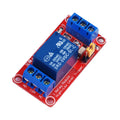
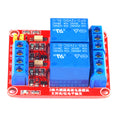
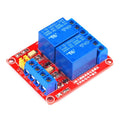
Overview
This 12V single-channel relay module accepts commands from an included 433 MHz wireless remote — no microcontroller needed. Press a button on the remote, the relay clicks, your AC or DC load switches. Perfect for remote-controlled garage doors, RC fans, lighting projects, and "wireless on/off" projects where you want a physical button you can carry around.
The module supports three switching modes (M / T / L for Momentary / Toggle / Latching), selectable by jumpers. The relay's NC/COM/NO terminals can switch up to 10A at 250VAC or 30VDC, giving plenty of headroom for typical home automation loads. The board's 433 MHz receiver chip has an EEPROM that remembers up to 4 paired remotes — you can train it to recognize new remotes by holding the small onboard learn button.
At a Glance
Specifications
| Parameter | Value |
| Operating Voltage | 12V DC |
| Operating Current | ~50 mA (relay energized) |
| RF Frequency | 433.92 MHz |
| Decoder IC | EV1527 / PT2262 / 2272 (compatible) |
| Reception Distance | ~30 meters open-air |
| Relay Type | SPDT, single channel |
| Contact Rating (AC) | 10A @ 250VAC |
| Contact Rating (DC) | 10A @ 30VDC |
| Output Modes (jumper-selectable) | M (Momentary), T (Toggle), L (Latching with self-hold) |
| Output Terminals | NC, COM, NO (3-position screw block) |
| Power Terminals | +V, -V (12V input) |
| Remote Capacity | Up to 4 paired remotes |
| Remote Buttons | 4 keys (A / B / C / D), CR2032 battery |
Pinout Diagram

Wiring Guide
Low-Voltage Load (12V LED, fan, motor)
Power the module with 12V DC. Wire the load through COM and NO to switch on when the relay is energized.
| Terminal | Connect To |
|---|---|
| +V | +12V DC supply |
| -V | Supply ground |
| COM | Load supply + |
| NO | Load + terminal |
| NC | (unused) |
| Load - | Returns to supply ground |
Mains AC Load
Switch the LIVE / HOT wire through the relay; pass NEUTRAL straight from supply to load. Always observe local electrical codes — if you're not comfortable wiring mains, hire an electrician.
| Terminal | Connect To |
|---|---|
| +V / -V | 12V DC for the module logic |
| COM | Mains LIVE from supply |
| NO | LIVE to load |
| NC | (unused, or "always-on" line) |
Mode Selection (OUTSET Jumper)
The board has a 3-position jumper labeled OUTSET with positions 1 / 2 / 3 = M / T / L:
| Position | Mode | Behavior |
|---|---|---|
| 1 = M | Momentary | Relay energized only while remote button is held |
| 2 = T | Toggle | One press = on, next press = off |
| 3 = L | Latching / Self-Hold | One press latches relay until power cycle |
Pairing a New Remote (Learn Mode)
The decoder IC has 4 memory slots. To learn a new remote:
- Power the relay module from 12V DC
- Press and hold the small LEARN button on the board for ~3 seconds — the LED lights solid
- Press any button on the remote you want to pair
- The LED flashes a few times to confirm the code is stored
- Test by pressing the button — relay should click
To erase ALL paired remotes, hold the LEARN button for 8+ seconds until the LED flashes rapidly then turns off.
Code Examples
This module operates fully standalone — no microcontroller code required. The included remote is the only "interface". The examples below show how to also trigger the module from an Arduino if you want to combine remote and programmatic control on the same load.
Arduino — Send 433 MHz Codes That Imitate the Remote
// Fake the wireless remote from an Arduino + cheap 433 MHz TX module
// Library: rc-switch by sui77

#include <RCSwitch.h>

RCSwitch tx = RCSwitch();

void setup() {
  tx.enableTransmit(10);    // TX module DATA pin
  tx.setProtocol(1);
  tx.setPulseLength(350);
}

void loop() {
  // Replace 1234567 with the code your remote actually sends.
  // To find it: run rc-switch's ReceiveDemo with a separate RX module
  // and press the remote's button.
  tx.send(1234567, 24);
  delay(2000);
}
Arduino — Sniff the Remote's Code
// Use a 433 MHz RX module + Arduino to learn what code the remote sends
// Library: rc-switch by sui77

#include <RCSwitch.h>

RCSwitch rx = RCSwitch();

void setup() {
  Serial.begin(9600);
  rx.enableReceive(0);  // Interrupt 0 = D2 on UNO
}

void loop() {
  if (rx.available()) {
    Serial.print("Code: ");
    Serial.print(rx.getReceivedValue());
    Serial.print("  Bits: ");
    Serial.println(rx.getReceivedBitlength());
    rx.resetAvailable();
  }
}
Raspberry Pi (Python) — Send Codes via Cheap TX Module
#!/usr/bin/env python3
# Install: pip install rpi-rf
# TX module DATA -> GPIO 17 (Pin 11)

from rpi_rf import RFDevice
import time

tx = RFDevice(17)
tx.enable_tx()

# Replace with your remote's actual code (use receive script first)
tx.tx_code(1234567, 1, 350)
time.sleep(1)
tx.cleanup()