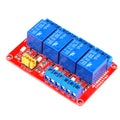
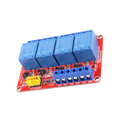
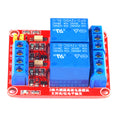
Overview
This 4-Channel Programmable Relay Module is a complete standalone delay/timer/sequencing controller built around an on-board microcontroller, a 4-digit 7-segment display, four optoisolated trigger inputs, and four 10A relays. Each channel can be programmed for delay-on, delay-off, pulse, or motor-reversing modes — all through the on-board SET/UP/DOWN/OK buttons. No microcontroller required for basic use.
Typical applications include garage door automation, water pump cycling, lighting sequences, motor reversal control (forward / pause / reverse), and any project where you need accurate sub-second to multi-hour timed switching of mains-voltage loads. The module supports two power inputs: a 6.5-25V terminal block (for vehicle / industrial applications) and a 5V DC barrel jack (for desktop power supplies).
For projects that need a microcontroller in the loop, each of the 4 trigger inputs is optoisolated and accepts a 5V or 3.3V signal — wire them to GPIO pins on an Arduino, ESP32, Raspberry Pi, or Pico to fire any pre-programmed timing sequence on demand.
At a Glance
Specifications
| Parameter | Value |
| Number of Channels | 4 independent relays |
| Power Input 1 | DC 6.5V - 25V (screw terminal) |
| Power Input 2 | DC 5V (barrel jack) |
| Quiescent Current | ~30 mA (display + MCU) |
| Per-Channel Current (relay on) | ~70 mA |
| Trigger Input | Optoisolated, 3.3V or 5V logic |
| Relay Type | SRD-05VDC-SL-C (SPDT, NO/NC/COM) |
| Relay Switching Capacity | 10A @ 250VAC, 10A @ 30VDC |
| Programmable Modes | Delay-on, Delay-off, Pulse, Cycle, Motor reverse |
| Time Range | 0.01 second to 999 hours (mode-dependent) |
| Display | 4-digit 7-segment LED |
| Buttons | SET, +, ++, OK |
| Operating Temperature | -20 degC to +60 degC |
| Dimensions | ~85 x 55 mm |
Pinout Diagram

Wiring Guide
Standalone (No Microcontroller)
The simplest way to use the module: power it from 5V (barrel jack) or 6.5-25V (terminal block), program a delay/pulse/cycle mode through the on-board buttons, and wire your load to one of the relay outputs. Trigger comes from a button or switch on the IN terminals.
| Connection | Goes To |
|---|---|
| VCC / GND (Power 1) | 6.5V-25V supply |
| or DC barrel jack | 5V power adapter |
| IN1 / IN2 / IN3 / IN4 | Push button to GND (or +5V, depending on mode setting) |
| Relay COM | Mains hot (or DC + line) |
| Relay NO | Load hot (lit when relay activates) |
Arduino-Triggered Operation
Use any Arduino digital pin to fire the trigger inputs. The optoisolated input draws only a few mA, so any GPIO can drive it. Power the relay module from its own supply — do NOT power it from the Arduino's 5V pin if more than one relay will be on at a time.
| Module Pin | Arduino Pin |
|---|---|
| Module GND | Arduino GND (shared) |
| IN1 | D2 |
| IN2 | D3 |
| IN3 | D4 |
| IN4 | D5 |
ESP32-Triggered Operation
The optoisolated inputs work just as well with 3.3V signals from an ESP32. Tie a common ground between the ESP32 and the relay module's power supply.
| Module Pin | ESP32 Pin |
|---|---|
| Module GND | ESP32 GND (shared) |
| IN1 | GPIO 12 |
| IN2 | GPIO 13 |
| IN3 | GPIO 14 |
| IN4 | GPIO 15 |
Raspberry Pi-Triggered Operation
Pi GPIO is 3.3V — perfect for these optoisolated inputs. Power the relay module from its own supply and tie GNDs together.
| Module Pin | Pi Pin |
|---|---|
| Module GND | Pi GND (Pin 6) |
| IN1 | Pin 11 (GPIO 17) |
| IN2 | Pin 13 (GPIO 27) |
| IN3 | Pin 15 (GPIO 22) |
| IN4 | Pin 16 (GPIO 23) |
Code Examples
Arduino - Trigger All 4 Channels in Sequence
// 4-Channel programmable relay - fire each input in sequence
// Wire IN1-IN4 to D2-D5, share GND with the module

const int triggers[4] = {2, 3, 4, 5};

void setup() {
  for (int i = 0; i < 4; i++) {
    pinMode(triggers[i], OUTPUT);
    digitalWrite(triggers[i], LOW);
  }
}

void pulseTrigger(int pin) {
  digitalWrite(pin, HIGH);
  delay(100);                  // 100 ms pulse fires the channel
  digitalWrite(pin, LOW);
}

void loop() {
  for (int i = 0; i < 4; i++) {
    pulseTrigger(triggers[i]);
    delay(2000);               // wait between channels
  }
}
Raspberry Pi (Python)
#!/usr/bin/env python3
# 4-channel programmable relay - sequence trigger from Pi GPIO

import RPi.GPIO as GPIO
import time

TRIGGERS = [17, 27, 22, 23]   # GPIO 17, 27, 22, 23
GPIO.setmode(GPIO.BCM)
for p in TRIGGERS:
    GPIO.setup(p, GPIO.OUT, initial=GPIO.LOW)

try:
    while True:
        for p in TRIGGERS:
            GPIO.output(p, GPIO.HIGH)
            time.sleep(0.1)
            GPIO.output(p, GPIO.LOW)
            time.sleep(2)
except KeyboardInterrupt:
    GPIO.cleanup()