Overview
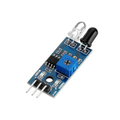
The TCRT5000 is a short-range optical reflectance sensor — an infrared LED and a phototransistor mounted side-by-side, facing the same direction. The IR LED constantly emits light; the phototransistor measures how much of that light bounces back from a surface. Bright surfaces reflect more (higher signal), dark surfaces absorb more (lower signal). That simple behavior makes it the canonical "line follower" sensor for mini robots: with the sensor pointing at the floor, it can tell when the robot is over a black tape line vs. a white surface.
This breakout adds a comparator IC, a sensitivity-adjustment trim pot, an analog output (AO) for raw readings, a digital output (DO) that flips state when the reading crosses the trim pot threshold, and indicator LEDs for power and trigger state. Range is short — the TCRT5000 works best at 1-15 mm above the surface.
Beyond line following, the same module works for object presence detection at very short range, surface contrast monitoring, encoder-wheel pulse counting, and small-object proximity sensing in conveyor / picker projects.
At a Glance
Specifications
| Parameter | Value |
| Sensor | Vishay TCRT5000 IR reflective sensor |
| Operating Voltage | 3.3V - 5V DC |
| Operating Current | ~20 mA |
| IR Emitter Wavelength | 950 nm |
| Detection Range | 1 - 15 mm (optimal ~2-5 mm) |
| Comparator IC | LM393 with adjustable threshold |
| Analog Output (AO) | ~0V (light surface) to ~VCC (dark surface) |
| Digital Output (DO) | HIGH/LOW based on trim pot threshold |
| Indicator LEDs | Power LED + DO state LED |
| Operating Temperature | -25 degC to +85 degC |
| Dimensions | ~32 x 14 mm |
Pinout Diagram

Wiring Guide
Arduino Wiring
Wire AO to an analog input for raw readings, or DO to a digital input if you only care about "is the line under me?". Most line-follower projects use DO with the trim pot tuned to the boundary between line and floor.
| TCRT5000 Pin | Arduino Pin |
|---|---|
| VCC | 5V |
| GND | GND |
| AO | A0 |
| DO | D2 (optional) |
ESP32 Wiring
The 3.3V supply works well. Use any ADC1 channel (GPIO 32-39) for the analog read; ADC2 channels conflict with Wi-Fi.
| TCRT5000 Pin | ESP32 Pin |
|---|---|
| VCC | 3V3 |
| GND | GND |
| AO | GPIO 34 |
| DO | GPIO 35 (optional) |
Raspberry Pi Wiring
The Pi has no built-in ADC. Use an ADS1115 over I2C to read AO, or just read DO directly on a GPIO if "line / no line" is enough.
| Connection | Pi / ADC |
|---|---|
| TCRT5000 VCC | Pin 1 (3.3V) |
| TCRT5000 GND | Pin 6 (GND) |
| TCRT5000 AO | ADS1115 A0 |
| TCRT5000 DO | Pin 11 (GPIO 17) |
| ADS1115 SDA | Pin 3 (GPIO 2) |
| ADS1115 SCL | Pin 5 (GPIO 3) |
Raspberry Pi Pico Wiring
The Pico has built-in 12-bit ADC on GP26-28. Power the sensor at 3.3V to keep AO within the 0-3.3V ADC range.
| TCRT5000 Pin | Pico Pin |
|---|---|
| VCC | 3V3 (OUT) |
| GND | GND |
| AO | GP26 (ADC0) |
| DO | GP15 (optional) |
Code Examples
Arduino - Print Raw Reflectance
// TCRT5000 - Print analog and digital readings on Arduino
// Wire VCC=5V, GND=GND, AO=A0, DO=D2 (optional)

const int aoPin = A0;
const int doPin = 2;

void setup() {
  Serial.begin(9600);
  pinMode(doPin, INPUT);
}

void loop() {
  int raw = analogRead(aoPin);
  int line = digitalRead(doPin);

  Serial.print("Raw=");  Serial.print(raw);
  Serial.print("   DO="); Serial.print(line);
  Serial.println(line == LOW ? "  [LINE DETECTED]" : "");

  delay(100);
}
Arduino - Simple Line Follower (3-Sensor Array)
// 3-sensor line follower using three TCRT5000 modules
// Sensors face the floor across the robot's width
// Left = D2, Center = D3, Right = D4
// Motor pins go to your motor driver of choice

const int sLeft = 2, sCenter = 3, sRight = 4;
const int motorL = 9, motorR = 10;   // PWM motor speeds

void setup() {
  pinMode(sLeft, INPUT);
  pinMode(sCenter, INPUT);
  pinMode(sRight, INPUT);
  pinMode(motorL, OUTPUT);
  pinMode(motorR, OUTPUT);
}

void loop() {
  bool L = digitalRead(sLeft)   == LOW;   // LOW = on line
  bool C = digitalRead(sCenter) == LOW;
  bool R = digitalRead(sRight)  == LOW;

  if (C && !L && !R)        { analogWrite(motorL, 180); analogWrite(motorR, 180); } // straight
  else if (L && !R)          { analogWrite(motorL, 80);  analogWrite(motorR, 200); } // turn left
  else if (R && !L)          { analogWrite(motorL, 200); analogWrite(motorR, 80);  } // turn right
  else                       { analogWrite(motorL, 0);   analogWrite(motorR, 0);   } // stop
}
Raspberry Pi Pico - MicroPython
# TCRT5000 on Raspberry Pi Pico (MicroPython)
# AO -> GP26 (ADC0); DO -> GP15

from machine import ADC, Pin
import time

ao = ADC(26)
do = Pin(15, Pin.IN)

while True:
    raw = ao.read_u16()             # 0 - 65535
    line = do.value() == 0          # LOW = line detected
    print("Raw={:5d}  Line={}".format(raw, "YES" if line else "no"))
    time.sleep(0.1)