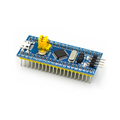
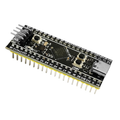
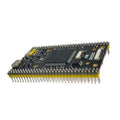
Overview
The STM32F103C8T6 "Blue Pill" is a tiny, cheap, and powerful 32-bit ARM Cortex-M3 development board. With 64 KB of Flash, 20 KB of SRAM, and a 72 MHz clock, it dramatically outperforms an Arduino Uno (16 MHz, 8-bit) at a similar price point — making it the natural step up for makers who have outgrown the Uno.
The board breaks out 32 GPIO pins on two rows of 0.1" headers, plus a 4-pin SWD programming header, dual 12-bit ADCs, hardware I2C, SPI, UART, USB 2.0, CAN, and PWM on most pins. The STM32 itself is a 3.3V chip, but most GPIO pins are 5V tolerant, which makes it easier to mix with classic 5V Arduino-era peripherals.
This is the unsoldered version — headers are included separately so you can solder them yourself or wire directly into a project. The board is supported in the Arduino IDE (via the STM32duino core), in STM32CubeIDE for full HAL/LL development, and in PlatformIO. Flashing options include ST-LINK V2 (SWD, fastest), USB-to-Serial via the UART1 pins, and DFU over USB if you flash a bootloader first.
At a Glance
Specifications
| Parameter | Value |
| Microcontroller | STMicro STM32F103C8T6 (32-bit ARM Cortex-M3) |
| Clock Frequency | 72 MHz (with external 8 MHz crystal) |
| Flash Memory | 64 KB (some C8T6 chips have 128 KB usable) |
| SRAM | 20 KB |
| Operating Voltage | 3.3V (LDO regulator on-board) |
| Input Voltage | 5V via USB or 5V pin; 3.3V on 3V3 pin |
| GPIO Logic Level | 3.3V (most GPIO are 5V tolerant) |
| Digital I/O Pins | 32 broken-out |
| Analog Input (ADC) Channels | 10 (12-bit, dual ADC) |
| PWM Channels | 15 (Timer-based) |
| Communication Interfaces | 2x I2C, 2x SPI, 3x UART, USB 2.0, CAN |
| Programming Interfaces | SWD (via ST-LINK), UART (via USB-TTL), USB DFU (with bootloader) |
| USB Connector | Micro-USB |
| BOOT0 / BOOT1 Jumpers | 2x yellow jumpers, select boot source |
| Reset Button | Yes |
| On-board LED | PC13 (active LOW) |
| Headers | Unsoldered (included separately) |
| Dimensions | ~53 x 23 mm |
Pinout Diagram

Wiring Guide
Flashing via ST-LINK V2 (SWD)
The fastest, most reliable way to flash and debug the Blue Pill. Use the 4-pin SWD header at the top edge of the board.
| Blue Pill SWD Pin | ST-LINK V2 Pin |
|---|---|
| 3V3 | 3.3V |
| SWDIO | SWDIO (DIO) |
| SWCLK | SWCLK (CLK) |
| GND | GND |
Flashing via USB-to-TTL Adapter (UART1)
If you don't have an ST-LINK, you can flash the Blue Pill over UART1 (PA9/PA10) using any 3.3V USB-to-Serial adapter (CP2102, FT232RL, CH340, etc.). Set BOOT0 to 1 to enter the built-in serial bootloader.
| Blue Pill Pin | USB-TTL Adapter Pin |
|---|---|
| 5V (or 3V3) | VCC (match adapter) |
| GND | GND |
| PA9 (TX1) | RX |
| PA10 (RX1) | TX |
I2C Sensor Wiring
The Blue Pill exposes two hardware I2C buses. I2C1 is on PB6 (SCL) and PB7 (SDA) — these are the most common defaults in libraries.
| Sensor Pin | Blue Pill Pin | Details |
|---|---|---|
| VCC | 3V3 (or 5V if sensor is 5V-tolerant) | |
| GND | GND | |
| SDA | PB7 | I2C1 |
| SCL | PB6 | I2C1 |
External LED + Button
The on-board LED is on PC13 (active LOW). For an external LED + button test, use any free GPIO with a series resistor for the LED and INPUT_PULLUP for the button.
| Component | Blue Pill Pin | Details |
|---|---|---|
| LED Anode (long leg) | PA0 | Through 220 ohm resistor |
| LED Cathode (short leg) | GND | |
| Button Terminal 1 | PA1 | Use INPUT_PULLUP in code |
| Button Terminal 2 | GND |
Code Examples
Arduino IDE - Blink the On-board LED (PC13)
// STM32 Blue Pill - Blink on-board LED (PC13, active LOW)
// Install: Boards Manager -> "STM32 MCU based boards" by STMicroelectronics
// Select Board: "Generic STM32F1 series" -> Board part number "BluePill F103C8"
// Upload Method: "STM32CubeProgrammer (SWD)" if using ST-LINK
//                "STM32CubeProgrammer (Serial)" if using USB-TTL

void setup() {
  pinMode(PC13, OUTPUT);
}

void loop() {
  digitalWrite(PC13, LOW);   // LED on (active LOW)
  delay(500);
  digitalWrite(PC13, HIGH);  // LED off
  delay(500);
}
Arduino IDE - Read Analog (Potentiometer)
// STM32 Blue Pill - read a 10k potentiometer on PA0 (ADC channel 0)
// Wire pot ends to 3V3 and GND, wiper to PA0

const int potPin = PA0;

void setup() {
  Serial.begin(115200);
  pinMode(potPin, INPUT_ANALOG);
  analogReadResolution(12);   // 0 - 4095
}

void loop() {
  int raw = analogRead(potPin);
  float voltage = raw * 3.3 / 4095.0;
  Serial.print("Raw=");  Serial.print(raw);
  Serial.print("  V="); Serial.println(voltage, 3);
  delay(200);
}
Arduino IDE - I2C Bus Scan
// STM32 Blue Pill - scan I2C1 bus (SDA=PB7, SCL=PB6)

#include <Wire.h>

void setup() {
  Serial.begin(115200);
  Wire.begin();   // I2C1 on default pins PB6/PB7
  delay(500);
  Serial.println("STM32 Blue Pill I2C Scanner");
}

void loop() {
  byte found = 0;
  for (byte addr = 1; addr < 127; addr++) {
    Wire.beginTransmission(addr);
    if (Wire.endTransmission() == 0) {
      Serial.print("  Found device at 0x");
      if (addr < 16) Serial.print('0');
      Serial.println(addr, HEX);
      found++;
    }
  }
  if (found == 0) Serial.println("  No I2C devices found");
  Serial.println("---");
  delay(3000);
}
STM32CubeIDE - Bare-Metal Blink (HAL)
/* STM32CubeIDE auto-generates main.c when you make a project for STM32F103C8.
 * Configure PC13 as GPIO_Output in the .ioc file, then drop this in the loop. */

#include "main.h"

int main(void) {
  HAL_Init();
  SystemClock_Config();
  MX_GPIO_Init();

  while (1) {
    HAL_GPIO_WritePin(GPIOC, GPIO_PIN_13, GPIO_PIN_RESET); // LED on
    HAL_Delay(500);
    HAL_GPIO_WritePin(GPIOC, GPIO_PIN_13, GPIO_PIN_SET);   // LED off
    HAL_Delay(500);
  }
}