Overview
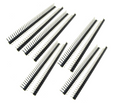
This 5-pack of 2x20 dual-row male pin headers is the standard GPIO header used on the Raspberry Pi Zero, Zero W, and Zero 2 W — and exactly the shape you need whenever you want to add a full 40-pin GPIO block to a custom PCB or breakout.
Each strip delivers 40 pins arranged in two rows of 20, on a 2.54mm (0.1") pitch. These are solid, straight-through male headers — solder one side to your board, then plug a stacking socket or ribbon cable onto the top. A 5-pack gives you plenty of spares for build variations, experiments, and the inevitable de-soldering do-over.
At a Glance
Pin Arrangement
2 × 20 (40 pins)
Orientation
Straight (Vertical)
Specifications
| Parameter |
Value |
| Pin Pitch |
2.54mm (0.1") |
| Pin Count |
40 pins (2 × 20) |
| Configuration |
Dual row, straight |
| Mating Length (top) |
~6mm |
| Solder Tail Length |
~3mm |
| Total Pin Length |
~11.5mm |
| Insulator Material |
PBT plastic, black |
| Pin Material |
Brass, nickel plated |
| Current Rating |
3A per pin |
| Voltage Rating |
250V AC/DC |
| Operating Temperature |
-40°C to +105°C |
How to Use
The most common use for this header is adding GPIO access to an un-soldered Raspberry Pi Zero. Drop the short pins through the 40 holes from the underside of the Pi, then solder each pin from the top side. Start with two diagonal corner pins to lock alignment before you solder the rest.
On a custom PCB, orient the longer mating pins toward whatever will plug in on top (stacking headers, ribbon cables, HAT-style add-ons) and the shorter tails into the board for soldering.
Alignment matters: Before you solder more than two pins, double-check that the plastic spacer sits flush against the board. Once all 40 pins are soldered, a crooked header is extremely tedious to correct.
Tip: A small strip of masking tape or a pair of 2.54mm female headers slipped over the mating pins keeps the header perfectly vertical while you solder the first few joints.
Mates with: 2x20 female stacking headers, 40-pin ribbon cable IDC sockets, and any standard 2.54mm GPIO HAT or pHAT header.
Frequently Asked Questions
Is this the right header for a Raspberry Pi Zero GPIO?
Yes. The Pi Zero, Zero W, and Zero 2 W all ship without a soldered header, and this 2x20 straight male header is the exact part that matches those 40 pads. Full-size Pi boards already have this header pre-soldered.
How do I break this into smaller sections?
These 2x20 dual-row headers aren't designed to be broken down the middle — the plastic is continuous across both rows. If you need a smaller dual-row piece, use diagonal cutters to carefully cut between columns, or buy a 1x40 single-row header instead.
Can I use this on Arduino or ESP32 projects?
Absolutely. Any custom PCB, breakout, or dev board that uses a standard 2.54mm dual-row footprint will accept this header. It's commonly used for OLED and TFT display modules, SBC breakout boards, and GPIO extenders.
Which side of the Pi Zero do I solder from?
Push the short (tail) end of the pins through the holes from the bottom (label side) of the Pi, then solder from the top (component) side. The longer mating pins should stick up through the top for HATs and ribbon cables to plug into.
What's the difference between this and a stacking header?
A stacking header has a female socket on top and long male pins on the bottom — you can plug things in and have pass-through pins for the next HAT. This is a plain male-only header, which is lighter, shorter, and better when nothing needs to stack above.
How many amps can each pin carry?
3A continuous per pin. Plenty for GPIO signaling and typical Pi 5V/3.3V supply rails. For high-current accessories, run a dedicated wire to the load rather than pulling large current through the header.
Related Tutorials