Overview
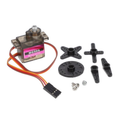
The SG92R is a small 9g hobby servo that delivers 2.5 kg-cm of torque using lightweight carbon-fiber gears — perfect for RC planes, robotic arms, pan/tilt camera mounts, and Arduino projects that need precise rotational control. It runs from 4.8-6V, accepts standard 50 Hz PWM signals, and has 0° to 180° travel.
Compared to the popular SG90, the SG92R is the same form factor but with carbon-fiber gears instead of plastic — much more durable for projects that see continuous use (CNC pen plotters, animatronic eyes, robotic claws). Connect it to any Arduino, ESP32, Raspberry Pi, or PCA9685 servo driver and you're up and running in minutes.
The wires are pre-attached: red is +5V, brown is GND, and orange is the PWM signal line. Total weight is just 9 grams, making it ideal for flying applications.
At a Glance
Specifications
| Parameter | Value |
| Operating Voltage | 4.8V - 6V DC |
| Stall Torque | 2.5 kg-cm @ 4.8V, 3.0 kg-cm @ 6V |
| Operating Speed | 0.1 sec/60° (4.8V), 0.08 sec/60° (6V) |
| Rotation Range | 180° (90° each direction from center) |
| Pulse Width Range | 500 µs (0°) to 2400 µs (180°) |
| PWM Frequency | 50 Hz (20 ms period) |
| Gear Material | Carbon fiber |
| Weight | 9 g |
| Dimensions | 22.8 × 12.2 × 28.5 mm |
| Wire Length | ~25 cm |
| Connector | Standard 3-pin JR / Futaba |
Pinout Diagram

Wiring Guide
Arduino Wiring
Arduino can power the servo directly from its 5V pin for testing, but for reliable operation use an external 5V supply that shares ground with the Arduino.
| Servo Wire | Arduino Pin |
|---|---|
| Red (+5V) | 5V (or external 5V) |
| Brown (GND) | GND |
| Orange (PWM) | Digital pin 9 (any PWM pin) |
ESP32 Wiring
The SG92R needs 5V — don't run it from the ESP32's 3.3V rail (it'll be weak and twitchy). Power VCC from an external 5V source and connect the PWM signal to any free GPIO. ESP32's 3.3V GPIO HIGH is enough to drive the signal pin.
| Servo Wire | ESP32 Pin |
|---|---|
| Red (+5V) | External 5V or VIN |
| Brown (GND) | GND (shared with ESP32) |
| Orange (PWM) | GPIO 18 (or any free GPIO) |
Raspberry Pi Pico Wiring
Pico GPIO is 3.3V which is enough for the servo signal pin. Power VCC from VBUS (5V from USB) or external 5V, sharing GND with Pico.
| Servo Wire | Pico Pin |
|---|---|
| Red (+5V) | VBUS (Pin 40, 5V from USB) |
| Brown (GND) | GND |
| Orange (PWM) | GP15 (any GPIO with PWM) |
Raspberry Pi Wiring
Use an external 5V supply for the servo — don't power it from the Pi's 5V pin (the Pi can brown out under load). Use a hardware PWM-capable pin like GPIO 18 for smooth motion.
| Servo Wire | Raspberry Pi |
|---|---|
| Red (+5V) | External 5V (separate supply) |
| Brown (GND) | Pi GND (shared) |
| Orange (PWM) | BCM 18 (Pin 12) |
Code Examples
Arduino — Sweep Example
// SG92R Servo - Sweep from 0 to 180 degrees and back
// Library: Servo (built-in to Arduino IDE)

#include <Servo.h>

Servo myServo;
const int servoPin = 9;

void setup() {
  myServo.attach(servoPin);
}

void loop() {
  for (int pos = 0; pos <= 180; pos++) {
    myServo.write(pos);
    delay(15);
  }
  for (int pos = 180; pos >= 0; pos--) {
    myServo.write(pos);
    delay(15);
  }
}
Raspberry Pi Pico (MicroPython)
# SG92R Servo - Pico MicroPython
# PWM on GP15 at 50 Hz; duty 1638 = 0.5 ms (0 deg), 8191 = 2.5 ms (180 deg)

from machine import Pin, PWM
import time

servo = PWM(Pin(15))
servo.freq(50)

def set_angle(angle):
    # Map 0-180 to 1638-8191 (16-bit duty for 0.5-2.5ms pulse at 50 Hz)
    duty = int(1638 + (angle / 180) * (8191 - 1638))
    servo.duty_u16(duty)

while True:
    for a in range(0, 181, 5):
        set_angle(a)
        time.sleep(0.02)
    for a in range(180, -1, -5):
        set_angle(a)
        time.sleep(0.02)
Raspberry Pi (Python with gpiozero)
#!/usr/bin/env python3
# SG92R Servo - Raspberry Pi Python Example
# Install: sudo pip3 install gpiozero pigpio
# Run pigpiod first: sudo pigpiod

from gpiozero import Servo
from gpiozero.pins.pigpio import PiGPIOFactory
import time

factory = PiGPIOFactory()
servo = Servo(18, pin_factory=factory,
              min_pulse_width=0.0005, max_pulse_width=0.0024)

while True:
    servo.min()
    time.sleep(1)
    servo.mid()
    time.sleep(1)
    servo.max()
    time.sleep(1)