Overview
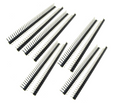
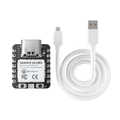
The Seeeduino XIAO is a thumb-sized Arduino-compatible development board built around the Microchip SAMD21G18 — a 32-bit ARM Cortex-M0+ running at 48 MHz. It packs 14 GPIO pins, hardware SPI/I2C/UART, 11 analog inputs, a true 10-bit DAC, and QTouch capacitive sensing into a board roughly the size of a thumbnail (20 x 17.5 mm). Headers come pre-soldered so you can drop it straight onto a breadboard.
Despite its size, the XIAO has 256 KB of Flash and 32 KB of SRAM — comfortably more than a classic Arduino Uno — and supports both the official Arduino IDE (via the Seeed SAMD board package) and CircuitPython. The USB Type-C connector handles flashing and serial monitoring directly through the SAMD21's native USB peripheral.
The XIAO is a great fit for compact wearables, USB HID devices (it can act as a keyboard or mouse), small sensor nodes, and any space-constrained project where an Uno is overkill. There's no on-board wireless, but the small footprint and low power consumption make it easy to pair with a separate radio module if you need it.
At a Glance
Specifications
| Parameter | Value |
| Microcontroller | Microchip SAMD21G18 (32-bit ARM Cortex-M0+) |
| Clock Frequency | 48 MHz |
| Flash Memory | 256 KB |
| SRAM | 32 KB |
| Operating Voltage | 3.3V |
| Input Voltage (5V pin) | 5V (USB-C or external) |
| GPIO Logic Level | 3.3V (NOT 5V tolerant) |
| Digital I/O Pins | 14 (D0-D13) |
| Analog Input (ADC) Channels | 11 (12-bit) |
| Analog Output (DAC) | 1 channel, 10-bit (D0) |
| PWM Output | Available on most digital pins |
| Capacitive Touch (QTouch) | Available on A0, A6, A7 |
| Communication Interfaces | I2C, SPI, UART, USB 2.0 (native) |
| USB Connector | USB Type-C |
| Dimensions | 20 x 17.5 mm |
| Headers | Pre-soldered male pins |
Pinout Diagram

Wiring Guide
LED + Push Button Wiring
The classic "hello world" hardware test. Use a 220-330 ohm resistor in series with the LED to keep the current within the SAMD21's GPIO drive limit (typically ~7 mA per pin).
| Component | XIAO SAMD21 Pin | Details |
|---|---|---|
| LED Anode (long leg) | D2 | Through 220 ohm resistor |
| LED Cathode (short leg) | GND | |
| Button Terminal 1 | D3 | Use INPUT_PULLUP in code |
| Button Terminal 2 | GND |
I2C Sensor Wiring
The default I2C bus on the XIAO uses D4 (SDA) and D5 (SCL). Most 3.3V breakout boards (BME280, MPU6050, SSD1306, ADS1115, BH1750, etc.) work without any modifications.
| Sensor Pin | XIAO SAMD21 Pin | Details |
|---|---|---|
| VCC | 3V3 | Use 3V3, not 5V |
| GND | GND | |
| SDA | D4 | |
| SCL | D5 |
SPI Device Wiring
Hardware SPI uses D8 (SCK), D9 (MISO), and D10 (MOSI). Any free GPIO can be used as a chip select; D7 is a common default in examples.
| SPI Device Pin | XIAO SAMD21 Pin | Details |
|---|---|---|
| VCC | 3V3 | |
| GND | GND | |
| SCK | D8 | Clock |
| MISO | D9 | Master In, Slave Out |
| MOSI | D10 | Master Out, Slave In |
| CS / SS | D7 (or any free GPIO) | Chip Select |
SPI object on D8/D9/D10 is all you need.
UART / Serial Wiring
The hardware UART (Serial1) uses D6 (TX) and D7 (RX). This is independent from the USB serial console (Serial), so you can talk to a peripheral and watch debug output simultaneously.
| External Device | XIAO SAMD21 Pin | Details |
|---|---|---|
| TX (out from device) | D7 (RX) | Cross-wire: their TX to your RX |
| RX (in to device) | D6 (TX) | Cross-wire: your TX to their RX |
| VCC | 3V3 or 5V | Match the device's voltage |
| GND | GND | Common ground required |
Code Examples
Arduino IDE - Blink the Built-in LED
// Seeeduino XIAO SAMD21 - Built-in LED blink
// Install: Boards Manager -> "Seeed SAMD Boards" by Seeed Studio
// Select Board: "Seeeduino XIAO"

void setup() {
  pinMode(LED_BUILTIN, OUTPUT);
}

void loop() {
  digitalWrite(LED_BUILTIN, LOW);   // LED is active LOW
  delay(500);
  digitalWrite(LED_BUILTIN, HIGH);
  delay(500);
}
Arduino IDE - DAC Sine Wave
// Seeeduino XIAO SAMD21 - Generate a sine wave on the DAC (D0 / A0)
// The SAMD21 has a true 10-bit DAC (0-1023 maps to 0-3.3V)

#include <math.h>

const int dacPin = A0;   // D0 / A0 is the DAC output
const int samples = 100;
int wave[samples];

void setup() {
  analogWriteResolution(10);   // 10-bit DAC
  for (int i = 0; i < samples; i++) {
    wave[i] = int(512.0 + 511.0 * sin(2.0 * M_PI * i / samples));
  }
}

void loop() {
  for (int i = 0; i < samples; i++) {
    analogWrite(dacPin, wave[i]);
    delayMicroseconds(50);
  }
}
Arduino IDE - USB HID Keyboard
// Seeeduino XIAO SAMD21 - Send keystrokes over native USB HID
// Wire a button between D3 and GND

#include <Keyboard.h>

const int buttonPin = 3;   // D3
bool lastState = HIGH;

void setup() {
  pinMode(buttonPin, INPUT_PULLUP);
  Keyboard.begin();
}

void loop() {
  bool state = digitalRead(buttonPin);
  if (state == LOW && lastState == HIGH) {
    Keyboard.print("Hello from XIAO!");
    Keyboard.write(KEY_RETURN);
    delay(50);   // simple debounce
  }
  lastState = state;
}
CircuitPython - Read Capacitive Touch (QTouch)
# Seeeduino XIAO SAMD21 - Capacitive touch on A0
# Drop CircuitPython for "Seeed XIAO" onto the board, then save this as code.py

import board
import touchio
import time

touch = touchio.TouchIn(board.A0)

while True:
    if touch.value:
        print("Touched! raw =", touch.raw_value)
    else:
        print("idle    raw =", touch.raw_value)
    time.sleep(0.1)
Frequently Asked Questions
adafruit_hid library.analogWriteResolution(10) followed by analogWrite(A0, value) in Arduino, where value is 0-1023, to output a corresponding 0-3.3V analog voltage. This is great for audio playback and waveform generation.