Overview
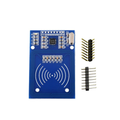
The RC522 is a 13.56 MHz contactless RFID reader/writer module based on NXP's MFRC522 chip. It speaks SPI by default (and also supports I2C and UART with hardware modifications), making it easy to read MIFARE Classic cards and key fobs from any Arduino, ESP32, Raspberry Pi, or Pico.
The kit version includes the reader board, a white PVC card, and a key-fob tag — everything you need to build a working RFID access control project, attendance system, or "tap-to-unlock" gadget out of the box. Range is short (a few centimeters) by design — perfect for door access, time clocks, and inventory tagging where you want to confirm intentional contact rather than passive scanning at distance.
At a Glance
Specifications
| Parameter | Value |
| IC | NXP MFRC522 |
| Operating Voltage | 3.3V (5V will damage the chip) |
| Operating Current | 13-26 mA (active), < 80 µA (sleep) |
| Frequency | 13.56 MHz |
| Read Range | 0 - 60 mm (typical 30 mm) |
| Communication | SPI up to 10 Mbps (default), I2C, UART (jumper config) |
| Supported Cards | MIFARE Classic 1K / 4K, MIFARE Ultralight, MIFARE Plus, NTAG203, ISO/IEC 14443A |
| Encryption | CRYPTO1 (MIFARE Classic) |
| Onboard Antenna | Spiral PCB trace |
| Pin Count | 8 (single-row 0.1" header) |
| Module Dimensions | 40 × 60 mm |
Pinout Diagram

Wiring Guide
Arduino Wiring (SPI)
Even though the RC522 is a 3.3V chip, its SPI inputs are 5V tolerant on most board variants. Power MUST come from the Arduino's 3.3V pin — feeding 5V to VCC will permanently damage the MFRC522 chip.
| RC522 Pin | Arduino UNO Pin |
|---|---|
| VCC | 3.3V (NEVER 5V) |
| RST | D9 |
| GND | GND |
| IRQ | (unused) |
| MISO | D12 |
| MOSI | D11 |
| SCK | D13 |
| SS / SDA | D10 |
ESP32 Wiring (SPI)
ESP32 is native 3.3V — perfect match for the RC522. Use VSPI (default SPI bus) for cleanest results.
| RC522 Pin | ESP32 Pin |
|---|---|
| VCC | 3V3 |
| RST | GPIO 22 |
| GND | GND |
| MISO | GPIO 19 |
| MOSI | GPIO 23 |
| SCK | GPIO 18 |
| SS / SDA | GPIO 21 |
Raspberry Pi Wiring (SPI)
Enable SPI in raspi-config first. The Pi's hardware SPI0 lives on the standard SPI header pins.
| RC522 Pin | Raspberry Pi Pin |
|---|---|
| VCC | Pin 1 (3.3V) |
| RST | Pin 22 (GPIO 25) |
| GND | Pin 6 (GND) |
| MISO | Pin 21 (GPIO 9) |
| MOSI | Pin 19 (GPIO 10) |
| SCK | Pin 23 (GPIO 11) |
| SS / SDA | Pin 24 (GPIO 8 / CE0) |
Raspberry Pi Pico Wiring (SPI)
Use SPI0 on the Pico — pins GP16 (MISO), GP19 (MOSI), GP18 (SCK), GP17 (CS).
| RC522 Pin | Pico Pin |
|---|---|
| VCC | 3V3 (OUT) |
| RST | GP20 |
| GND | GND |
| MISO | GP16 |
| MOSI | GP19 |
| SCK | GP18 |
| SS / SDA | GP17 |
Code Examples
Arduino — Read Card UID
// RC522 RFID - Arduino Example
// Library: MFRC522 by GithubCommunity

#include <SPI.h>
#include <MFRC522.h>

#define SS_PIN 10
#define RST_PIN 9

MFRC522 rfid(SS_PIN, RST_PIN);

void setup() {
  Serial.begin(9600);
  SPI.begin();
  rfid.PCD_Init();
  Serial.println("Tap an RFID card or fob...");
}

void loop() {
  if (!rfid.PICC_IsNewCardPresent() || !rfid.PICC_ReadCardSerial()) return;

  Serial.print("UID: ");
  for (byte i = 0; i < rfid.uid.size; i++) {
    if (rfid.uid.uidByte[i] < 0x10) Serial.print("0");
    Serial.print(rfid.uid.uidByte[i], HEX);
    Serial.print(" ");
  }
  Serial.println();

  rfid.PICC_HaltA();
  rfid.PCD_StopCrypto1();
}
Raspberry Pi (Python)
#!/usr/bin/env python3
# Install: pip install mfrc522 spidev
# Enable SPI: sudo raspi-config -> Interface Options -> SPI

from mfrc522 import SimpleMFRC522
import time

reader = SimpleMFRC522()

print("Tap an RFID card...")
try:
    while True:
        id, text = reader.read_no_block()
        if id:
            print(f"UID: {id}  text: {text!r}")
            time.sleep(1)
        time.sleep(0.1)
except KeyboardInterrupt:
    pass
Raspberry Pi Pico (MicroPython)
# RC522 on Pico - MicroPython
# Use the micropython-mfrc522 library by danjperron
# https://github.com/danjperron/micropython-mfrc522

from mfrc522 import MFRC522
import utime

reader = MFRC522(spi_id=0, sck=18, mosi=19, miso=16, cs=17, rst=20)

print("Tap an RFID card...")
while True:
    (stat, tag_type) = reader.request(reader.REQIDL)
    if stat == reader.OK:
        (stat, uid) = reader.SelectTagSN()
        if stat == reader.OK:
            print('UID:', '-'.join(['{:02X}'.format(x) for x in uid]))
            utime.sleep(1)
    utime.sleep_ms(100)
Frequently Asked Questions
MIFARE_Write() function to write blocks of 16 bytes. Be careful with the manufacturer's read-only block 0.