Overview
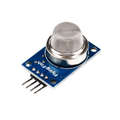
The MQ-135 is an air quality / hazardous gas sensor that responds to ammonia (NH3), nitrogen oxides (NOx), alcohol vapors, benzene, smoke, and carbon dioxide (CO2). It's the sensor of choice for general "indoor air quality" projects, simple smoke detectors, and bedroom / office monitors that just need to know "is the air getting worse?".
The breakout module includes the bare MQ-135 element along with an LM393 voltage comparator, a sensitivity-adjustment trimpot, and a clean 4-pin header (VCC, GND, DO, AO). The analog output (AO) gives you a continuous readout of gas concentration; the digital output (DO) goes LOW once the level crosses the threshold set by the on-board pot.
The MQ-135 needs to warm up — typically 24-48 hours on first use, then 1-3 minutes any time you re-power it — before readings stabilize. Once warm, it's stable enough for trend monitoring and simple alarms, though it's not a calibrated lab instrument.
At a Glance
Specifications
| Parameter | Value |
| Sensing Element | MQ-135 metal-oxide semiconductor |
| Operating Voltage | 5V DC |
| Heater Voltage | 5V +/- 0.1V |
| Heater Power | ~800 mW |
| Heater Current | ~150 mA |
| Detected Gases | NH3, NOx, alcohols, benzene, smoke, CO2 |
| Detection Range | 10 - 1000 ppm (gas-dependent) |
| Analog Output (AO) | 0 - VCC, increases with gas concentration |
| Digital Output (DO) | HIGH normally, LOW above threshold |
| Comparator | LM393, threshold via on-board pot |
| Initial Warm-up | 24-48 hours (first use) |
| Re-warm-up | 1-3 minutes |
| Operating Temperature | -20 degC to +50 degC |
| Dimensions | ~32 x 20 mm |
Pinout Diagram

Wiring Guide
Arduino Wiring
The MQ-135's heater draws around 150 mA. Powering it from the Arduino's 5V rail is fine for a single sensor; if you stack multiple gas sensors, use an external 5V supply with a shared ground.
| MQ-135 Pin | Arduino Pin |
|---|---|
| VCC | 5V |
| GND | GND |
| AO | A0 (analog input) |
| DO | D2 (digital input, optional) |
ESP32 Wiring
Power the heater from the ESP32's VIN (5V) pin. The analog output can swing close to 5V at high gas concentrations, so use a 2:1 divider before the ADC pin to protect the GPIO and stay in the 0-3.3V range.
| MQ-135 Pin | ESP32 Pin | Details |
|---|---|---|
| VCC | VIN (5V) | Heater needs 5V |
| GND | GND | |
| AO | GPIO 34 | Through 2:1 divider |
| DO | GPIO 35 | 3.3V logic; safe direct |
Raspberry Pi Wiring
The Pi has no analog input. Use an external ADC like the ADS1115 to read AO, and a regular GPIO for DO. Power the heater from the Pi's 5V rail (or external 5V if powering many sensors).
| Connection | Pi Pin |
|---|---|
| MQ-135 VCC | Pin 2 (5V) |
| MQ-135 GND | Pin 6 (GND) |
| MQ-135 AO | ADS1115 A0 |
| MQ-135 DO | Pin 11 (GPIO 17) |
| ADS1115 SDA | Pin 3 (GPIO 2) |
| ADS1115 SCL | Pin 5 (GPIO 3) |
Raspberry Pi Pico Wiring
The Pico's 12-bit ADC reads up to 3.3V. Use a 2:1 divider on AO, just like with the ESP32, so the signal never exceeds 3.3V.
| MQ-135 Pin | Pico Pin | Details |
|---|---|---|
| VCC | VBUS (5V from USB) | |
| GND | GND | |
| AO | GP26 (ADC0) | Through 2:1 divider |
| DO | GP15 |
Code Examples
Arduino - Print Air Quality
// MQ-135 - Print analog air quality reading on Arduino
// Allow 1-3 minutes warm-up after powering on for stable values.

const int aoPin = A0;
const int doPin = 2;

void setup() {
  Serial.begin(9600);
  pinMode(doPin, INPUT);
  Serial.println("MQ-135 warming up... wait at least 1 minute.");
}

void loop() {
  int raw = analogRead(aoPin);
  float volts = raw * 5.0 / 1023.0;

  Serial.print("Raw=");   Serial.print(raw);
  Serial.print("  V=");   Serial.print(volts, 2);
  Serial.print("  DO=");  Serial.print(digitalRead(doPin));
  if (digitalRead(doPin) == LOW) Serial.print("  [ALARM]");
  Serial.println();

  delay(500);
}
Raspberry Pi Pico - MicroPython
# MQ-135 on Raspberry Pi Pico (MicroPython)
# AO -> 2:1 divider -> GP26 (ADC0); DO -> GP15

from machine import ADC, Pin
import time

ao = ADC(26)
do = Pin(15, Pin.IN)

print("Warming up MQ-135 - wait 1-3 minutes for stable values")

while True:
    raw = ao.read_u16()              # 0 - 65535
    v_pin  = raw * 3.3 / 65535       # voltage at the GPIO
    v_real = v_pin * 2               # un-divide the 2:1 divider
    print("Raw={:5d}  Vreal={:.2f} V  DO={}".format(raw, v_real, do.value()))
    time.sleep(0.5)
Raspberry Pi (Python + ADS1115)
#!/usr/bin/env python3
# MQ-135 + ADS1115 on Raspberry Pi
# pip install adafruit-circuitpython-ads1x15 RPi.GPIO

import time
import board, busio
import RPi.GPIO as GPIO
from adafruit_ads1x15.ads1115 import ADS1115
from adafruit_ads1x15.analog_in import AnalogIn

DO_PIN = 17
GPIO.setmode(GPIO.BCM)
GPIO.setup(DO_PIN, GPIO.IN)

i2c = busio.I2C(board.SCL, board.SDA)
ads = ADS1115(i2c)
ao  = AnalogIn(ads, 0)

try:
    while True:
        v = ao.voltage
        d = "ALARM" if GPIO.input(DO_PIN) == 0 else "OK"
        print("AO={:.3f} V    DO={}".format(v, d))
        time.sleep(0.5)
except KeyboardInterrupt:
    GPIO.cleanup()