Overview
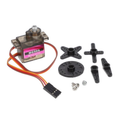
The MG995 is a high-torque metal-gear analog servo — one of the most widely used hobby servos for robotics, RC vehicles, robotic arms, pan/tilt rigs, and steering linkages. Inside is a DC motor, a metal gear train, a feedback potentiometer, and a control circuit that constantly drives the output shaft to match the position you command via PWM.
Unlike the smaller plastic-gear SG90, the MG995 uses copper and metal gears that can absorb shock loads and hold significant torque without stripping. Rated around 9-12 kg-cm at 6V, it has plenty of muscle for medium robotic joints, gripper claws, RC car steering, and camera tilt platforms.
It accepts a standard 50 Hz hobby-servo PWM signal (1.0 ms = 0 degrees, 1.5 ms = 90 degrees, 2.0 ms = 180 degrees) on the orange wire, and runs from any 4.8V - 7.2V DC supply on red/brown. It's a "180-degree" positional servo (not continuous-rotation by default) — the shaft rotates within roughly a 180-degree arc.
At a Glance
Specifications
| Parameter | Value |
| Servo Type | MG995 analog hobby servo, 180-degree positional |
| Operating Voltage | 4.8V - 7.2V DC |
| Stall Current (peak) | ~1.5A - 2.5A at 6V |
| No-load Current | ~100 mA |
| Idle Current | ~5-10 mA |
| Stall Torque @ 4.8V | ~9.4 kg-cm |
| Stall Torque @ 6V | ~12 kg-cm |
| Speed @ 4.8V | ~0.20 s / 60 deg (no load) |
| Speed @ 6V | ~0.16 s / 60 deg (no load) |
| Rotation Range | ~180 degrees |
| Control Signal | 50 Hz PWM, 1.0 - 2.0 ms pulse width |
| Gear Material | Metal (copper / brass) |
| Wires | Orange (signal), Red (V+), Brown (GND) |
| Operating Temperature | 0 degC to +55 degC |
| Dimensions | ~40 x 20 x 38 mm |
| Weight | ~55 g |
Pinout Diagram

Wiring Guide
Arduino Wiring
Power the servo from a separate 5-6V supply that can deliver at least 1A (a beefier supply is better — 2A leaves headroom for stalls). Do not power it from the Arduino's onboard 5V regulator; the inrush current will reset your board. Tie supply ground to Arduino GND.
| MG995 Wire | Arduino Pin / Supply |
|---|---|
| Orange (signal) | D9 (any PWM-capable pin) |
| Red (VCC) | External 5-6V supply (+) |
| Brown (GND) | External supply GND + Arduino GND |
ESP32 Wiring
The ESP32's 3.3V signal is enough to drive the MG995's signal line, but the servo itself still needs a 5-6V power source. Use the LEDC PWM peripheral or the ESP32Servo Arduino library.
| MG995 Wire | ESP32 Pin / Supply |
|---|---|
| Orange (signal) | GPIO 18 |
| Red (VCC) | External 5-6V supply (+) |
| Brown (GND) | External GND + ESP32 GND |
Raspberry Pi Wiring
The Pi can generate the PWM signal directly on a hardware-PWM pin (GPIO 12, 13, 18, or 19). The servo still needs an external 5-6V supply.
| MG995 Wire | Raspberry Pi Pin / Supply |
|---|---|
| Orange (signal) | Pin 12 (GPIO 18, hardware PWM) |
| Red (VCC) | External 5-6V supply (+) |
| Brown (GND) | External GND + Pi GND (Pin 6) |
RPi.GPIO) is jittery for servos. The pigpio daemon or gpiozero's AngularServo with pigpio backend gives clean, glitch-free pulses.
Raspberry Pi Pico Wiring
Every Pico GPIO supports hardware PWM, so any free pin works. As always, the servo wants its own 5-6V supply — not the Pico's 3V3.
| MG995 Wire | Pico Pin / Supply |
|---|---|
| Orange (signal) | GP15 |
| Red (VCC) | External 5-6V supply (+) |
| Brown (GND) | External GND + Pico GND |
Code Examples
Arduino - Sweep 0 to 180 degrees
// MG995 sweep using built-in Servo library
// Signal -> D9, V+ -> external 5-6V, GND tied together

#include <Servo.h>

Servo myServo;

void setup() {
  myServo.attach(9);   // signal pin
}

void loop() {
  for (int pos = 0; pos <= 180; pos++) {
    myServo.write(pos);
    delay(15);
  }
  for (int pos = 180; pos >= 0; pos--) {
    myServo.write(pos);
    delay(15);
  }
}
Arduino - Move to Specific Angles
#include <Servo.h>

Servo s;

void setup() {
  s.attach(9, 500, 2500);   // tighter pulse range, full ~180 swing
}

void loop() {
  s.write(0);    delay(800);
  s.write(90);   delay(800);
  s.write(180);  delay(800);
  s.write(90);   delay(800);
}
ESP32 - ESP32Servo Library
// Install "ESP32Servo" via Library Manager

#include <ESP32Servo.h>

Servo myServo;

void setup() {
  myServo.setPeriodHertz(50);             // standard hobby servo
  myServo.attach(18, 500, 2500);          // GPIO 18, min/max us
}

void loop() {
  for (int a = 0; a <= 180; a += 30) {
    myServo.write(a);
    delay(400);
  }
}
Raspberry Pi Pico - MicroPython
# MG995 on Raspberry Pi Pico (MicroPython)
# Signal -> GP15, V+ -> external 5-6V supply, GND common with Pico GND

from machine import Pin, PWM
import time

servo = PWM(Pin(15))
servo.freq(50)        # 50 Hz hobby servo

def angle(deg):
    # 0.5 ms = 0 deg, 2.5 ms = 180 deg, period = 20 ms
    pulse_us = 500 + (deg * 2000 // 180)
    duty = int(pulse_us * 65535 / 20000)
    servo.duty_u16(duty)

while True:
    for a in (0, 45, 90, 135, 180, 90):
        angle(a)
        time.sleep(0.5)
Raspberry Pi (gpiozero + pigpio)
#!/usr/bin/env python3
# Run pigpiod first:  sudo pigpiod
# pip install gpiozero pigpio

from gpiozero import AngularServo
from gpiozero.pins.pigpio import PiGPIOFactory
import time

servo = AngularServo(
    18,
    min_pulse_width=0.0005,   # 0.5 ms
    max_pulse_width=0.0025,   # 2.5 ms
    pin_factory=PiGPIOFactory()
)

while True:
    for a in (-90, 0, 90, 0):
        servo.angle = a
        time.sleep(0.6)
Frequently Asked Questions
Servo.attach(pin) uses a conservative pulse range (typically 544 - 2400 us). MG995 units often need closer to 500 - 2500 us to hit the full mechanical limits. Use Servo.attach(pin, 500, 2500) on Arduino, or set explicit min/max pulse widths in your library, then trim by trial.