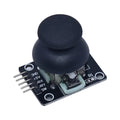
Overview
The Joystick Shield V1.A is a plug-and-play gamepad shield that drops onto an Arduino UNO R3 (or any UNO-form-factor board) and adds two analog thumb-stick joysticks plus servo, sensor, and Bluetooth/nRF24 expansion headers. It's the perfect base for retro-style game controllers, RC robot remotes, drone transmitters, and any project that needs intuitive directional input.
Each joystick provides X/Y analog readings (0-1023 on a 10-bit ADC) plus a digital push-button when you press it down. The shield also breaks out a digital Servo header (D8-D11), an analog sensor row (A1, A5, 3.3V, 5V, GND), and pin headers for I2C, SPI, and serial expansion modules. Everything routes through standard Arduino UNO header pins so existing libraries just work.
At a Glance
Specifications
| Parameter | Value |
| Compatible Board | Arduino UNO R3 (and clones) |
| Operating Voltage | 5V (taken from UNO 5V rail) |
| Logic Level | 5V |
| Joystick Type | Analog (potentiometer-based) with push-button |
| Joystick X Axis | Left = A0, Right = A2 |
| Joystick Y Axis | Left = A1, Right = A3 |
| Joystick Button | Left = D8, Right = D9 (active LOW) |
| Servo Headers | S/+/G on D5, D6, D9, D10, D11 |
| Sensor Header | 5V, 3.3V, GND, A1, A5, D8 |
| Comm Headers | I2C (SDA/SCL), SPI (MISO/MOSI/SCK/SS), TX/RX |
| Dimensions | 65.1 mm × 53.8 mm |
Pinout Diagram

Wiring Guide
Mounting on the Arduino UNO
Power off your UNO, then press the shield down so its pins line up with the UNO's male headers. There's only one orientation that fits — gently rock it down evenly so no pins bend.
| Shield Function | UNO Pin |
|---|---|
| Left Joystick X | A0 |
| Left Joystick Y | A1 |
| Left Joystick Button | D8 |
| Right Joystick X | A2 |
| Right Joystick Y | A3 |
| Right Joystick Button | D9 |
| Power | 5V (from USB or barrel jack) |
Servo Header
The shield has 5 servo positions, each with three pins: Signal (S), 5V (+), GND (G). Just plug in any standard 9g hobby servo (SG90, MG90S, etc.) and call Servo.attach() in your sketch.
| Position | Signal Pin |
|---|---|
| Servo 1 | D5 |
| Servo 2 | D6 |
| Servo 3 | D9 |
| Servo 4 | D10 |
| Servo 5 | D11 |
Sensor / Module Header
The sensor strip exposes 5V, 3.3V, GND, A1, A5, D8 — enough to plug in an OLED, a BME280, or a soil moisture sensor without leaving the shield.
| Header Pin | UNO Pin / Use |
|---|---|
| 3.3V | 3.3V output |
| 5V | 5V output |
| GND | Ground |
| A1 | Shared with Left Joystick Y — pick one |
| A5 | Free analog (also I2C SCL) |
| D8 | Shared with Left Button |
Code Examples
Arduino — Read Both Joysticks
// Joystick Shield V1.A - Read both joysticks
// Print X, Y, and button state for left and right sticks

const int LX = A0, LY = A1, LBTN = 8;
const int RX = A2, RY = A3, RBTN = 9;

void setup() {
  Serial.begin(9600);
  pinMode(LBTN, INPUT_PULLUP);
  pinMode(RBTN, INPUT_PULLUP);
}

void loop() {
  int lx = analogRead(LX), ly = analogRead(LY);
  int rx = analogRead(RX), ry = analogRead(RY);
  bool lpress = digitalRead(LBTN) == LOW;
  bool rpress = digitalRead(RBTN) == LOW;

  Serial.print("L: ("); Serial.print(lx); Serial.print(",");
  Serial.print(ly); Serial.print(") "); Serial.print(lpress ? "DOWN" : "up");
  Serial.print("   R: ("); Serial.print(rx); Serial.print(",");
  Serial.print(ry); Serial.print(") "); Serial.println(rpress ? "DOWN" : "up");

  delay(100);
}
Arduino — Drive a Servo with the Right Joystick
// Map right joystick X (0-1023) to servo angle (0-180)
// Plug servo into the D9 servo header

#include <Servo.h>
Servo srv;

const int RX = A2;
const int SERVO_PIN = 9;

void setup() {
  srv.attach(SERVO_PIN);
}

void loop() {
  int x = analogRead(RX);
  int angle = map(x, 0, 1023, 0, 180);
  srv.write(angle);
  delay(15);
}
Arduino — Deadband + 4-Direction Helper
// Convert raw joystick X/Y into discrete UP/DOWN/LEFT/RIGHT

const int LX = A0, LY = A1;
const int CENTER = 512, DEAD = 100;

const char* dirOf(int x, int y) {
  if (x < CENTER - DEAD) return "LEFT";
  if (x > CENTER + DEAD) return "RIGHT";
  if (y < CENTER - DEAD) return "UP";
  if (y > CENTER + DEAD) return "DOWN";
  return "CENTER";
}

void setup() { Serial.begin(9600); }

void loop() {
  Serial.println(dirOf(analogRead(LX), analogRead(LY)));
  delay(150);
}
Frequently Asked Questions
tone() on D2 (varies by board revision — check yours). Not all V1.A revisions populate this.