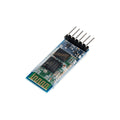
Overview
The HM-10 is a small Bluetooth Low Energy (BLE 4.0) module built around TI's CC2541 chip. It exposes a UART interface — your Arduino sends bytes over TX/RX, and the HM-10 forwards them wirelessly to a paired smartphone, iPad, or another HM-10. Range is typically 10-30 meters indoors, more than enough for home automation, robot remote control, or wireless logging.
Unlike older HC-05/HC-06 Bluetooth Classic modules, the HM-10 is BLE — meaning it works directly with iOS apps (Apple blocks classic Bluetooth from third-party apps), runs on tiny coin-cell battery power for months in low-power mode, and integrates cleanly with apps like LightBlue, BLE Scanner, and nRF Connect. It's the go-to module for any Arduino project that needs to talk to an iPhone.
Configuration is via AT commands sent over the UART. Out of the box it acts as a peripheral (slave) advertising itself as "HMSoft" — your phone connects, and any data you send through the phone's BLE app appears as bytes on Arduino's serial port.
At a Glance
Specifications
| Parameter | Value |
| Bluetooth Version | BLE 4.0 (Bluetooth Low Energy) |
| Chipset | Texas Instruments CC2541F256 |
| Operating Voltage | 3.6V - 6V (on-board regulator) |
| Logic Level | 3.3V (use level shifter for 5V Arduino RX line) |
| Operating Current | ~9 mA active, ~1 mA sleep |
| UART Default Baud | 9600 bps |
| UART Configurable | 1200 / 2400 / 4800 / 9600 / 19200 / 38400 / 57600 / 115200 |
| Range | ~10-30 meters indoors, ~50 meters open air |
| Pin Count | 4 (RXD, TXD, GND, VCC) |
| Default Name | HMSoft |
| Default PIN | 000000 |
| Dimensions | ~26 × 13 mm |
Pinout Diagram

Wiring Guide
Arduino Wiring
The HM-10 is 3.3V on logic. Arduino's TX pin is 5V, which can damage the HM-10's RX over time — use a voltage divider (1k + 2k) on Arduino TX -> HM-10 RX. The HM-10's 3.3V TX is high enough for Arduino RX without a level shifter.
| HM-10 Pin | Arduino Pin |
|---|---|
| VCC | 5V |
| GND | GND |
| RXD | D3 (via 1k+2k voltage divider) |
| TXD | D2 |
ESP32 Wiring
ESP32 is 3.3V — connect directly to HM-10 with no level shifter.
| HM-10 | ESP32 |
|---|---|
| VCC | 3.3V |
| GND | GND |
| RXD | GPIO 17 (TX2) |
| TXD | GPIO 16 (RX2) |
Raspberry Pi Pico Wiring
Pico is 3.3V — direct connection works.
| HM-10 | Pico |
|---|---|
| VCC | 3V3 (Pin 36) |
| GND | GND |
| RXD | GP0 (UART0 TX) |
| TXD | GP1 (UART0 RX) |
Code Examples
Arduino — Bridge USB Serial to HM-10
// HM-10 Bluetooth Bridge - Arduino Example
// Connect HM-10 RX -> D3, TX -> D2 (via voltage divider for RX)
// Send AT commands from Serial Monitor at 9600 baud, "No line ending"

#include <SoftwareSerial.h>

SoftwareSerial bt(2, 3);   // RX, TX

void setup() {
  Serial.begin(9600);
  bt.begin(9600);
  Serial.println("Type AT in Serial Monitor (No line ending). Should reply OK.");
}

void loop() {
  if (bt.available())     Serial.write(bt.read());
  if (Serial.available()) bt.write(Serial.read());
}
Arduino — LED Control via Phone
// HM-10 - Toggle LED from a phone app (LightBlue, BLE Scanner, etc.)
// Send "1" to turn on, "0" to turn off.

#include <SoftwareSerial.h>

SoftwareSerial bt(2, 3);
const int ledPin = 13;

void setup() {
  pinMode(ledPin, OUTPUT);
  bt.begin(9600);
}

void loop() {
  if (bt.available()) {
    char c = bt.read();
    if (c == '1') digitalWrite(ledPin, HIGH);
    if (c == '0') digitalWrite(ledPin, LOW);
  }
}
Frequently Asked Questions
AT+NAMEMyDevice over the UART (no quotes, no line ending). Module replies with "OK+Set:MyDevice". Power-cycle to apply. Now your phone shows "MyDevice" instead of "HMSoft". Other useful AT commands: AT+ROLE0/1 (peripheral/central), AT+BAUD0-7 (change baud), AT+RESET.