Overview
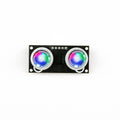
The HC-SR04 is a popular ultrasonic distance sensor used in Arduino and Raspberry Pi projects. It measures distance by sending ultrasonic pulses and timing their echo return. With a range of 2-400 cm and operating frequency of 40 kHz, it's an affordable and reliable solution for obstacle detection, distance measurement, and robotics applications.
At a Glance
Specifications
| Parameter | Value |
| Operating Voltage | 5V DC |
| Operating Current | 15 mA |
| Frequency | 40 kHz |
| Maximum Range | 400 cm (13 ft) |
| Minimum Range | 2 cm (0.8 in) |
| Measuring Angle | 15 degrees |
| Trigger Input Signal | 10 us TTL pulse |
| Echo Output Signal | TTL pulse proportional to distance |
| Dimensions | 45 x 20 x 15 mm |
Pinout Diagram
Wiring Guide
Arduino Wiring
The HC-SR04 connects directly to Arduino with standard digital pins. No special voltage conversion is needed because Arduino accepts 5V logic levels.
| HC-SR04 Pin | Arduino Pin |
|---|---|
| VCC | 5V |
| Trig | Digital Pin 9 |
| Echo | Digital Pin 10 |
| GND | GND |
ESP32 Wiring
The ESP32 operates at 3.3V GPIO logic levels. The HC-SR04 Echo pin outputs 5V, so you must use a voltage divider on the Echo line to protect the ESP32.
| HC-SR04 Pin | ESP32 Pin | Details |
|---|---|---|
| VCC | VIN (5V) | |
| Trig | GPIO 5 | |
| Echo | GPIO 18 | Via voltage divider |
| GND | GND |
Raspberry Pi Wiring
Raspberry Pi GPIO operates at 3.3V, so the 5V Echo output from the HC-SR04 must be reduced using a voltage divider circuit with 1k and 2k resistors.
| HC-SR04 Pin | Raspberry Pi Pin | Details |
|---|---|---|
| VCC | Pin 2 (5V) | |
| Trig | Pin 16 (GPIO 23) | |
| Echo | Pin 18 (GPIO 24) | Via voltage divider |
| GND | Pin 6 (GND) |
Raspberry Pi Pico Wiring
Like Raspberry Pi, the Pico uses 3.3V GPIO. The Echo output must be protected with a voltage divider circuit.
| HC-SR04 Pin | Pico Pin | Details |
|---|---|---|
| VCC | VSYS (5V) | |
| Trig | GP15 | |
| Echo | GP14 | Via voltage divider |
| GND | GND |
Code Examples
Arduino
// HC-SR04 Ultrasonic Distance Sensor - Arduino Example
// Trig Pin: 9, Echo Pin: 10

const int trigPin = 9;
const int echoPin = 10;

void setup() {
  Serial.begin(9600);
  pinMode(trigPin, OUTPUT);
  pinMode(echoPin, INPUT);
}

void loop() {
  // Send a 10 microsecond pulse to trigger the sensor
  digitalWrite(trigPin, LOW);
  delayMicroseconds(2);
  digitalWrite(trigPin, HIGH);
  delayMicroseconds(10);
  digitalWrite(trigPin, LOW);

  // Measure the duration of the echo pulse
  long duration = pulseIn(echoPin, HIGH);

  // Calculate distance in cm (sound travels 34300 cm/s)
  // distance = duration / 2 / 29.1
  float distance = duration * 0.034 / 2;

  // Print the distance
  Serial.print("Distance: ");
  Serial.print(distance);
  Serial.println(" cm");

  delay(500);
}
Raspberry Pi (Python)
#!/usr/bin/env python3
# HC-SR04 Ultrasonic Distance Sensor - Raspberry Pi Example
# Trig Pin: GPIO 23, Echo Pin: GPIO 24

import RPi.GPIO as GPIO
import time

trigPin = 23
echoPin = 24

GPIO.setmode(GPIO.BCM)
GPIO.setup(trigPin, GPIO.OUT)
GPIO.setup(echoPin, GPIO.IN)

try:
    while True:
        # Send trigger pulse
        GPIO.output(trigPin, GPIO.LOW)
        time.sleep(0.00001)
        GPIO.output(trigPin, GPIO.HIGH)
        time.sleep(0.00001)
        GPIO.output(trigPin, GPIO.LOW)

        # Wait for echo to start
        while GPIO.input(echoPin) == 0:
            pulse_start = time.time()

        # Wait for echo to end
        while GPIO.input(echoPin) == 1:
            pulse_end = time.time()

        # Calculate distance
        pulse_duration = pulse_end - pulse_start
        distance = pulse_duration * 17150  # cm

        print("Distance: {:.2f} cm".format(distance))
        time.sleep(0.5)

except KeyboardInterrupt:
    print("Measurement stopped by user")
finally:
    GPIO.cleanup()
Raspberry Pi Pico (MicroPython)
# HC-SR04 Ultrasonic Distance Sensor - Pico MicroPython Example
# Trig Pin: GP15, Echo Pin: GP14

from machine import Pin, time_pulse_us
import time

trigPin = Pin(15, Pin.OUT)
echoPin = Pin(14, Pin.IN)

while True:
    # Send trigger pulse
    trigPin.value(0)
    time.sleep_us(2)
    trigPin.value(1)
    time.sleep_us(10)
    trigPin.value(0)

    # Measure pulse duration
    try:
        pulse_duration = time_pulse_us(echoPin, 1, 30000)
    except OSError:
        print("Timeout waiting for echo")
        continue

    # Calculate distance in cm
    distance = pulse_duration * 0.0343 / 2

    print("Distance: {:.2f} cm".format(distance))
    time.sleep(0.5)