Overview
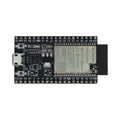
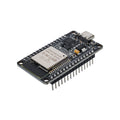
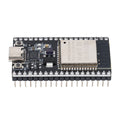
The ESP8266 D1 Mini V3 (a Wemos / LOLIN-style board) is a tiny 25 x 35 mm dev board built around the ESP-8266EX SoC. It packs Wi-Fi (2.4 GHz, 802.11 b/g/n), 4 MB of Flash, 11 broken-out GPIO pins, a 10-bit ADC, hardware I2C/SPI/UART, and a USB Type-C connector with a CH340-style USB-to-Serial chip — all on a board roughly the size of a postage stamp.
It's the right pick for compact Wi-Fi sensors, smart-home plugs (paired with a relay shield), MQTT publishers, OTA firmware updates, ESP-Now mesh nodes, and any project where the larger NodeMCU is overkill. The D1 Mini's footprint is also a de-facto standard, so a huge selection of stackable shields (relay, OLED, motor driver, battery) plug straight on top.
The D1 Mini is supported in the Arduino IDE (via the ESP8266 Community core), MicroPython, and Espressif's NONOS SDK / RTOS SDK. The GPIO pins are 3.3V — they are NOT 5V tolerant.
At a Glance
Specifications
| Parameter | Value |
| SoC | Espressif ESP8266EX (32-bit Tensilica L106) |
| Clock Frequency | 80 MHz default (160 MHz max) |
| Flash Memory | 4 MB SPI Flash |
| Wireless | Wi-Fi 802.11 b/g/n, 2.4 GHz |
| Antenna | On-board PCB trace |
| Operating Voltage | 3.3V |
| Input Voltage | 5V via USB-C, or 5V on 5V pin |
| GPIO Logic Level | 3.3V (NOT 5V tolerant) |
| Digital I/O Pins | 11 (D0-D8, plus RX/TX) |
| Analog Input | 1 channel, 10-bit (A0, 0-3.2V via on-board divider) |
| PWM Output | Software PWM on most digital pins |
| Communication Interfaces | I2C, SPI, UART |
| USB-to-Serial Chip | CH340 (varies by revision) |
| USB Connector | USB Type-C |
| Buttons | RESET |
| Headers | Pre-soldered (also includes male+female header sets) |
| Dimensions | ~25 x 35 mm |
Pinout Diagram

Wiring Guide
LED + Push Button
Use a 220-330 ohm series resistor on the LED. The board also has a built-in user LED on D4 (GPIO 2) — handy for status without external wiring.
| Component | D1 Mini Pin | Details |
|---|---|---|
| LED Anode (long) | D5 (GPIO 14) | Through 220 ohm resistor |
| LED Cathode (short) | GND | |
| Button Terminal 1 | D6 (GPIO 12) | INPUT_PULLUP in code |
| Button Terminal 2 | GND |
digitalWrite(LED_BUILTIN, LOW) turns it ON.
I2C Sensor
The D1 Mini's default I2C bus uses D2 (GPIO 4 = SDA) and D1 (GPIO 5 = SCL). Most 3.3V breakouts (BME280, MPU6050, SSD1306, BH1750, ADS1115, etc.) connect with no level shifting.
| Sensor Pin | D1 Mini Pin |
|---|---|
| VCC | 3V3 |
| GND | GND |
| SDA | D2 (GPIO 4) |
| SCL | D1 (GPIO 5) |
SPI Device
Hardware SPI on the D1 Mini uses D5 (GPIO 14 = SCLK), D6 (GPIO 12 = MISO), D7 (GPIO 13 = MOSI), and D8 (GPIO 15 = CS). Use any free GPIO as an additional chip select if you have multiple devices.
| SPI Pin | D1 Mini Pin |
|---|---|
| VCC | 3V3 |
| GND | GND |
| SCK | D5 (GPIO 14) |
| MISO | D6 (GPIO 12) |
| MOSI | D7 (GPIO 13) |
| CS / SS | D8 (GPIO 15) |
UART / Serial
The hardware UART on the D1 Mini is the same one used for USB programming. For talking to an external UART device (GPS, fingerprint, etc.) without conflicting, use SoftwareSerial on any free GPIO pair.
| External Device | D1 Mini Pin |
|---|---|
| Device TX | D6 (GPIO 12) - SoftwareSerial RX |
| Device RX | D7 (GPIO 13) - SoftwareSerial TX |
| VCC | 3V3 or 5V (match device) |
| GND | GND (shared) |
Code Examples
Arduino IDE - Connect to Wi-Fi
// D1 Mini V3 - join Wi-Fi and print IP
// Install: Boards Manager URL http://arduino.esp8266.com/stable/package_esp8266com_index.json
// Select Board: "LOLIN(WEMOS) D1 R2 & mini"

#include <ESP8266WiFi.h>

const char* ssid = "YOUR_SSID";
const char* pass = "YOUR_PASSWORD";

void setup() {
  Serial.begin(115200);
  delay(500);
  WiFi.begin(ssid, pass);
  while (WiFi.status() != WL_CONNECTED) { delay(300); Serial.print("."); }
  Serial.println();
  Serial.print("IP: "); Serial.println(WiFi.localIP());
  Serial.print("RSSI: "); Serial.print(WiFi.RSSI()); Serial.println(" dBm");
}

void loop() { delay(5000); }
Arduino IDE - Read A0 (Analog)
// D1 Mini V3 - read the single ADC channel on A0
// The on-board divider gives 0 - 3.2V input range, 10-bit (0 - 1023)

void setup() {
  Serial.begin(115200);
}

void loop() {
  int raw = analogRead(A0);
  float voltage = raw * 3.2 / 1023.0;
  Serial.print("Raw="); Serial.print(raw);
  Serial.print("  V="); Serial.println(voltage, 3);
  delay(200);
}
MicroPython - Tiny Web Server
# D1 Mini V3 - join Wi-Fi and serve a hello-world page (MicroPython)
# Flash MicroPython for ESP8266 from micropython.org

import network, socket, time

SSID = "YOUR_SSID"
PASS = "YOUR_PASSWORD"

wlan = network.WLAN(network.STA_IF)
wlan.active(True)
wlan.connect(SSID, PASS)
while not wlan.isconnected():
    time.sleep(0.3)
print("IP:", wlan.ifconfig()[0])

s = socket.socket()
s.bind(("0.0.0.0", 80))
s.listen(1)

PAGE = b"HTTP/1.1 200 OK\r\nContent-Type: text/html\r\n\r\n<h1>Hello from D1 Mini</h1>"

while True:
    conn, addr = s.accept()
    conn.recv(1024)
    conn.send(PAGE)
    conn.close()
Frequently Asked Questions
http://arduino.esp8266.com/stable/package_esp8266com_index.json. Then choose Tools > Board > "LOLIN(WEMOS) D1 R2 & mini" and pick a 4MB Flash size variant (e.g., "4MB (FS:2MB OTA:~1019KB)"). That mapping enables the standard D-pin labels and OTA / SPIFFS layout.D1, D2 that map to the right GPIO underneath. You can use either the D-name or the raw GPIO number (e.g., digitalWrite(D2, HIGH) is the same as digitalWrite(4, HIGH)).