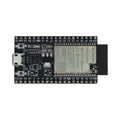
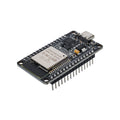
Overview
The ESP32-S3 Nano is a powerful, compact dev board built around Espressif's dual-core Xtensa LX7 processor with built-in Wi-Fi (2.4 GHz) and Bluetooth 5.0 LE. It comes with pre-soldered headers, a USB-C connector, and an Arduino Nano-compatible footprint, making it a drop-in upgrade for projects that have outgrown the classic Nano but still need to fit on a breadboard.
With 8 ADC channels, hardware SPI, I2C, UART, and 17 usable GPIO pins broken out, the S3 Nano is well-suited for IoT projects, BLE peripherals, sensor hubs, small robotics, and anything that needs both wireless connectivity and modern peripheral support. The chip's vector instruction extensions also enable simple AI/ML workloads at the edge.
This board is fully supported in the Arduino IDE (via the ESP32 by Espressif core) as well as MicroPython and CircuitPython. The Type-C USB connection handles both flashing and serial monitoring with no separate programmer required.
At a Glance
Specifications
| Parameter | Value |
| Microcontroller | ESP32-S3 (Xtensa LX7 dual-core, 32-bit) |
| Clock Frequency | Up to 240 MHz |
| Flash Memory | 16 MB QSPI Flash |
| SRAM | 512 KB (on-chip) |
| Wireless | Wi-Fi 802.11 b/g/n (2.4 GHz), Bluetooth 5.0 LE |
| Operating Voltage | 3.3V |
| Input Voltage (VIN) | 5V (via USB-C or VIN pin) |
| GPIO Logic Level | 3.3V (NOT 5V tolerant) |
| Digital I/O Pins | 17 broken-out GPIO |
| Analog Input (ADC) Channels | 8 (A0-A7, 12-bit) |
| Communication Interfaces | I2C, SPI, UART, USB OTG |
| USB Connector | USB Type-C (native USB OTG) |
| Form Factor | Arduino Nano-compatible (45 x 18 mm) |
| Headers | Pre-soldered male pins |
Pinout Diagram

Wiring Guide
LED + Push Button Wiring
The simplest way to verify your board is working. We'll wire an LED to one GPIO and a push button to another. Always use a current-limiting resistor (220-330 ohms) in series with the LED.
| Component | ESP32-S3 Nano Pin | Details |
|---|---|---|
| LED Anode (long leg) | D2 (GPIO5) | Through a 220 ohm resistor |
| LED Cathode (short leg) | GND | |
| Button Terminal 1 | D3 (GPIO6) | Use INPUT_PULLUP in code |
| Button Terminal 2 | GND |
pinMode(pin, INPUT_PULLUP) so you don't need an external resistor on the button. The button will read LOW when pressed and HIGH when released.
I2C Sensor Wiring
The default I2C bus on the ESP32-S3 Nano is broken out to A4 (SDA) and A5 (SCL). This works with any standard 3.3V I2C device including BME280, MPU6050, SSD1306 OLEDs, BH1750, and others.
| Sensor Pin | ESP32-S3 Nano Pin | Details |
|---|---|---|
| VCC | 3V3 | Use 3V3, not 5V |
| GND | GND | |
| SDA | A4 (GPIO11) | Internal pull-up enabled by Wire |
| SCL | A5 (GPIO12) | Internal pull-up enabled by Wire |
SPI Device Wiring
The default hardware SPI bus is broken out to D11 (MOSI), D12 (MISO), and D13 (SCK). The chip select (SS / CS) pin can be any free GPIO; D10 is the convention.
| SPI Device Pin | ESP32-S3 Nano Pin | Details |
|---|---|---|
| VCC | 3V3 | |
| GND | GND | |
| SCK | D13 (GPIO48) | Clock |
| MISO | D12 (GPIO47) | Master In, Slave Out |
| MOSI | D11 (GPIO38) | Master Out, Slave In |
| CS / SS | D10 (GPIO21) | Software-controlled chip select |
UART / Serial Wiring
The board exposes a hardware UART on D0 (RX) and D1 (TX). This is separate from the USB serial and is useful for talking to GPS modules, fingerprint scanners, ESP-01 modules, or any external device that speaks UART.
| External Device | ESP32-S3 Nano Pin | Details |
|---|---|---|
| TX (out from device) | D0 / RXD (GPIO44) | Cross-wire: their TX to your RX |
| RX (in to device) | D1 / TXD (GPIO43) | Cross-wire: your TX to their RX |
| VCC | 3V3 or VIN/VBUS | Match the device's voltage |
| GND | GND | Common ground required |
Code Examples
Arduino IDE - Wi-Fi Scanner
// ESP32-S3 Nano - Wi-Fi Network Scanner
// Install: Boards Manager -> "esp32" by Espressif Systems
// Select Board: "ESP32S3 Dev Module"

#include <WiFi.h>

void setup() {
  Serial.begin(115200);
  delay(1000);

  // Set Wi-Fi to station mode and disconnect from any AP
  WiFi.mode(WIFI_STA);
  WiFi.disconnect();
  delay(100);

  Serial.println("ESP32-S3 Nano Wi-Fi Scanner Ready");
}

void loop() {
  Serial.println("Scanning for networks...");
  int n = WiFi.scanNetworks();

  if (n == 0) {
    Serial.println("No networks found");
  } else {
    Serial.print(n);
    Serial.println(" networks found:");
    for (int i = 0; i < n; i++) {
      Serial.print(i + 1);
      Serial.print(": ");
      Serial.print(WiFi.SSID(i));
      Serial.print(" (");
      Serial.print(WiFi.RSSI(i));
      Serial.print(" dBm) ");
      Serial.println((WiFi.encryptionType(i) == WIFI_AUTH_OPEN) ? "[Open]" : "[Encrypted]");
      delay(10);
    }
  }
  Serial.println();
  delay(5000);
}
Arduino IDE - LED Blink
// ESP32-S3 Nano - Blink an external LED on D2 (GPIO5)
// Wire LED through a 220 ohm resistor between D2 and GND

const int ledPin = 5;  // D2 = GPIO5

void setup() {
  pinMode(ledPin, OUTPUT);
}

void loop() {
  digitalWrite(ledPin, HIGH);
  delay(500);
  digitalWrite(ledPin, LOW);
  delay(500);
}
MicroPython - BLE Advertise
# ESP32-S3 Nano - Simple BLE Advertiser (MicroPython)
# Flash MicroPython for ESP32-S3 from micropython.org

import bluetooth
import time
from micropython import const

_ADV_TYPE_FLAGS = const(0x01)
_ADV_TYPE_NAME = const(0x09)

def advertising_payload(name):
    payload = bytearray()
    payload += bytes((2, _ADV_TYPE_FLAGS, 0x06))
    name_bytes = name.encode()
    payload += bytes((len(name_bytes) + 1, _ADV_TYPE_NAME)) + name_bytes
    return payload

ble = bluetooth.BLE()
ble.active(True)
ble.gap_advertise(100_000, advertising_payload("ESP32-S3-Nano"))

print("Advertising as 'ESP32-S3-Nano' - scan with any BLE app")

while True:
    time.sleep(1)
MicroPython - Read Analog Input
# ESP32-S3 Nano - Read an analog value from A0 (GPIO1)
# Connect a potentiometer wiper to A0, ends to 3V3 and GND

from machine import ADC, Pin
import time

adc = ADC(Pin(1))                # A0 = GPIO1
adc.atten(ADC.ATTN_11DB)         # Full 0 - 3.3V range
adc.width(ADC.WIDTH_12BIT)       # 0 - 4095

while True:
    raw = adc.read()
    voltage = raw * 3.3 / 4095
    print("Raw: {:>4}   Voltage: {:.2f} V".format(raw, voltage))
    time.sleep(0.5)