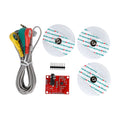
Overview
The ShillehTek EMG Muscle Signal Sensor Module is a compact electromyography (EMG) front-end that detects the electrical activity of your muscles and converts it into a simple analog voltage you can read with any microcontroller. Put the three included electrode pads on a bicep, forearm, or calf — flex the muscle — and the module outputs a proportional analog signal that spikes as your muscle fires. It's a fantastic starting point for gesture-controlled robotics, bionic projects, prosthetics demos, and biofeedback experiments.
The module runs on 3.3V to 5V, which makes it friendly to Arduino, ESP32, Raspberry Pi Pico, and Raspberry Pi (with an external ADC). The output is an amplified, filtered, and rectified envelope of the raw EMG signal, so you don't need to do complex DSP — a simple analogRead() and threshold is enough to detect a flex.
This kit is designed for hobby, robotics, and STEM education use. It is not a medical device and should not be used for diagnostic purposes.
At a Glance
Specifications
| Parameter | Value |
| Operating Voltage | 3.3V - 5V DC |
| Operating Current | ~10 mA typical |
| Output Type | Amplified, filtered, rectified analog envelope |
| Output Range | 0V (rest) to ~Vcc (maximum contraction) |
| Signal Bandwidth | Roughly 20 - 500 Hz (muscle EMG band) |
| Electrode Connection | 3-lead snap-on electrode cable |
| Electrode Type | Disposable Ag/AgCl gel pads |
| Header Pins | VCC, GND, SIG (2.54 mm) |
| Compatible Platforms | Arduino, ESP32, Raspberry Pi (with ADC), Pico |
| Intended Use | Maker, STEM, robotics, biofeedback — NOT medical |
Pinout Diagram

Wiring Guide
Arduino Wiring
Arduino is the easiest platform for this module — it has built-in 10-bit analog input and runs at 5V, which gives the module its full output range.
| EMG Pin | Arduino Pin |
|---|---|
| VCC | 5V |
| GND | GND |
| SIG | A0 (analog input) |
Electrode Placement
Connect the 3-lead cable to the module and snap one disposable gel electrode onto each clip. Place the pads on the muscle you want to monitor:
| Lead | Placement |
|---|---|
| Mid (middle of muscle) | Belly of the target muscle (e.g. center of the forearm) |
| End (end of muscle) | Near a tendon or the end of the same muscle |
| Ref (reference) | A bony, electrically quiet spot (e.g. back of the wrist or elbow) |
ESP32 Wiring
The ESP32 runs at 3.3V. Power the module from the 3V3 rail so the output range stays within the ESP32's ADC input range (0 - 3.3V). Do NOT power the module from 5V and feed SIG directly to a GPIO — you'll saturate the ADC at best and damage the pin at worst.
| EMG Pin | ESP32 Pin | Details |
|---|---|---|
| VCC | 3V3 | Keep the module on the 3.3V rail |
| GND | GND | |
| SIG | GPIO 34 (ADC1_CH6) | Input-only pin; ideal for analog |
Raspberry Pi Wiring
The Raspberry Pi has no built-in analog input, so you need an external ADC like the ADS1115 (I2C) to read the SIG line. Power the EMG module from the Pi's 3V3 rail and wire its SIG output to one of the ADS1115 channels.
| EMG Pin | Raspberry Pi Pin | Details |
|---|---|---|
| VCC | Pin 1 (3.3V) | |
| GND | Pin 6 (GND) | |
| SIG | ADS1115 A0 | Via external I2C ADC |
ADS1115 to Pi
| ADS1115 Pin | Raspberry Pi Pin |
|---|---|
| VDD | 3.3V (Pin 1) |
| GND | GND (Pin 6) |
| SDA | GPIO 2 (Pin 3) |
| SCL | GPIO 3 (Pin 5) |
raspi-config before running the code.
Raspberry Pi Pico Wiring
The Pico has three built-in 12-bit ADC channels (GP26, GP27, GP28). Power the EMG module from the 3V3 output so its SIG signal stays inside the Pico's safe 0 - 3.3V ADC input range.
| EMG Pin | Pico Pin | Details |
|---|---|---|
| VCC | 3V3 (OUT) | Not VSYS/VBUS |
| GND | GND | |
| SIG | GP26 (ADC0) | 12-bit ADC channel |
Code Examples
Arduino
// ShillehTek EMG Sensor - Arduino Example
// Reads the analog signal from the EMG module on A0, prints
// raw value + a simple "flex detected" flag based on a threshold.

const int EMG_PIN = A0;
const int FLEX_THRESHOLD = 400;   // tune this by watching your resting value

void setup() {
  Serial.begin(9600);
  pinMode(EMG_PIN, INPUT);
}

void loop() {
  int raw = analogRead(EMG_PIN);

  Serial.print("EMG: ");
  Serial.print(raw);
  if (raw > FLEX_THRESHOLD) {
    Serial.println("  FLEX!");
  } else {
    Serial.println("");
  }

  delay(20);  // ~50 Hz sample rate
}
Raspberry Pi (Python with ADS1115)
#!/usr/bin/env python3
# ShillehTek EMG Sensor - Raspberry Pi Example
# Reads the EMG module via an ADS1115 I2C ADC on channel A0.
# Install: pip3 install adafruit-circuitpython-ads1x15

import time
import board
import busio
import adafruit_ads1x15.ads1115 as ADS
from adafruit_ads1x15.analog_in import AnalogIn

i2c = busio.I2C(board.SCL, board.SDA)
ads = ADS.ADS1115(i2c)
ads.gain = 1  # +/- 4.096V range
chan = AnalogIn(ads, ADS.P0)

FLEX_THRESHOLD_V = 1.2  # tune this to your resting baseline

try:
    while True:
        voltage = chan.voltage
        label = "FLEX!" if voltage > FLEX_THRESHOLD_V else ""
        print("EMG: {:.3f} V  {}".format(voltage, label))
        time.sleep(0.02)
except KeyboardInterrupt:
    print("Stopped")
Raspberry Pi Pico (MicroPython)
# ShillehTek EMG Sensor - Pico MicroPython Example
# Reads the EMG SIG line on GP26 (ADC0).
# The Pico ADC is 12-bit but read_u16() scales it to 0..65535.

from machine import ADC, Pin
import time

emg = ADC(Pin(26))       # GP26 = ADC0
FLEX_THRESHOLD = 40000   # tune by watching your rest reading

while True:
    raw = emg.read_u16()
    voltage = raw * 3.3 / 65535
    label = "FLEX!" if raw > FLEX_THRESHOLD else ""
    print("EMG: {:5d}  ({:.2f} V)  {}".format(raw, voltage, label))
    time.sleep(0.02)
Arduino — Moving Average Smoothing
// ShillehTek EMG Sensor - Smoothed reading with a moving average.
// Averaging over N samples makes flex detection much more reliable.

const int EMG_PIN = A0;
const int N = 16;               // window size
int buf[N];
int idx = 0;
long sum = 0;

const int FLEX_THRESHOLD = 380;

void setup() {
  Serial.begin(9600);
  for (int i = 0; i < N; i++) buf[i] = 0;
}

void loop() {
  int raw = analogRead(EMG_PIN);
  sum -= buf[idx];
  buf[idx] = raw;
  sum += raw;
  idx = (idx + 1) % N;
  int avg = sum / N;

  Serial.print("raw:");
  Serial.print(raw);
  Serial.print("  avg:");
  Serial.print(avg);
  Serial.println(avg > FLEX_THRESHOLD ? "  FLEX!" : "");

  delay(20);
}