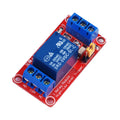
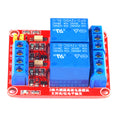
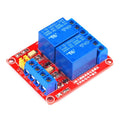
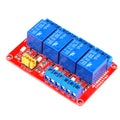
Overview
The ShillehTek 2-Channel 24V Relay Module lets your microcontroller switch up to two independent loads — lights, fans, pumps, solenoids, AC appliances, motors, or DC devices — from a few GPIO pins. Each channel uses an SRD-24VDC-SL-C electromechanical relay rated up to 10A at 250VAC or 30VDC, with COM, NO (normally open), and NC (normally closed) screw terminals so you can wire either fail-safe or fail-on circuits.
The relay coils run on 24V, so the board needs a separate 24V DC supply for the relay side. The optoisolated input side accepts a 3.3V or 5V logic-level trigger from any microcontroller. An on-board optoisolator separates the MCU side from the relay coil side, protecting your Arduino, ESP32, Raspberry Pi, or Pico from coil back-EMF and ground noise. Inputs are active LOW by default — driving an IN pin LOW energizes the corresponding relay coil and switches the COM contact from NC to NO.
The board exposes a header for GND, IN1-IN2, and VCC, plus a JD-VCC / VCC jumper that lets you split the logic power from the relay coil power for full electrical isolation when needed.
At a Glance
Specifications
| Parameter | Value |
| Number of Channels | 2 |
| Relay Part Number | SRD-24VDC-SL-C |
| Relay Coil Voltage | 24V DC |
| Coil Current (per relay, energized) | ~15 mA |
| Coil Current (all relays on) | ~30 mA |
| Trigger Logic | Active LOW (LOW = relay ON) |
| Trigger Voltage | 3.3V or 5V logic-compatible |
| Maximum AC Switching | 10A @ 250VAC |
| Maximum DC Switching | 10A @ 30VDC |
| Isolation | Optocoupler on each input |
| Status Indicator | Per-channel LED + power LED |
| Output Terminals | Per channel: COM, NO, NC (screw terminals) |
Pinout Diagram

Wiring Guide
Arduino Wiring
Wire VCC and GND to power the board, then drive each IN pin from any digital output. Inputs are active LOW — write LOW to energize the relay, HIGH to release it.
Because this is a 24V relay module, you cannot power the board from the MCU. Use a separate 24V DC supply (a wall adapter or bench supply rated for at least 60 mA continuous) and share grounds with the MCU.
| Module Pin | Arduino Pin | Details |
|---|---|---|
| VCC | External 24V supply (+) | Do NOT connect Arduino 5V to VCC |
| GND | GND | Common ground with Arduino and 24V supply |
| IN1 | Digital Pin 7 | Active LOW |
| IN2 | Digital Pin 8 | Active LOW |
ESP32 Wiring
The ESP32's 3.3V GPIO is enough to drive the optoisolated inputs reliably. Active-LOW means a 3.3V HIGH releases the relay and a 0V LOW energizes it.
Because this is a 24V relay module, you cannot power the board from the MCU. Use a separate 24V DC supply (a wall adapter or bench supply rated for at least 60 mA continuous) and share grounds with the MCU.
| Module Pin | ESP32 Pin | Details |
|---|---|---|
| VCC | External 24V supply (+) | Do NOT connect ESP32 VIN to VCC |
| GND | GND | Common ground with ESP32 and 24V supply |
| IN1 | GPIO 5 | Active LOW (3.3V OK) |
| IN2 | GPIO 18 | Active LOW (3.3V OK) |
Raspberry Pi Wiring
Raspberry Pi 3.3V GPIO drives the optoisolator inputs without any level shifter. Use BCM pin numbers in your Python code to match the GPIO numbers below.
Because this is a 24V relay module, you cannot power the board from the MCU. Use a separate 24V DC supply (a wall adapter or bench supply rated for at least 60 mA continuous) and share grounds with the MCU.
| Module Pin | Raspberry Pi Pin | Details |
|---|---|---|
| VCC | External 24V supply (+) | Do NOT connect Pi 5V to VCC |
| GND | Pin 6 (GND) | Common ground with Pi and 24V supply |
| IN1 | GPIO 17 | Active LOW (3.3V OK) |
| IN2 | GPIO 27 | Active LOW (3.3V OK) |
Raspberry Pi Pico Wiring
Pico GPIO is 3.3V and works fine with the optoisolated inputs. Active-LOW logic — set the GP pin to 0 to energize a relay.
Because this is a 24V relay module, you cannot power the board from the MCU. Use a separate 24V DC supply (a wall adapter or bench supply rated for at least 60 mA continuous) and share grounds with the MCU.
| Module Pin | Pico Pin | Details |
|---|---|---|
| VCC | External 24V supply (+) | Do NOT connect Pico VBUS to VCC |
| GND | GND | Common ground with Pico and 24V supply |
| IN1 | GP2 | Active LOW (3.3V OK) |
| IN2 | GP3 | Active LOW (3.3V OK) |
Pin(n, Pin.OUT, value=1) so the line starts HIGH (relay OFF). Otherwise the pin will momentarily glitch LOW during boot and click the relay on.
Code Examples
Arduino
// 2-Channel 24V Relay Module - Arduino Example
// Active LOW: digitalWrite(pin, LOW) energizes the relay.
// IN pins: 7, 8

void setup() {
  Serial.begin(9600);
  pinMode(7, OUTPUT);
  digitalWrite(7, HIGH);  // start with relay OFF
  pinMode(8, OUTPUT);
  digitalWrite(8, HIGH);  // start with relay OFF
}

void loop() {
  // Cycle through each relay one by one
  digitalWrite(7, LOW);   // Relay 1 ON
  delay(500);
  digitalWrite(7, HIGH);  // Relay 1 OFF
  delay(500);
  digitalWrite(8, LOW);   // Relay 2 ON
  delay(500);
  digitalWrite(8, HIGH);  // Relay 2 OFF
  delay(500);
}
ESP32 (Arduino Core)
// 2-Channel 24V Relay Module - ESP32 Arduino Example
// IN pins: GPIO 5, 18
// Active LOW logic.

void setup() {
  Serial.begin(115200);
  pinMode(5, OUTPUT);
  digitalWrite(5, HIGH);  // start OFF
  pinMode(18, OUTPUT);
  digitalWrite(18, HIGH);  // start OFF
}

void loop() {
  digitalWrite(5, LOW);   // Relay 1 ON
  delay(500);
  digitalWrite(5, HIGH);  // Relay 1 OFF
  delay(500);
  digitalWrite(18, LOW);   // Relay 2 ON
  delay(500);
  digitalWrite(18, HIGH);  // Relay 2 OFF
  delay(500);
}
Raspberry Pi (Python)
#!/usr/bin/env python3
# 2-Channel 24V Relay Module - Raspberry Pi Example
# IN pins: GPIO 17, 27 (BCM)
# Active LOW logic.

import RPi.GPIO as GPIO
import time

PINS = [17, 27]

GPIO.setmode(GPIO.BCM)
for p in PINS:
    GPIO.setup(p, GPIO.OUT, initial=GPIO.HIGH)  # start OFF

try:
    while True:
        GPIO.output(17, GPIO.LOW)   # Relay 1 ON
        time.sleep(0.5)
        GPIO.output(17, GPIO.HIGH)  # Relay 1 OFF
        time.sleep(0.5)
        GPIO.output(27, GPIO.LOW)   # Relay 2 ON
        time.sleep(0.5)
        GPIO.output(27, GPIO.HIGH)  # Relay 2 OFF
        time.sleep(0.5)
except KeyboardInterrupt:
    print("Stopped by user")
finally:
    for p in PINS:
        GPIO.output(p, GPIO.HIGH)  # ensure OFF
    GPIO.cleanup()
Raspberry Pi Pico (MicroPython)
# 2-Channel 24V Relay Module - Pico MicroPython Example
# IN pins: GP2, GP3
# Active LOW logic.

from machine import Pin
from time import sleep

relay1 = Pin(2, Pin.OUT, value=1)  # start OFF (HIGH)
relay2 = Pin(3, Pin.OUT, value=1)  # start OFF (HIGH)

try:
    while True:
        relay1.value(0)  # Relay 1 ON
        sleep(0.5)
        relay1.value(1)  # Relay 1 OFF
        sleep(0.5)
        relay2.value(0)  # Relay 2 ON
        sleep(0.5)
        relay2.value(1)  # Relay 2 OFF
        sleep(0.5)
except KeyboardInterrupt:
    print("Stopped by user")
Frequently Asked Questions
digitalWrite(pin, HIGH); pinMode(pin, OUTPUT);). On Pico use Pin(n, Pin.OUT, value=1) in one shot. On the Pi, set GPIO.setup(pin, GPIO.OUT, initial=GPIO.HIGH).